
01
Isolate any part
Solo the guitar to learn the riff, or mute the vocal and sing it yourself. Every stem on its own fader.
Isolate instruments, see the chords, loop the hard parts, change key and slow any song down — right inside YouTube.
Sixty seconds: open any YouTube video, split it into stems, and remix it directly on YouTube.
We’ll split the first 60 seconds free. No account, and your audio never leaves your device.
The four moves that turn watching a song into playing it — every one of them right under the YouTube player. Nothing to upload, nothing to download.
Solo the guitar to learn the riff, or mute the vocal and sing it yourself. Every stem on its own fader.
Drag a region over the part that trips you up and let it cycle. Snap to the beat, repeat until it sticks.
Shift the whole track up or down into a key that fits your voice or instrument — no chipmunk, no warble.
Pull the tempo back to catch every note, then bring it up to full speed once it is in your hands — pitch stays put.
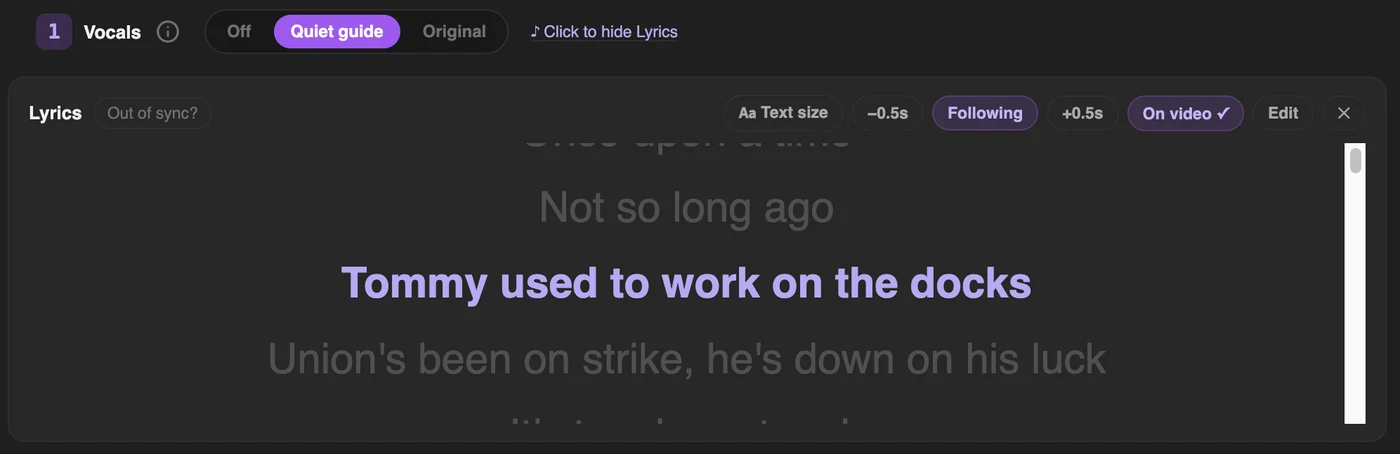
Take the lead vocal out of any song and move it into your range — on YouTube, on your own files, or on your phone. On YouTube, the lyrics follow along on the video.
Mute the lead vocal, or just turn it down, and keep the band.
Shift the whole song up or down, ±12 semitones, until it fits your voice.
Synced lyrics on YouTube, so you can sing it karaoke-style.
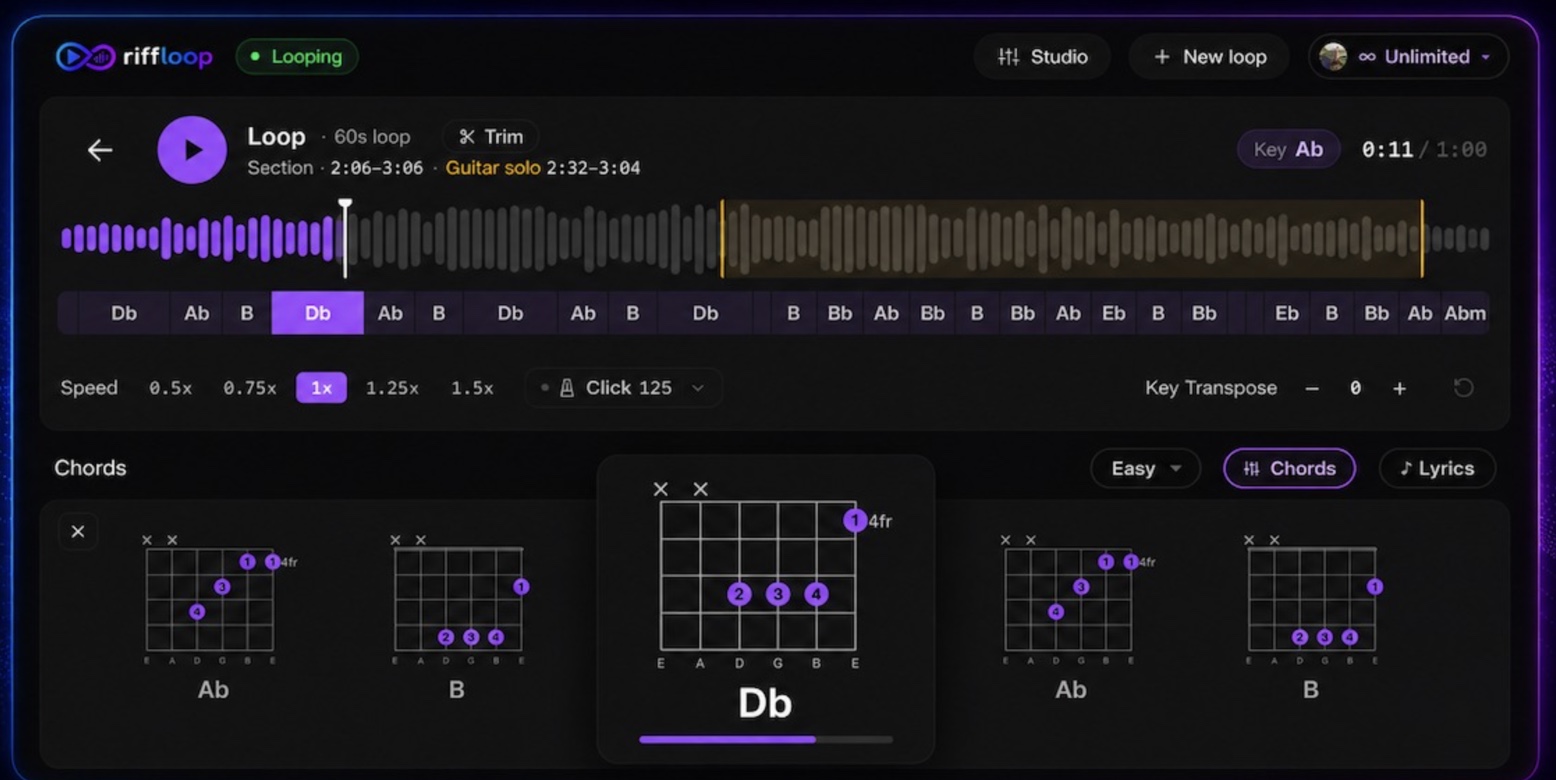
Chords with guitar shapes as the song plays, the song’s key and BPM, a metronome at the song’s tempo, and synced lyrics for karaoke on YouTube.
Find the key and real BPM, then click along at the song’s tempo.
Key & BPM Finder →You don't need the file. Play a song in any app and Riffloop records the audio on your phone, never the microphone. Then it splits it into six stems and shows its chords.
Have the file? Open it from your files instead. Either way, nothing is uploaded. Copy-protected audio records as silence.


A stem splitter hands you files and walks away. A looper forgets the stems. A full app makes you upload the song and open another window. Riffloop is the whole practice studio — and it opens right on the video you are already watching.
| What you can do | YouTube speed/ | Cloud stem splitters | Practice apps | Riffloop |
|---|---|---|---|---|
| AI stem separation (6 stems) | ✕ | ✓ | varies | ✓ |
| Per-instrument isolation (bass / drums / guitar / piano) | ✕ | varies | varies | ✓ |
| Works right on a YouTube video | ✓ | ✕ | ✕ | ✓ |
| Works on your own uploaded files | ✕ | ✓ | ✓ | ✓ |
| Runs on your device — nothing uploaded | ✓ | ✕ | varies | ✓ |
| Change key · slow down (pitch kept) · A-B loop | ✓ | ✕ | ✓ | ✓ |
| Chords, key & BPM, synced lyrics | ✕ | varies | varies | ✓ |
| Opens a YouTube or SoundCloud link | ✕ | varies | varies | ✓ |
| Free to start | varies | varies | varies | ✓ |
Compared by category, not specific products. Riffloop is the only one that does all of it — on the video you’re already watching, on your device.
No card to try it. Upgrade only when Riffloop has earned a spot in your practice routine.
Riffloop is an all-in-one music practice studio: separate any song into stems, remove the vocals, isolate a single instrument, make a backing track, see its chords, change the key, slow it down without changing pitch, and A-B loop the hard part — on a YouTube video or your own upload, on your device.
Split any song into six stems and solo or mute each part.
AI Vocal RemoverRemove the vocals for a karaoke track, or keep only the vocal.
Stem Splitter for YouTubeAll six stems from a YouTube video, right on the page.
YouTube Vocal RemoverPull the vocals out of any YouTube song instantly.
AI Chord FinderSee the chords of any song as it plays, with guitar shapes.
Key & BPM FinderFind the key and real BPM of any song, on your device.
YouTube Karaoke MakerVocals down, synced lyrics on the video, in your key.
YouTube Chord FinderThe chords of a YouTube song, on the video itself.
YouTube MetronomeA click on any YouTube song that locks to its tempo.
Vocal Remover AppFor iPhone and Android: split, loop and slow songs on your phone.
Backing Track MakerMute the one part you play and jam over the rest.
Song Key ChangerTranspose any song to fit your instrument or voice.
Slow Down SongsSlow a song down to learn it — the pitch stays correct.
Loop a YouTube VideoA-B loop the hard bars and drill them on repeat.
Learn Songs by EarIsolate, slow and loop a part to work it out by ear.
Riffloop is an all-in-one music practice studio. It separates any song into stems — vocals, drums, bass, guitar, piano and other — removes vocals, slows songs down without changing their pitch, changes their key, and A-B loops the hard sections, right on a YouTube video or a file you upload, on your device. It's built for practising a song, and it's free to get started.
Riffloop brings every practice tool into one place: an AI stem splitter and a vocal remover (for YouTube videos or your own uploads), per-instrument isolation for bass, drums, guitar and piano, a backing track maker, a song key changer, and a song slow-downer that keeps the pitch correct — plus A-B looping. Isolate a part to learn it, mute it to play along, slow it down, loop it, or change the key, all without leaving the page. It also shows a song's chords, key and BPM, puts synced lyrics on the video for karaoke, and comes as an iPhone and Android app.
Yes. Riffloop shows the chords of a song as it plays, with a guitar shape for each chord. It works on YouTube videos, on your own files, and in the iPhone and Android apps. The first 30 seconds of chords are free; Riffloop Pro shows them all the way through the song. See the AI Chord Finder →
Yes — Riffloop is free to get started, and you can try it without an account. Pro (from $9.99/month, $39/year, or a one-time $99 Founder's Lifetime) unlocks unlimited separations, longer loops, and full-length song separation in the Studio. Practising with separated parts is free.
Both. The Chrome extension works right on the YouTube video you're watching, and the web Studio takes your own audio (MP3, WAV, FLAC and more) or a YouTube or SoundCloud link. On a phone, the iPhone and Android apps open songs from your files. Use YouTube for quick practice on anything; upload your own files for the cleanest separation and to export stems on Pro.
Yes. Riffloop is on the App Store for iPhone and on Google Play for Android. The app splits a song into its parts on the phone itself — from your files or from audio you record — then lets you loop a section, slow it down, change the key and follow the chords. Nothing is uploaded.
A stem splitter uses AI separation to break a finished song into its individual parts — its "stems," like vocals, drums, bass, guitar and piano — so you can solo or mute any one of them. Riffloop is a stem splitter that works right on a YouTube video or a file you upload, on your device.
An AI vocal remover separates the lead vocal from a song, so you're left with the instrumental (a karaoke track) — or just the vocal (an acapella). Riffloop removes vocals from a YouTube video or your own upload, on your device, and lets you loop, slow down and re-key the result to practise.
AI separation analyses the finished mix and estimates each part — vocals, drums, bass, guitar, piano and the rest — rebuilding them as separate tracks you can solo or mute. Quality is best on clean studio mixes; busy, live or lo-fi recordings are harder. Riffloop runs it on your device, so nothing is uploaded.
Personal practice and study is broadly considered fair use under US copyright law (and equivalents elsewhere) — exactly what Riffloop is for: learning a song, transcribing, practicing your instrument. The stems we separate from a YouTube video stay on your device — we don't let you download, export or redistribute them. Exporting is only for audio files you add yourself, in the web Studio or the iPhone and Android apps: the first 60 seconds on the free plan, the whole song on Pro. To publish a cover, use the original audio under YouTube's licensing or get a sync license.
Riffloop uses the same isolation tech the pro tools use under the hood. On well-mixed studio recordings, vocals and drums come out nearly indistinguishable from the original, and bass and piano are very good. Synths and strings (the "other" bucket) are the noisiest — true of every tool on the market. Live, lo-fi, or heavily-processed recordings reduce quality; that is physics, not a bug.
Chrome, Edge, Brave, Arc, Opera, and any other Chromium-based browser that supports Manifest V3 extensions from the Chrome Web Store. Firefox and Safari are not supported yet — they are on the roadmap.
The Riffloop extension only runs on YouTube and YouTube Music — never on any other site. We don't read your watch history or track which videos you open. The separation runs on your device — your audio is never uploaded to us, and we don't store it.
Almost certainly. Riffloop attaches to the standard HTML5 video element YouTube has used for over a decade — if they change that, every practice tool breaks at once, and we'd ship a fix within days. The extension auto-updates from the Chrome Web Store, so you'd never have to think about it.
YouTube and YouTube Music work today with the extension, right on the page. For SoundCloud, paste the track's link into the web Studio. Spotify uses DRM that doesn't allow this kind of audio routing, so it's a no on Spotify, regardless of vendor.
Yes. Riffloop pays 20% recurring commission on every paid plan you refer, for as long as that customer keeps paying. Joining is free, there is no follower minimum, and the referral cookie lasts 90 days. Full terms and signup are at riffloop.app/affiliates.
 Press play on practice
Free to start, no signup. Works on YouTube and your own files — open the Studio and isolate the first part in seconds.