Transpose Extension Alternative
The closest Transpose extension alternative is Riffloop if you practise from YouTube and want to mute or solo the band's parts. Keep Transpose for Spotify, fine-tuning and practice ramps.
Disclosure: Riffloop is our product. Transpose is a well-loved browser extension that changes pitch and speed and loops sections on YouTube, Spotify and other music sites. Riffloop does the same three jobs on YouTube, then separates the song into six parts on your device — vocals, drums, bass, guitar, piano and the rest — so you can mute your part, solo another, and read the chords as guitar shapes. This page says plainly where Transpose is the better fit, and every Transpose fact is from its own pages, read on 18 October 2026.
Free to try: three songs as a guest with no account, five a day signed in; A-B looping is always free. Also on iPhone and Android.
Last updated · Transpose facts read from its own site and store listing on 18 October 2026 · maintained by the Riffloop team
Riffloop vs Transpose, at a Glance
Pick Transpose if your songs play on Spotify or other music sites, or you want fine pitch control, a wider speed range and practice ramps. Pick Riffloop if you practise from YouTube and want to hear the parts of the band on their own — mute your instrument, solo another, read the chords as guitar shapes.
- 🎚️ Both: pitch ±12 semitones, slow down with the pitch held, A-B loops — free
- 🌐 Transpose lists YouTube, Spotify, SoundCloud, Apple Music, Deezer, Vimeo and Tidal; Riffloop's extension works on YouTube
- 🎛️ Transpose adds fine-tuning, 25–400% speed, markers, clips and a practice ramp
- 🥁 Riffloop separates six parts on any YouTube song; Transpose's Stem Mix is free on three Studio songs
- 🎸 Riffloop shows chords as guitar shapes and synced lyrics on the video
- 📱 Riffloop has iPhone and Android apps; Transpose's site links to browser extensions
Pick by the Job You're Doing
The two overlap on the basics, so the deciding question is what you do after the pitch and speed are set. Find your job in the table; the right-hand column says why.
| Your job | Better pick | Why |
|---|---|---|
| Change the key of a song on Spotify, Apple Music, Deezer or Tidal in the browser | Transpose | It lists those sites; Riffloop's extension works on YouTube |
| Nudge a recording a few cents to match your tuned instrument | Transpose | Fine-tuning; Riffloop moves whole semitones |
| Speed a passage up past 2× | Transpose | Up to 400%; Riffloop stops at 2× |
| Build a practice ramp or a clip sequence with a count-in | Transpose | Studio feature; in Riffloop you raise the speed yourself |
| Hear the guitar or piano alone on any YouTube song | Riffloop | Six parts, guitar and piano separate |
| Mute your part and play along with the band | Riffloop | One fader per part, on the video |
| Read the chords as guitar shapes that follow the key change | Riffloop | Shapes move when you transpose |
| Sing with synced lyrics in a new key | Riffloop | Lyrics on the YouTube video |
| Practise on your phone | Riffloop | iPhone and Android apps |
| Pay once | Riffloop | $99 Founder's Lifetime; Transpose's is $149.99 |
| Pay the least per month or year | Transpose | $4.99 a month or $34.99 a year |
What Each One Is
Transpose is a pitch, speed and loop extension for music sites, with a Studio mode for deeper practice tools. Riffloop is a practice extension for YouTube built around stem separation, with a web Studio and phone apps beside it.
Transpose
Made by Transpose Studio B.V., Transpose runs in Chrome and Edge. Its site says it lets you "change pitch and speed and loop difficult sections on YouTube, Spotify and other websites": pitch ±12 semitones with fine-tuning, speed from 25% to 400%, and loops and markers, all free for every supported song with no account. The Studio adds a Stem Mix for vocals, drums, bass or other instruments, a Vocal Reducer, EQ, chord and beat recognition, clips, clip sequences, a practice ramp, a count-in and formant control. Its Chrome Web Store listing showed a Featured badge, 1,000,000 users and a 4.2 rating from 1.1K ratings, and was updated on 17 October 2026.
Riffloop
Riffloop's extension opens a panel under the YouTube video. Pick a section and it separates it into six parts on your own device, with a fader each, then reads the chords, key and BPM. The same panel changes the key up to twelve semitones either way with the tempo kept, slows from 0.25× to 2× with the pitch held, and loops between A and B. The chords show as guitar shapes that move when you change key, and synced lyrics can sit on the video. For files and links there's the web Studio, and for phones, apps for iPhone and Android. The general how-to for re-keying a song lives on changing a song's key.
Riffloop vs Transpose
On pitch, speed and loops the two are close, and Transpose is more flexible. They split on what surrounds those controls: Transpose builds out sites and practice structure, Riffloop builds out the recording itself.
| Capability | Riffloop | Transpose |
|---|---|---|
| Change pitch, tempo kept | ✓ ±12 semitones | ✓ ±12 semitones + fine-tuning |
| Slow down, pitch held | ✓ 0.25×–2× | ✓ 25%–400% |
| A-B loop | ✓ free | ✓ free, plus markers |
| Works on YouTube | ✓ watch pages | ✓ |
| Spotify, Apple Music, Deezer, Tidal, Vimeo | ✗ | ✓ |
| Separate the band into parts | ✓ six parts, any YouTube song | ✓ Stem Mix, 3 Studio songs free |
| Guitar and piano as their own parts | ✓ | guide names vocals, drums, bass, other |
| Chords | ✓ guitar shapes that follow the key | ✓ chord recognition in Studio |
| Key and tempo of the song | ✓ key + real BPM | ✓ in Studio |
| Synced lyrics on the video | ✓ | not listed |
| Clips, sequences, practice ramp | ✗ | ✓ Studio |
| Formant control | ✗ | ✓ Studio |
| Your own audio files | ✓ Studio | ✓ Transpose Player |
| Phone apps | ✓ iPhone, Android | not on its site |
| Where separation runs | your device | not stated on its pages |
| Account needed to start | no — 3 songs as a guest | no |
Where Transpose Fits Better
Transpose is the better choice when your music isn't on YouTube, when you need finer control than whole semitones, or when you want the practice session structured for you. It also has a far longer track record.
- 🌐 More places to practise. Spotify, SoundCloud, Apple Music, Deezer, Vimeo and Tidal, as well as YouTube. Riffloop's extension is YouTube-only.
- 🎯 Finer pitch. Fine-tuning on top of semitones, for recordings that sit slightly off concert pitch.
- ⏩ A wider speed range. Up to 400%; Riffloop stops at 2×.
- 🪜 Structured practice. Clips, clip sequences with repeats, a count-in, and a practice ramp that raises the tempo or moves through keys for you.
- 💲 Cheaper subscriptions. $4.99 a month or $34.99 a year, against Riffloop's $9.99 and $39.
- ⭐ Track record. A Featured badge and a million users on the Chrome Web Store. Riffloop is newer.
If most of your practice happens on Spotify, or you live in the practice ramp, keep Transpose. Riffloop isn't trying to replace it there.
Where Riffloop Is Genuinely Different
Riffloop's difference is the recording underneath the controls: every YouTube song can be taken apart into six parts, so changing the key or the speed is the start of the session, not the whole of it.
- 🎚️ Six parts on any YouTube song. Not limited to a set of chosen songs — any video, within your daily credits, with guitar and piano as their own faders.
- 🎸 Mute your part, keep the band. Pull the guitar to 0% and play along to the real recording, slowed and in your key.
- 🔑 Chords that follow the key. Transpose the song down two semitones and the guitar shapes move with it.
- 🎤 Synced lyrics on the video — sing in a new key with the words in front of you.
- 🔒 Nothing uploaded. The separation and the chord reading run on your own device.
- 📱 Phone apps. iPhone and Android apps split songs from files, or audio recorded while it plays on the phone.
One honest limit: separated parts are estimates rebuilt from the finished mix, not the studio tracks. Vocals and drums come out cleanest; a soloed bass or guitar can sound a little watery, and Riffloop reads chords at the major and minor level, so a Cmaj7 shows as C.
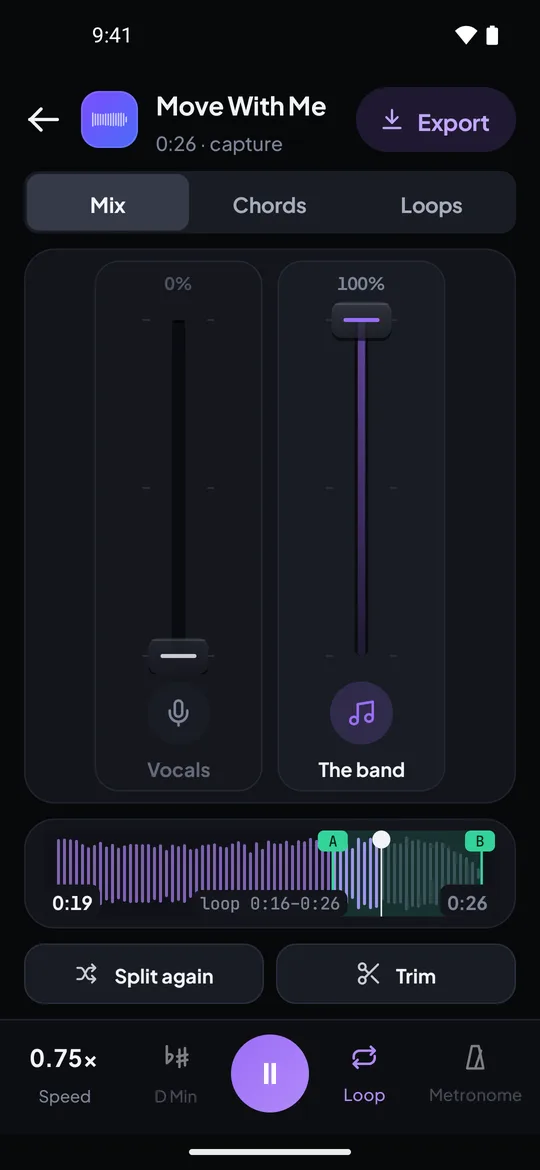

Real captures from the Riffloop Android app: an A-B loop at 0.75× speed with the vocals muted, and the Chords tab with the detected key and tempo.
Price, Compared Honestly
Both are free for pitch, speed and loops. Transpose's subscriptions cost less than Riffloop's; Riffloop's one-time plan costs less than Transpose's. What each free plan limits is different.
| Riffloop | Transpose | |
|---|---|---|
| Free | key, speed, loops; stems on 3 songs as a guest or 5 a day signed in; chords for the first 30 s, key + BPM in full | pitch, speed, loops on every song; Studio tools on 3 songs, swap one every 30 days |
| Monthly | $9.99 | $4.99 |
| Yearly | $39 | $34.99 |
| Pay once | $99 Founder's Lifetime | $149.99 Lifetime |
| What paid adds | unlimited songs, whole-song chords, longer loops, beat-locked metronome, full exports of your uploads | Studio tools on unlimited songs |
The practical read: if pitch, speed and loops are all you need, both are free and you don't need to pay either. If you want stems on many songs, Riffloop's free plan gives them on any song with a daily cap, and Transpose's free plan gives them on three songs you choose.
Switching From Transpose: What Maps Across
The everyday controls map across directly; Transpose's structured practice tools and fine-tuning don't. Here's where each one lives in Riffloop.
| In Transpose | In Riffloop |
|---|---|
| Pitch ±12 semitones | Key change ±12 semitones, tempo kept |
| Fine-tuning | ✗ whole semitones only |
| Speed 25%–400% | Speed 0.25×–2× in 5% steps, pitch held |
| A-B loops and markers | A-B loop, free — plus saved loops per song |
| Clips, sequences, practice ramp | Loop the passage and raise the speed in 5% steps yourself |
| Stem Mix (vocals, drums, bass, other) | Six faders: vocals, drums, bass, guitar, piano, the rest |
| Chords, key and tempo in Studio | Chords as guitar shapes, key and BPM; whole-song chords on Pro |
| Count-in | A metronome locked to the song's beats (Pro) |
| Transpose Player for your own files | The Studio, for files and YouTube or SoundCloud links |
| Cloud sync and share links | Saved loops synced between the extension and the web once signed in |
A Practice Ramp by Hand, With the Band Apart
Riffloop has no automatic practice ramp, but the manual version takes a minute to set up and adds something a ramp on the full mix can't: you hear your part alone first, then play it with the band.
- Loop the passage. Set A and B around the four bars you keep missing, starting a beat early so you hear it coming. See A-B looping on YouTube.
- Solo your instrument and slow the loop to 60–70% with the pitch held. Listen three times before you play.
- Play along with it soloed until you get three clean passes in a row.
- Mute your instrument and bring the rest of the band back. Now you're the guitar on the record.
- Raise the speed 5% at a time, three clean passes per step, until you reach 100%. If a step falls apart, go back one.
- Move the key last, if you need it for your voice or tuning — the chord shapes follow.
The 5% steps match Riffloop's speed control, so each press of the + button is one rung. For the speed side on its own, see slowing a song down without changing the pitch.
Using Transpose and Riffloop Together
Plenty of players will keep both: Transpose for Spotify and other sites, Riffloop on YouTube when they want the stems. On YouTube, leave one of them neutral so you always know which one is changing the sound.
- 0️⃣ One tool in charge. On a YouTube song, keep the other at 0 semitones and 1× speed. Two pitch shifts on one video make it hard to tell what you're hearing.
- 🔀 Split by site. Spotify, Apple Music, Deezer or Tidal → Transpose. YouTube, when you want to mute or solo a part → Riffloop.
- 🧪 Turn one off to troubleshoot. If the sound stutters or the speed resets, switch one extension off on that tab and try again.
How We Checked This
Riffloop is our product, and the Riffloop column reflects that. Every Transpose fact here comes from its own pages, read on 18 October 2026: transpose.video, its Studio guide, and its Chrome Web Store listing. We didn't use review sites, and we didn't benchmark the sound of either.
- ⭐ Ratings differ by place. Transpose's site shows 4.5/5 from 1.1K+ ratings; its Chrome Web Store listing showed 4.2 from 1.1K ratings the same day. We quote the store figure.
- ❓ What its pages don't say. They don't say where Stem Mix does its work or how many parts it makes beyond the four it names, and they don't measure fine-tuning in cents. We left those blank rather than guess.
- 🏷️ The name. Its store listing reads "Transpose: pitch ▸ speed ▸ loop"; its Edge Add-ons address still carries the older ▲▼ name.
- 🎟️ Riffloop's numbers come from our pricing and how credits work, both public without an account.
Extensions update often — Transpose's listing changed the day before we read it. If something here has gone stale, tell us via support and we'll correct it.
If Neither Is Quite Right
Pitch-and-speed extensions are a crowded shelf, and other practice jobs — tuning, keeping time, finding chords — have their own tools.
For the wider shelf, sorted by job, see our Chrome extensions for musicians roundup. If what you really want is the stems, compare the field on the stem splitter roundup; for the chords, the YouTube chord finder; and if you came from Moises, Riffloop vs Moises.
Transpose and Riffloop — FAQ
What players ask when they weigh the two: free plans, price, stems, Spotify, speed range, fine-tuning, phones and running both.
What is the Transpose extension?
Transpose is a Chrome and Edge extension from Transpose Studio B.V. that changes the pitch and speed of music playing in your browser and loops sections of it, on YouTube, Spotify and other supported sites. Its Chrome Web Store listing is titled "Transpose: pitch ▸ speed ▸ loop". A Studio mode adds stem mixing, chords, clips and practice ramps.
Is there an alternative to the Transpose extension?
Riffloop is the closest alternative if you practise from YouTube and want to hear the parts of the band separately. It changes key up to twelve semitones with the tempo kept, slows down with the pitch held and A-B loops, like Transpose, and also separates every YouTube song into six parts on your device, with the chords as guitar shapes. Transpose is the better pick if you need Spotify and other music sites.
Is Transpose free?
Yes, for pitch, speed and loops on every supported song, with no account. Its Studio tools — Stem Mix, chord recognition, clips and the practice ramp — are free for three songs at a time, and you can swap one of them every 30 days. A subscription or Lifetime purchase unlocks Studio for unlimited songs.
How much does Transpose cost?
On transpose.video on 18 October 2026: $4.99 a month, $34.99 a year, or $149.99 once for Lifetime, which unlock the Studio tools on unlimited songs. Riffloop is $9.99 a month, $39 a year, or $99 once. Transpose's subscriptions cost less; Riffloop's one-time plan costs less.
Does Transpose separate stems?
Yes, in its Studio. Its guide says Stem Mix lets you bring out or turn down vocals, drums, bass or other instruments, and the Studio also has a Vocal Reducer and EQ. It's free for three Studio songs at a time. Riffloop separates six parts, with guitar and piano as their own faders, on any YouTube song within its daily credits.
Does Riffloop work on Spotify?
No. Riffloop's extension works on YouTube watch pages, and its Studio takes audio files plus YouTube and SoundCloud links. If you practise from Spotify, Apple Music, Deezer or Tidal in the browser, Transpose lists those sites and Riffloop doesn't.
Which has the wider speed range, Transpose or Riffloop?
Transpose: its site lists 25% to 400%. Riffloop's extension goes from 0.25× to 2× in 5% steps, with the pitch held. For practising, the slow end is the one that matters, and both reach a quarter speed.
Can Riffloop fine-tune the pitch by cents?
No. Riffloop moves the key in whole semitones, up to twelve either way, with the tempo kept. Transpose lists fine-tuning alongside its ±12 semitones, which helps when a recording sits slightly off concert pitch and you want it to match a tuned instrument.
Is Riffloop better than Transpose?
Neither is a straight upgrade. Transpose covers more music sites, has finer pitch and speed control, a practice ramp and cheaper subscriptions. Riffloop separates every YouTube song into six parts on your device, shows chords as guitar shapes that follow the key change, shows synced lyrics and has iPhone and Android apps. Choose by where your songs play and whether you need to hear the band apart.
Does Transpose have a phone app?
Its site, read on 18 October 2026, links to the Chrome and Edge extensions only, plus a Transpose Player for your own files. Riffloop has iPhone and Android apps that take files or record audio playing on the phone, and split it on the phone.
Which is better for singers?
For moving a song into your range, both shift by semitones with the tempo kept. Riffloop adds the vocal stem — turn the singer down to sing over the band, or solo it to learn the melody — and synced lyrics on the YouTube video. Transpose adds formant control and works on Spotify. Pick by where your songs are.
Can I use Transpose and Riffloop together?
Yes. On YouTube, leave one of them at 0 semitones and 1× so you always know which one is changing the sound; two extensions shifting the same video makes it hard to tell what you're hearing. A sensible split is Transpose on Spotify and other sites, Riffloop on YouTube when you want the stems.
Do Transpose and Riffloop work without signing in?
Not to start. Transpose works without an account, including three Studio songs. Riffloop gives three songs as a guest with no account, and five a day once you sign in; looping a section never uses one.
If You Remember Four Things
- 1 Both change pitch and speed and loop, free. Transpose is finer and covers more sites.
- 2 Riffloop separates six parts on any YouTube song, so you can mute your own.
- 3 Transpose's subscriptions cost less; Riffloop's one-time plan costs less.
- 4 Keeping both? Leave one at 0 semitones and 1× on YouTube.
Keep Going With Riffloop
Same Loop. Now Mute Your Part.
Open a song you're learning on YouTube, loop the hard bars at 70%, then pull your instrument down and play it with the band. Three songs as a guest, no account.

