YouTube Stem Splitter
Pull any song apart into its instruments — right on the YouTube video you're watching.
A YouTube stem splitter uses AI separation to split a song into its individual parts — vocals, drums, bass, guitar, piano and more — so you can solo or mute any one of them. Riffloop does it right on the video, on your device, with nothing uploaded; then you loop, slow it down and change the key to practise.
Free to get started — splitting a YouTube song and practising on the video are free; YouTube stems can't be exported (licensing), and exporting your own uploads plus higher limits need Pro.
Last updated · maintained by the Riffloop team
Splitting a YouTube Song, at a Glance
- 🎛️ Split a song into six stems: vocals, drums, bass, guitar, piano + other
- 🎯 Solo or mute any one part
- ▶️ Works right on the YouTube video
- 🔒 Runs on your device — nothing uploaded
- 🚫 No video download, no copy-paste into another site
- 🔁 Then A-B loop, slow down & change the key
- 🙂 Honest about quality — a little residue can remain
- 💸 Free to get started — Pro from $5.95/mo
What Is a YouTube Stem Splitter?
A YouTube stem splitter uses AI separation to break a YouTube song into its individual parts — "stems" like vocals, drums, bass, guitar and piano — so you can isolate, mute or rebalance any of them. Riffloop does it on the video itself, on your device, with nothing uploaded. Going from a YouTube link to stems happens right in the page, with no download step and no file to manage.
It's the multi-stem tool aimed at YouTube. If you want the same on a file you upload (and to export the stems), that's the AI stem splitter; if you only want the vocals out for a karaoke track, that's the YouTube vocal remover. Same on-device engine, different jobs.
How to Split a YouTube Song Into Stems
Open the song on YouTube with the Riffloop extension, let it separate the parts on your device, then solo or mute whichever you want. No download, no upload, no copying a link into another site.
- Open the song on YouTube. With the free Riffloop Chrome extension, the Riffloop panel appears right under the video.
- Separate the stems. AI separation splits the song into its parts on your device — nothing is uploaded.
- Solo or mute any part. Isolate the guitar, drop the vocals, or rebalance everything in the mixer.
- Practice with it. A-B loop the hard section, slow it down with the pitch kept clean, or change the key to fit you.
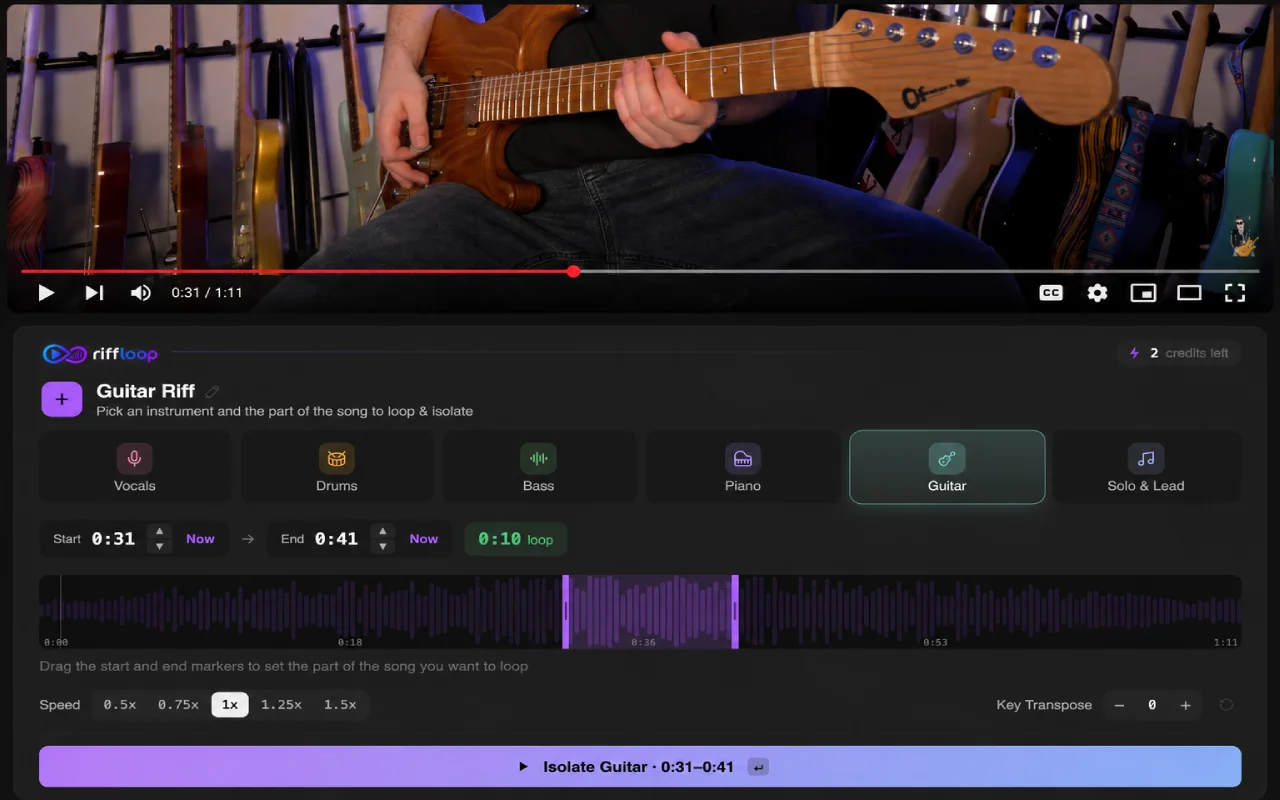
The Six Stems You Can Isolate
Riffloop separates a song into six stems — vocals, drums, bass, guitar, piano and an "other" part for everything else. Solo any one to hear it alone, or mute it to play that role yourself. Some separate more cleanly than others, and we're upfront about which.
- 🎤 Vocals — the cleanest stem; mute for karaoke or solo for an acapella
- 🥁 Drums — solo to study the groove, or mute to play your kit
- 🎵 Bass — pull it out to learn the line, or drop it to play bass
- 🎸 Guitar — isolate a riff or solo note-for-note
- 🎹 Piano — hear the exact voicings and chords
- 🎼 Other — synths, strings, horns and the rest of the mix
Want just one instrument from a YouTube song? Isolate the guitar, bass, piano or drums on its own — or follow the step-by-step guide to isolating an instrument on YouTube.
Right on the Video, on Your Device — No Downloads or Uploads
Most "YouTube" stem tools make you download the video and re-upload the audio to a server. Riffloop runs the separation on your own device, right on the video you're already watching — so your audio never leaves your machine and there's no upload-and-wait.
No copying a link into a third-party site, no cloud queue, no minute meter. You're on the song already, so you separate it, isolate the part you want, and start practising — without a single file changing hands.
Is It Legal to Separate a YouTube Song Into Stems?
General guidance, not legal advice: separating a song for your own private practice or study is widely treated as personal use, and separating it doesn't change the song's copyright. The line is distribution.
Performing, posting, releasing or monetizing the result generally needs the rights holder's permission — often covering both the composition and the recording. Riffloop is built for practising on the video: it doesn't download, rip or distribute audio, and stems made from a YouTube link can't be exported.
How Good Is the Separation? (Honest Limits)
No AI separation is perfect, and we won't pretend otherwise. Vocals come out cleanest; bass, drums and the "other" bucket are the hardest, and live or lo-fi recordings are tougher than clean studio mixes. For isolating a part to learn or practise, it's reliably good.
YouTube audio is also already compressed, so it's a touch harder than a lossless master — on dense or live songs a faint trace of a muted part can remain. If you want the cleanest possible stems (and the option to export them), separate a lossless file you own in the Studio.
- ✅ Cleanest — vocals, and well-produced studio mixes
- 🎚️ Hardest — bass, drums, the "other" part; live & lo-fi
- 🎯 Best source — a lossless file you own, in the Studio
How Musicians Actually Use It
Splitting a YouTube song into stems turns "play along with the record" into "study the exact part you care about." In practice that's three moves: isolate to learn, mute to play, and rebalance to hear.
- 🎸 Learn a riff — solo the guitar, loop 4 bars at 70%, get every note, then bring it to tempo.
- 🎵 Lock in with the drums — solo bass + drums to hear the pocket, then mute the bass and play it.
- 🎹 Work out chords — solo the piano or guitar to hear the exact voicings, no full-mix mud.
- 🎤 Sing or transcribe — solo the vocal to catch phrasing, or mute it for a karaoke run.
Common mistakes: expecting a flawless stem on a busy mix (pick a cleaner source), and practising the whole song at once — isolate one part and loop the one hard section instead.
Then Practice It: Loop, Slow Down, Change Key
Isolating the part is the start. Because it's all one studio, the stem you just pulled out is ready to practise with — no exporting or re-importing.
- 🔁 A-B loop the hard section and drill it
- 🐢 Slow it down to learn a fast part — the pitch stays correct
- 🎼 Change the key to fit your instrument or voice
- 👂 Learn it by ear with the part isolated and slowed
YouTube Stem Splitter vs the Upload Splitter & Vocal Remover
All three share the same on-device separation; pick by what you're starting from and what you want out.
- ▶️ YouTube stem splitter (this page) — split a YouTube song into all its stems, on the video
- 🎛️ AI stem splitter — same for a file you upload, and you can export the stems
- 🎤 YouTube vocal remover — the 2-stem case: vocals out for karaoke, or vocals only for an acapella
- 🎸 Backing track maker — mute the one part you play and jam over the rest
Riffloop vs Cloud Splitters vs Download-Then-Edit
They can all separate a song into parts. The difference is the friction: Riffloop works on the video with nothing uploaded, and the stems drop straight into a practice studio.
| Capability | Riffloop | Cloud splitters | Download-then-edit |
|---|---|---|---|
| Works right on the YouTube video | ✓ | varies (server-side) | ✗ |
| Runs on your device — nothing uploaded | ✓ | ✗ cloud | varies |
| No download / re-upload step | ✓ | ✗ (you upload) | ✗ |
| Six stems incl. guitar & piano | ✓ | varies | varies |
| Real-time solo / mute / rebalance | ✓ | ✗ (export only) | ✗ |
| Loop / slow / re-key built in | ✓ | ✗ | ✗ |
| Honest about quality limits | ✓ | rarely | n/a |
| Price | Free / Pro from $5.95/mo | credits / subscription | free but manual |
Free to Split & Practice, Pro to Export Your Uploads
Splitting a YouTube song into stems and practising on the video is free to get started. Pro adds higher daily limits and exporting stems from files you upload yourself.
| Split a YouTube song into stems | Free to get started |
|---|---|
| Solo / mute / rebalance on the video | Free to get started |
| Loop, slow down & change the key | Free to get started |
| Export stems from YouTube content | Not available (licensing) |
| Export stems from your own upload | Pro |
| Higher daily usage limits | Pro |
| Pro pricing | $5.95/mo or $39/year · Lifetime $99 |
In Short
- ✅ A YouTube stem splitter splits a song into its parts so you can solo or mute any one.
- ✅ Riffloop does it right on the video, on your device — no download, nothing uploaded.
- ✅ Six stems: vocals, drums, bass, guitar, piano and other; vocals separate cleanest.
- ✅ Then loop, slow down and change key to practise; free to start, export is Pro (your uploads).
- ✅ Personal practice is fine; performing or releasing needs the rights holder's permission.
Frequently Asked Questions
How do I split a YouTube video into stems?
Open the song on YouTube with the Riffloop Chrome extension and let the AI separation split it into its parts on your device. The Riffloop panel appears under the video — pick the stems, then solo or mute any part. Nothing is uploaded and there's no video to download.
Can I isolate a single instrument from a YouTube song?
Yes — solo any one part (the guitar, the piano, the bass, the drums or the vocal) and the rest drops away, or mute a part and keep everything else. It's how musicians lift a riff out to learn it note-for-note, right on the video.
Do I need to download the YouTube video first?
No. Riffloop works on the video you're already watching — the separation runs on your device, with no separate download and nothing uploaded to a server. That's the main thing that sets it apart from download-then-upload tools.
What stems can I separate, and how many are there?
Riffloop separates a song into six stems: vocals, drums, bass, guitar, piano and an 'other' part for everything else (synths, strings, horns and the like). You can solo or mute each one independently, or rebalance them all in the mixer.
Can I remove the vocals to make a karaoke track?
Yes — mute the vocal stem and what's left is a karaoke instrumental, or solo it for an acapella. If that's your main goal, the YouTube vocal remover is built specifically for the vocals-vs-instrumental job; this page is the full multi-stem splitter.
Is it legal to separate a YouTube song into stems?
General guidance, not legal advice: separating a song for your own private practice or study is widely treated as personal use, and separating it doesn't change the song's copyright. Performing, posting, releasing or monetizing the result needs the rights holder's permission. Riffloop is built for practising on the video — it doesn't download, rip or distribute audio.
How good is the separation — is it perfect?
No AI separation is perfect, and we won't pretend otherwise. Vocals come out cleanest; bass, drums and the 'other' bucket are the hardest, and live or lo-fi recordings are tougher than clean studio mixes. For isolating a part to learn or practise it's reliably good.
Why can I still hear a little of a part I muted?
Separation estimates each part from the finished mix, so on dense, heavily-processed or live recordings a faint trace can remain — most noticeable on bass, drums and busy guitar. YouTube audio is also already compressed, which makes it a little harder than a lossless source. For most practice the small residue doesn't get in the way.
Does my audio get uploaded to a server?
No — the separation runs on your own device and nothing is uploaded to us. Your listening stays private, and there's no upload-and-wait. The heavier separation work runs best on a desktop.
Can I split a YouTube song into stems on my phone?
The on-the-video experience is a desktop Chrome workflow, since on-device separation is real processing that runs best on a computer. On mobile you can still work with a file in the Studio. For the YouTube-native flow, use desktop Chrome, Edge, Brave, Arc or Opera.
Is the YouTube stem splitter free?
Yes, it's free to get started — splitting a YouTube song into stems and practising on the video doesn't cost anything. Unlimited separations, longer loops and full-length songs in the Studio come with Pro (from $5.95/month, $39/year, or a one-time $99 Founder's Lifetime). YouTube content can't be exported, so in-app practice is the free, intended use.
Can I download or export the separated stems?
Stems from a YouTube link are for in-app practice and can't be exported, for licensing reasons. To export separated stems as files, upload your own audio in the Studio — export is a Pro feature and works with your own uploads, where you hold the rights.
What's the difference between this and the AI stem splitter or vocal remover?
This page is the YouTube version — split a song into all its stems right on the video. The AI stem splitter does the same for a file you upload (and can export the stems). The vocal remover is the focused 2-stem case — vocals versus instrumental. They share the same on-device engine, aimed at different jobs.
Can I loop, slow down or change the key after separating?
Yes — that's the point. Once a part is isolated you can A-B loop the hard bars, slow the tempo down with the pitch kept clean, and transpose the key to fit your instrument or voice, all in the same place. See the looping, slow-down and change-key guides for each.
Does it work for any genre or song?
It works across genres, but clean studio mixes — most pop, rock and singer-songwriter tracks — separate best. Live recordings, lo-fi uploads, dense walls of sound and heavily effected parts are the hardest. The cleaner the source, the cleaner the stems.
How long does it take to split a YouTube song?
Separation runs on your device and usually takes from under a minute to a few minutes, depending on the song length and your computer. There's no upload or download wait because nothing leaves your machine. Once it's done, the stems are ready to solo, mute, loop and re-key instantly.
Continue Improving Your Music Practice
Split Any YouTube Song Into Stems
Isolate the part you want, mute the rest, then loop, slow it down and re-key — right on the video. Install Riffloop and start practising.