YouTube Karaoke Maker
Vocals down, lyrics up, in a key that suits your voice — on the YouTube video you're already watching.
A YouTube karaoke maker turns a song you found on YouTube into something you can sing over: the lead vocal drops back, the words appear on screen in time with the music, and you can move the whole song into your own key. Riffloop does all three on the video itself, on your device — no download, nothing uploaded.
Free to get started — dropping the vocals, showing the lyrics and singing along cost nothing, and there's no account needed to try it. YouTube audio can't be exported (for copyright reasons); higher usage limits and exporting your own uploads need Pro.
Last updated · maintained by the Riffloop team
YouTube Karaoke, at a Glance
Riffloop turns a YouTube song into karaoke in one place: the lead vocal drops back, synced lyrics appear on the video, and the key moves to fit your voice. It runs on your device and it is free to start.
- 🎤 The lead vocal drops back on the whole song
- 📝 Synced lyrics on screen or over the video
- 👆 Words drifting? Tap the line being sung
- 🎚️ Off, a quiet guide vocal, or the original
- 🎼 Move it into your key — tempo unchanged
- ▶️ Right on the video — no download step
- 🔒 Runs on your device — nothing uploaded
- 🙂 Honest: a faint ghost can remain on dense mixes
- 💸 Free to get started — Pro from $5.95/mo
What Is a YouTube Karaoke Maker?
A YouTube karaoke maker takes a song on YouTube and prepares it for you to sing: it lowers or removes the lead vocal, shows the lyrics in time with the music, and lets you move the song into a comfortable key. Riffloop does all three on the video itself, on your device, so there's no file to download and nothing gets uploaded.
That's a different job from simply taking a singer out of a track. A YouTube vocal remover produces an instrumental and stops there — it's the right page if you want a clean acapella or you care mostly about the split itself. A karaoke maker is about the ten minutes you actually spend singing: the words have to be readable and in time, the key has to fit your range, and you need to be able to rewind the bridge without leaving the page. The rest of the practice kit lives in Riffloop's tools.
It's also different from a karaoke catalogue. Sites like those sell or stream pre-made backing tracks from a fixed library, so the song you want is either in it or it isn't. Working from YouTube means the library is every recording on YouTube: the live version, the acoustic session, the obscure B-side, the cover in the key you prefer.
How to Make Karaoke From a YouTube Video
Open the song on YouTube with the Riffloop extension, choose Remove vocals, turn on the lyrics, and shift the key if the chorus sits too high. There is no link to paste into another site, no queue to wait in and no download at the end — you sing over the video that's already playing.
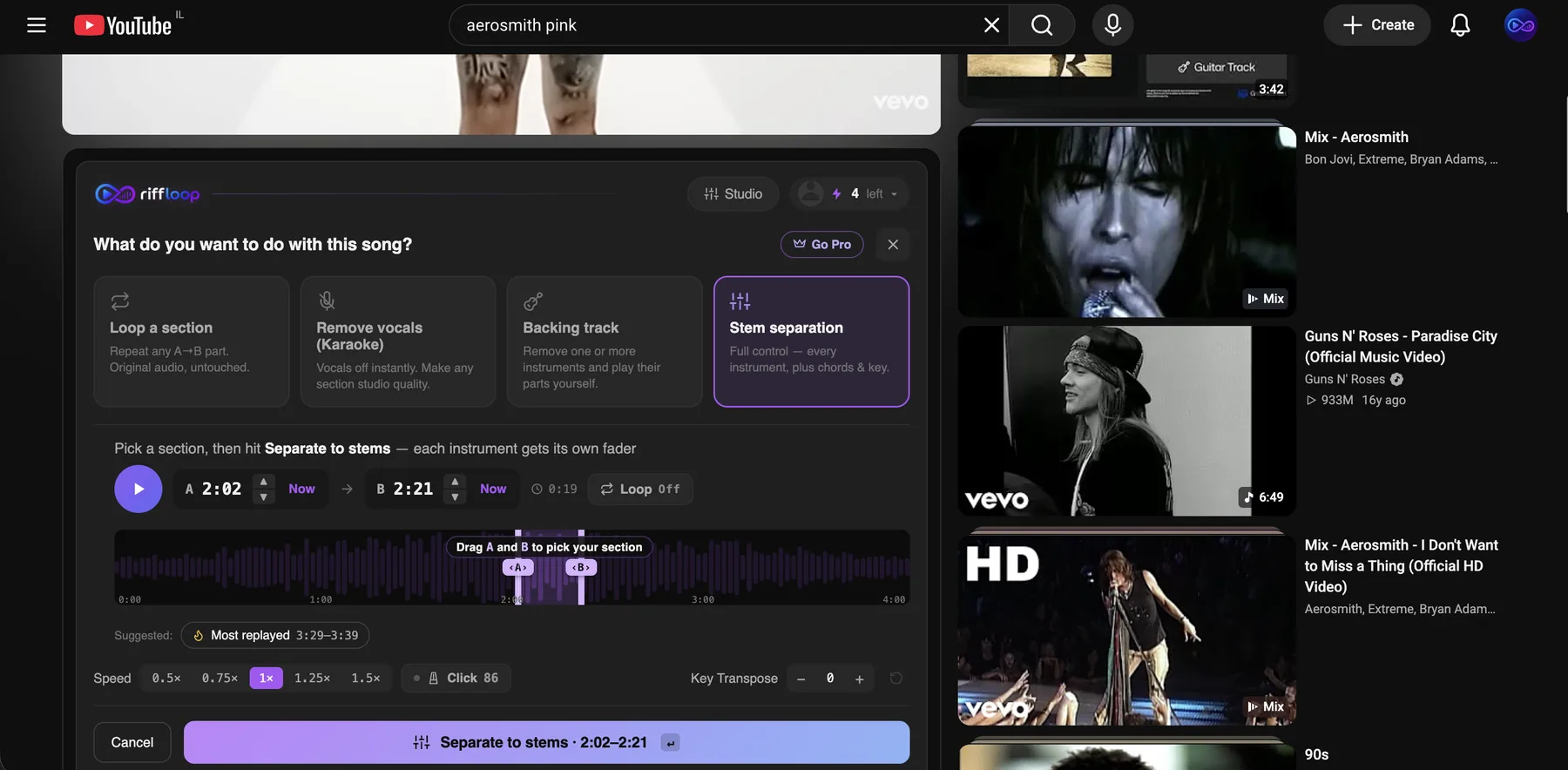
- Open the song on YouTube. With the free Riffloop Chrome extension installed, the Riffloop panel appears right under the video.
- Choose "Remove vocals". The singer drops back across the whole song straight away — no capture, no waiting, no credit spent.
- Turn on the lyrics. Read them in the panel, or put them over the video so you're looking at one thing while you sing.
- Move it into your key. Nudge a semitone at a time and test the chorus, not the verse — the chorus is where a key is really decided.
- Rehearse the hard part. Loop the bridge, slow it down with the pitch kept correct, then bring the speed back to normal.
Lyrics That Follow the Song
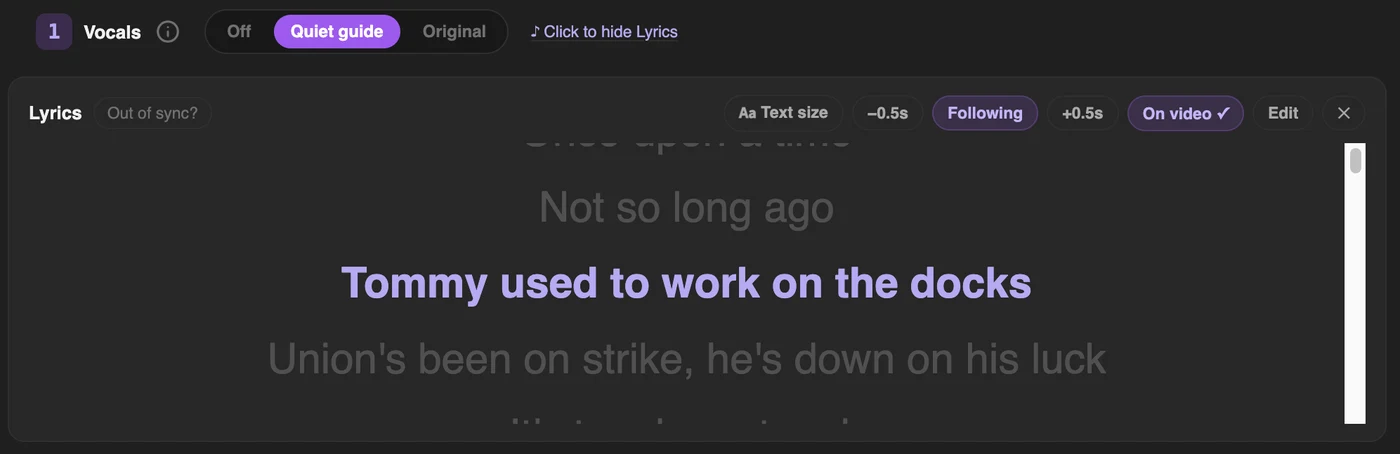
Riffloop shows synced lyrics on the video: each line highlights as it's sung, so you always know where you are. When the video carries its own caption track, the words come from that video, which means they match the upload you're watching rather than some other recording of the same song.
This is the part most karaoke tools skip. Vocal removers hand you an instrumental and leave you to find the words somewhere else; lyric extensions show you words with no way to quieten the singer. Doing both on the same video is the point — you're reading and singing in one place, not switching tabs mid-verse.
When the words drift out of time
On covers, live takes and fan uploads the words often lag or lead the music, because the timings were written for the studio master and this upload runs longer, starts later, or has a minute of talking cut into it. Tap the line that's being sung right now and the whole sheet snaps into place. Half-second nudge buttons handle the final trim. Tapping never moves the playhead, so the song keeps rolling while you fix it — you can re-sync mid-verse without losing your place.
Reading them while you sing
Put the words over the video and they stay visible in fullscreen, which matters when your laptop is across the room on a music stand. There are four text sizes, because lyrics get read from further back than a web page does. If a song has no caption track and no match in the lyrics lookup, you can paste your own words in and they'll show as a static sheet.
Sing It in Your Own Key
If a song sits too high, move it down a semitone at a time and sing the chorus after each step. Most singers land within one to four semitones of the original — beyond about six the track starts to sound noticeably thick or thin. In Riffloop the key change and the vocal removal work at the same time, and the tempo doesn't move when the key does.
Test on the chorus, never the verse. Verses sit low and comfortable in almost any key, so a song can feel perfect for ninety seconds and then ambush you at the big note. The chorus is where the decision is made.
A practical method that takes about a minute: play the chorus at the original key and note whether you're straining or dropping out. Move two semitones in that direction and sing it again. If it's now too easy and the low notes are disappearing, come back one. Two or three passes is usually all it takes. Changing the key of a song covers the mechanics in full, including what happens to the sound at bigger shifts.
This is the single most useful thing for anyone leading a room — a congregation, a choir, a family at Christmas. The original singer's range is rarely the range of the people in front of you.
Vocals Off, or a Quiet Guide Vocal
The vocals control has three positions: off, a quiet guide, or the original. It opens on the quiet guide, which leaves the singer just audible under you. Learn the melody with the guide on, then switch to off when you want the room to yourself.
Most tools treat this as binary, and that's a mistake for anyone actually learning a song. A guide vocal is how you find out where a phrase really starts, whether that line is triplets, and how the singer lands the end of the chorus. Take it away too early and you'll rehearse your own wrong version until it's a habit.
The instant version starts the moment you pick the goal, across the whole song. If you want the cleanest split a particular song can give — vocals fully separated rather than reduced — run the full AI separation, which is the same one behind the YouTube vocal remover and the YouTube stem splitter.
How Good Does the Karaoke Track Sound?
Good enough to sing over, and worth being honest about the rest. Separation makes an estimate of what the vocal is, so on a dense mix you can hear a faint ghost of the original singer, especially under a big chorus. Nobody's tool is flawless here, whatever the marketing says.
What tends to come out clean, and what fights back:
- ✅ A clear lead vocal over a normal band mix
- ✅ Studio recordings with space around the voice
- ⚠️ Heavy reverb — the tail sounds like it's still there
- ⚠️ Stacked harmonies and choirs — they leave more behind
- ⚠️ Live and phone-recorded uploads — the crowd bleeds in
- ⚠️ Very loud, heavily compressed masters
A practical tip: if a song won't clean up, look for another upload of it. The same track in a clearer transfer, or an acoustic session version, often separates far better than a loud remaster. It costs nothing to try three uploads and keep the one that sings best.
Is It Legal to Make a Karaoke Version?
General guidance, not legal advice. Singing along at home, for practice or private fun, is personal use and millions of people do it. Taking the vocals out doesn't change who owns the song. Performing it in public, streaming it, posting the result or making money from it needs the rights holder's permission — that's what a karaoke licence exists for.
The practical line most people care about: rehearsing at home is fine, a video of you singing it posted publicly is a different question, and a paid performance is squarely licensing territory. Venues that run karaoke nights hold a licence for exactly this reason, and so do churches that project song words.
Riffloop is built for practising and singing along. It doesn't rip or download the audio, and YouTube tracks can't be exported on any plan — that's a deliberate line, not a paywall. YouTube's own Terms of Service are the primary source on what you may do with content on the platform, and our privacy policy sets out that separation runs on your device rather than on a server.
Riffloop vs Karaoke Sites, Catalogues and Apps
Most karaoke makers hand you a file: you paste a link, their server fetches and processes the audio, and you download an MP3 or MP4. Catalogues sell finished backing tracks from a fixed library. Riffloop does it live on the video, which is why the lyrics and the key change can be part of it at all.
| What you get | Riffloop | Paste-a-link karaoke sites | Karaoke catalogues |
|---|---|---|---|
| Any song on YouTube | ✓ | ✓ | ✗ fixed library |
| Works on the video — no download | ✓ | ✗ exports a file | streams their own track |
| Audio stays on your device | ✓ | ✗ server-side | n/a |
| Synced lyrics on the song | ✓ | rarely | ✓ |
| Re-sync the words yourself | ✓ tap a line | ✗ | n/a |
| Change the key for your voice | ✓ | ✗ | varies (often paid) |
| Keep a quiet guide vocal | ✓ | ✗ | sometimes |
| Loop and slow down a hard phrase | ✓ | ✗ | ✗ |
| Download the finished track | ✗ by design | ✓ | ✓ (paid) |
| Price | Free / Pro from $5.95/mo | freemium, usually metered | per track or subscription |
The one row where the others win is the last-but-one: if you need a file to take to a venue on a USB stick, a paste-a-link site or a catalogue is the right tool and we'd rather say so. Riffloop is for singing in front of your own screen.
Rehearsing a Song You're Actually Learning
Karaoke and rehearsal are the same setup used two different ways. Once the vocal is down and the key fits, the useful move is to stop singing the whole song and drill the four bars that keep going wrong.
The twenty-minute karaoke rehearsal
Six passes, in this order. The whole point is that only the first and last are full run-throughs of the song — the middle four are spent on the part that actually goes wrong.
- Sing it once with the guide vocal on. You're finding out where the song actually breaks, not performing it.
- Fix the key. Two or three semitone steps, tested on the chorus.
- Loop the phrase that broke. Set an A-B loop over those four bars and sing them eight times — looping a section of a YouTube video takes a few seconds.
- Slow it down if the words are the problem. At 75% the consonants have room; the pitch stays correct so you're not learning it in a different key by accident.
- Bring it back to full speed and drop the guide vocal. If it survives that, it'll survive an audience.
- Sing the whole song once more. Ending on a full pass is what makes it stick.
If you're learning the song by ear rather than reading the words, the same tools do that job too — learning songs by ear is mostly slowing down, looping and isolating until the line is obvious.
Five Mistakes That Ruin a Karaoke Take
Most bad karaoke sessions fail for the same handful of reasons, and every one of them is fixable in under a minute.
- Picking the key from the verse. Verses are comfortable in almost any key. Test the chorus or you'll discover the problem in front of people.
- Choosing a loud remaster. Heavily compressed masters separate worst. An acoustic session or a cleaner upload of the same song often sings far better.
- Killing the guide vocal too early. If you don't yet know exactly where a phrase lands, the guide is what stops you rehearsing a wrong version into a habit.
- Fighting drifting lyrics instead of fixing them. On a live upload the words will lag. Tap the line being sung once and the rest of the song is fine.
- Singing it start to finish over and over. Six full passes is worse practice than one pass plus twenty minutes on the two bars you keep missing.
On a Phone or Tablet
Karaoke on the video needs desktop Chrome — mobile browsers don't let an extension work on a YouTube video the way a laptop can. A Chromebook works, because it runs the same Chrome extension.
On the desktop side it works in Chrome, Edge, Brave, Arc and Opera, on Windows, macOS, Linux and ChromeOS. Riffloop is a desktop-and-Chromebook tool, and we'd rather say that plainly than let you install something that can't do the job on your phone. On mobile you can still open the Studio and work with a file you already have — that is the same upload path behind the AI vocal remover. In practice, singing from a laptop propped on a music stand is the common setup anyway — the lyrics are readable from across the room at the larger text sizes.
Pricing
Dropping the vocals, showing the lyrics, changing the key and singing along are free, with no account needed to start. Pro raises the usage limits and unlocks exporting audio from files you upload yourself.
| Plan | Price | What you get |
|---|---|---|
| Free | $0 | Vocals down, synced lyrics, key change, looping and slow-down on YouTube songs |
| Pro | $5.95/mo or $39/year | Higher usage limits, longer loops, full-length songs in the Studio, exporting your own uploads |
| Founder Lifetime | $99 once | Everything in Pro, paid once |
YouTube audio can't be exported on any plan. Export applies to files you upload yourself, which is the case where you already hold the rights.
YouTube Karaoke — FAQ
The questions singers ask most before their first take: what it costs, whether anything downloads, how to fix lyrics that drift, how far to move the key, and where the legal line sits.
How do I turn a YouTube video into karaoke?
Open the song on YouTube with the Riffloop Chrome extension and choose the Remove vocals goal. The lead vocal drops back across the whole song straight away, synced lyrics can appear on screen or over the video, and you can shift the key if the song sits too high for you. Nothing is downloaded and nothing is uploaded — it all happens on the video you are already watching.
Is it free to sing along with the vocals removed?
Yes. Dropping the vocals on the video, showing the lyrics and singing along cost nothing, and you do not need an account to try it. Higher daily usage limits, and exporting audio from files you upload yourself, come with Pro (from $5.95/month, $39/year, or a one-time $99 Founder's Lifetime). YouTube audio cannot be exported on any plan, so singing along in the page is the free and intended use.
Do I have to download the video first?
No, and that is the main difference from most karaoke makers. Sites that take a YouTube link usually fetch the audio on their own servers and hand you an MP3 or MP4 to download. Riffloop works on the video in your own browser tab, so there is no download step, no copy-pasting links into another site, and no file left on your machine.
Does it show the lyrics too?
Yes. When the video carries its own caption track, Riffloop reads the words from that video, so the words and timings match the upload you are watching. When it does not, the words come from a lyrics lookup instead. The lines highlight as they are sung and can sit over the video itself, and there are four text sizes because you are reading them from further back than a web page.
The words are out of sync — can I fix it?
Yes, and this is common on covers, live takes and fan uploads, where the recording runs longer or starts later than the studio master the timings were written for. Tap the line that is being sung right now and the whole sheet snaps to it. There are also half-second nudge buttons for a final trim. Tapping a line never moves the playhead — the song keeps playing where it is.
The song is too high for me — what do I do?
Move the song down until the chorus feels comfortable — the vocal removal and the key change work at the same time. Shift a semitone at a time and sing the chorus after each step — the hardest part is usually where a key is decided. Most singers land within one to four semitones of the original. The tempo does not change when the key does.
Can I keep a quiet guide vocal while I learn the words?
Yes. The vocals control has three positions — off, a quiet guide, or the original. It opens on the quiet guide, which leaves the singer just audible underneath you. That is the setting to learn a melody with; switch to off once you know the tune and want the room to yourself.
How good does the karaoke track sound?
Good enough to sing over, and honest about the rest. AI separation makes an estimate of the vocals, so on dense mixes you may hear a faint ghost of the original singer, and heavy reverb or a backing choir is the hardest thing to remove cleanly. A clean studio recording separates better than a phone recording of a live show. For the cleanest possible split of a song, use the full AI separation on the YouTube vocal remover.
Is it legal to make a karaoke version of a song?
General guidance, not legal advice: singing along at home for practice or private fun is personal use, and millions of people do it. Removing the vocals does not change who owns the song. Performing it publicly, streaming it, posting the result or making money from it needs permission from the rights holder — that is what a karaoke licence covers. Riffloop is built for practising and singing along, and it does not rip or download the audio.
Is there a karaoke Chrome extension?
Riffloop is one. It installs from the Chrome Web Store, adds a panel under the YouTube player, and works in Chrome, Edge, Brave, Arc and Opera. Most other karaoke extensions either do a rough left-right cancellation that hollows out the whole mix, or send the audio to a server and charge for the good version.
Does it work on my phone?
Not yet. Mobile browsers do not let an extension work on the video the way desktop Chrome does, so karaoke on the video needs a laptop or desktop. On a phone you can still open the Studio and work with a file you already have. If you sing from a tablet, a Chromebook works — it runs the same Chrome extension.
Is a karaoke maker the same as a vocal remover?
A vocal remover produces an instrumental — the song with the singer taken out, which you might then use anywhere. A karaoke maker is about the singing session: the vocals go down, the words come up on screen in time, and the key moves to suit your voice. Riffloop's YouTube vocal remover covers the first job in depth, including how to pull an acapella.
Can I use it for a worship set or a choir rehearsal?
For rehearsing, yes — that is exactly the personal-practice use it is built for, and the key change matters more here than anywhere, because a congregation or a choir rarely sits in the original singer's range. For a live service or a public performance you need the right performance licence, the same as any other backing track.
Does it work on YouTube Music?
The panel appears on youtube.com watch pages. If you find a song on YouTube Music, open the same track on YouTube itself and it works there. Anything you can watch on a normal YouTube page is fair game, including live sessions and covers.
Can I save the karaoke track to sing later?
You can save your practice loops and reopen the song, but YouTube audio cannot be exported on any plan — that is a copyright line we do not cross. If you want an exported file to keep, upload a recording you own to the Studio and export from there with Pro.
What if there are backing vocals as well as a lead singer?
Backing vocals and harmonies usually come out together with the lead, because separation works on the singing as a whole rather than on individual voices. On songs built around stacked harmonies you may hear more of a ghost left behind. Riffloop does not split a lead vocal away from its own backing vocals.
If You Remember Four Things
- 1️⃣ Karaoke is three jobs, not one: vocal down, words on screen, key that fits
- 2️⃣ Pick the key on the chorus — usually one to four semitones
- 3️⃣ On a live upload, tap the sung line to fix the lyric timing
- 4️⃣ A faint ghost of the singer on dense mixes is normal, not a fault
Keep Going With Riffloop
Vocals Down, Lyrics Up, in Your Key
Open any song on YouTube, drop the singer, read the words in time and move the key until the chorus feels easy. It runs on your device and it's free to start.