Chordify Alternative
Both read a song's chords from the audio. One gives you the chord chart; the other gives you the chords plus the band, separated.
Chordify is a chord-chart service: open a song, and a timeline of chords plays along under it, with guitar, piano, ukulele and mandolin diagrams. Riffloop reads the chords too, then splits the recording into six parts so you can mute your instrument, loop the bar you keep missing and slow it down with the pitch held — on the YouTube video itself. Below: what each is for, what each plan includes, and the jobs where Chordify is still the better pick.
Free to try: five songs a day signed in, three as a guest with no account. Riffloop runs on computers and Chromebooks, and as an app for iPhone and Android.
Last updated · maintained by the Riffloop team
At a Glance
Pick Chordify if you want chord charts — a large library of songs ready to strum along to, diagrams for four instruments, PDF sheets and setlists. Pick Riffloop if you want to play with the band — the chords arrive with the song split into six parts, so you can mute your instrument, solo it to check a chord, and loop and slow the hard bar.
- 🎼 Both read chords from the audio and keep them in time with the song
- 📚 Chordify has a song library; Riffloop analyses the song you open
- 🎚️ Riffloop separates the band into six parts; Chordify doesn't
- ▶️ Riffloop works on the YouTube page itself; Chordify in its own site and apps
- 🪕 Chordify draws guitar, piano, ukulele and mandolin; Riffloop draws guitar shapes
- 🆓 Chordify's free plan shows full charts for a few songs a day; Riffloop's shows the first 30 seconds of chords, with the stems
What Each One Is
Chordify is a chord-chart service: it shows the chords of a song as a timeline that plays along with the music. Riffloop is a practice studio: it reads the chords, key and tempo, and separates the recording so the chords sit next to stems you can mute, loop and slow down.
Chordify
A website plus iOS and Android apps. You pick a song — from its library, which it puts at more than 36 million songs, or from YouTube — and the chords scroll under the player with diagrams for guitar, piano, ukulele or mandolin. Chordify says its chords come from AI combined with human music researchers. The free plan limits how many songs you open a day; paid plans unlock unlimited songs, then key and tempo change, looping, a digital capo, PDF chord sheets, MIDI and setlists.
Riffloop
A Chrome extension, a web Studio, and iPhone and Android apps. On YouTube, a panel opens under the video; pick the section you want, and Riffloop separates it into vocals, drums, bass, guitar, piano and the rest on your own device, then reads the chords, the key and the real BPM. The chords show as guitar shapes that move with the song, next to six faders, an A-B loop, a speed control that holds the pitch and a key change that moves the audio and the shapes together. Read more on the YouTube chord finder page.
Riffloop vs Chordify
Both read chords from the audio and keep them in time with the song. They split on what surrounds the chords: Chordify builds out the chart — library, instruments, printing — and Riffloop builds out the recording — stems, loop, tempo and key.
| Capability | Riffloop | Chordify |
|---|---|---|
| Chords read from the audio, synced to the song | ✓ | ✓ |
| Ready-made library of songs to browse | ✗ analyses what you open | ✓ 36M+ songs |
| Chords on the YouTube page itself | ✓ panel under the video | ✗ in its own player |
| Your own audio files | ✓ | ✓ Premium |
| Mute or solo an instrument (stem separation) | ✓ six parts | ✗ song vs chord volume |
| Key and tempo of the song | ✓ key + real BPM | not listed on its Premium page |
| A-B loop a section | ✓ free | ✓ Premium |
| Slow down with the pitch held | ✓ free to start | ✓ Premium |
| Change the key | ✓ audio and shapes together | ✓ Premium |
| Metronome | ✓ locked to the song's beats (Pro) | ✓ with drumbeat (Premium Plus) |
| Chord diagrams | guitar — easy or barre | ✓ guitar, piano, ukulele, mandolin |
| Extended chords (7ths, sus) | ✗ major and minor | check the chart for your song |
| PDF chord sheets, MIDI, setlists | ✗ | ✓ Premium |
| Analysis runs on your own device | ✓ | ✗ |
| Phone apps | ✓ iPhone and Android | ✓ iOS and Android |
| Free plan | 5 songs a day; chords for the first 30 s, key + BPM in full | full charts, limited songs a day, with ads |
Chordify's wins sit around the chart: the library, four instruments, sheets you can print and a free plan that shows whole songs. Riffloop takes the rows about the recording itself. If what you need is to hear the guitar on its own, then play it with the band, read the rows about the recording.
Where Chordify Fits Better
Chordify is still the better choice in five situations, and if one of them describes you, keep it.
- 📚 You want a song now. A library of tens of millions of songs means most charts are already there, with no analysis to wait for.
- 🪕 You play ukulele, mandolin or piano. Chordify draws diagrams for all four instruments. Riffloop draws guitar shapes only.
- 🖨️ You want paper. PDF chord sheets, MIDI files and setlists for rehearsals and gigs. Riffloop has no printable chord sheet.
- 📖 You read whole charts on the free plan. Chordify's free tier shows a song's chords end to end, a few songs a day. Riffloop's free chords cover the first 30 seconds.
- 🧑🏫 You teach a class. Chordify runs a school programme, and its charts are quick to put in front of a room.
If you mostly strum along from a chart, Chordify was built for exactly that, and it has been doing it for years. Riffloop is built for the moment the chart isn't enough — when you need to hear the part.
Where Riffloop Is Genuinely Different
Riffloop's difference is the recording underneath the chords: it separates the song into six parts, so the chords come with a band you can take apart.
- 🎚️ Mute your part and play it. Drop the guitar and strum the chords over the rest of the band — a backing track that is the real recording.
- 👂 Solo the chord instrument to check the chart. When a chord sounds wrong, hear the guitar or piano alone and settle it in seconds.
- ▶️ Stay on YouTube. The panel sits under the video you already have open, including live takes, covers and lessons.
- 🔁 Loop and slow down for free. A-B looping is free, and slowing down with the pitch held is free to start — on the stems, not just the mix.
- 🔑 Move the key, and the shapes follow. Transpose the audio into a friendlier key and the guitar shapes move with it.
- 🔒 Nothing uploaded. The separation and the chord reading both run on your own device.
One honest limit to weigh against that: Riffloop reads harmony at the major and minor level, so a Cmaj7 shows as C. Because you can solo the guitar, you can hear the seventh the label leaves out — but the chart itself won't spell it.

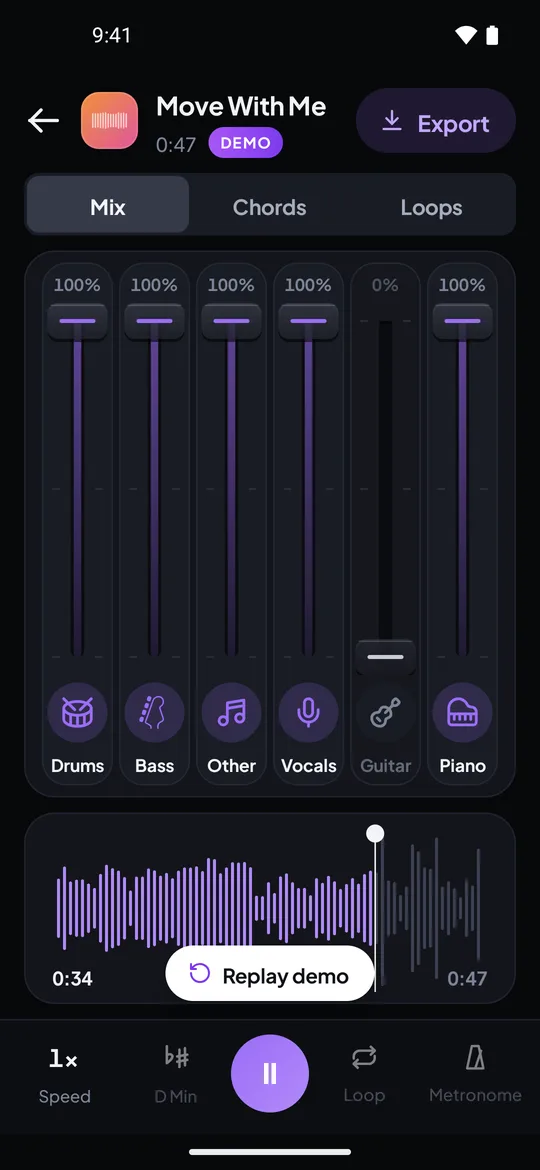
Real screenshots from the Riffloop Android app, using our own demo song. On a computer, the Chrome extension shows the chord track under the YouTube video instead.
Free and Paid, Compared Honestly
Both have a free plan, and they limit different things. Chordify's free plan limits how many songs you open; Riffloop's limits how many songs you separate and shows the first 30 seconds of chords on each.
| Riffloop | Chordify | |
|---|---|---|
| Free | 5 songs a day signed in, 3 as a guest; chords for the first 30 s, key + BPM in full; looping free | guitar, piano, ukulele, mandolin chords; limited songs a day; ads |
| Paid tiers | Pro, or a one-time Founder's Lifetime | Basic, Premium, Premium Plus |
| Entry price | $9.99/month | Basic — unlimited songs |
| Yearly | $39/year, or $99 once | yearly billing saves up to 50% |
| Money back | cancel any time | 14-day refund, cancel any time |
The practical difference: on Chordify, the things a practising player reaches for — loop, tempo, key, capo, your own files — are on Premium rather than Basic. On Riffloop, looping, slowing and key change are free to start; Pro adds whole-song chords, longer loops, unlimited songs, the beat-locked metronome and full-length exports of your own uploads.
Switching From Chordify: What Maps Across
Most of the Chordify Premium practice tools have a direct equivalent in Riffloop, and two don't. Here's where each one lives, so you know what you keep and what you give up.
| In Chordify | In Riffloop |
|---|---|
| Loop parts of a song | A-B loop — free, and saved loops per song |
| Change the tempo | Speed, with the pitch held |
| Change the key / digital capo | Key change, a semitone at a time; the guitar shapes move with it |
| Song and chords volume | Six faders — mute or solo any part of the recording |
| Count-off / metronome with drumbeat | A metronome locked to the song's own beats (Pro) |
| Upload your own music files | The Studio on a computer, or the iPhone and Android apps |
| PDF chord sheets, MIDI, setlists | ✗ no equivalent — keep Chordify for these |
| Ukulele, mandolin and piano diagrams | ✗ guitar shapes only |
Checking a Chord Chart by Ear
Every chord detector gets some chords wrong — usually inversions, sus chords and sevenths. The fastest fix is to hear the chord instrument on its own, which is the step a chart-only tool can't give you.
- Read the chart first. Strum through the progression once with the full mix and mark the chords that feel wrong under your hands.
- Loop the suspect bar. Set an A-B loop around the two or three beats where the chord changes, and drop the speed to 75% with the pitch held.
- Solo the chord instrument. Mute everything except the guitar or piano. With the vocal and drums gone, a missing seventh or a sus4 is usually obvious within a couple of passes.
- Check the bass. Solo the bass on the same loop. If it isn't on the chord's root, you have an inversion — write it as a slash chord, like C/E.
- Play it with the band. Mute your instrument, bring the speed back up in 5% steps, and play the corrected chart against the real recording.
This works whichever chart you started from — Chordify's, a tab site's or Riffloop's own. For the full method, see how to find the chords of a song by ear.
Test It Yourself in Ten Minutes
We make Riffloop, so don't settle this on our say-so. A song whose chords you already know is the fairest test, and both free plans cover it.
- Choose a song you can already play. Knowing the real chords is what lets you judge each result instead of trusting it.
- Open it in Chordify. Play the first verse and chorus and note any chord that doesn't match what you play.
- Now load that song on YouTube and open the Riffloop panel. No account needed. Separate the first verse and read the chord track under the video.
- Compare the same eight bars. On a clear pop or rock recording, expect both to get most of the changes right — that's the honest expectation.
- Now play along. In Riffloop, mute your instrument and play over the band. In Chordify, play along with the chart. Whichever feels more like practice is your answer.
How We Checked This
Riffloop is our product, and the Riffloop column reflects that. The Chordify column comes from one source: Chordify's own Premium page, read on 17 October 2026. We didn't use review sites for it, and we didn't run their service through tests of our own.
Two things to know if you're pricing it up. Chordify shows its prices in your local currency, so we haven't converted them; check the Premium page for yours. And its free song limit isn't stated on that page — the figure of four songs a day comes from user reviews quoted there, so treat it as typical rather than guaranteed.
We haven't scored either tool for chord accuracy. Both read chords with AI, results vary by recording, and any page quoting a precise accuracy percentage for either made the number up. The workflow above is how to judge it on the songs you actually play.
If Neither Is Quite Right
Chord charts, stem apps and tab sites each solve part of the job. If neither of these two fits, one of these probably does.
Moises pairs stem separation with chords on its phone and tablet apps — see our Moises comparison. Tab sites like Ultimate Guitar have human-written charts for popular songs, which beat any detector on extended chords. And if you want to get the chords yourself, our guide to finding the key and guide to transcribing by ear cover the method from scratch.
Chordify and Riffloop — FAQ
What people ask before switching: what Chordify's free plan covers, what Premium adds, whether either can mute an instrument, and which suits which way of learning.
Is there a free alternative to Chordify?
Riffloop is free to start: three songs as a guest with no account, or five a day on a free account. Each one gives you the key and the real BPM in full and the chords for the first 30 seconds, with the band separated so you can mute your part. Be clear about the trade-off: Chordify's free plan shows a whole song's chord chart, for a limited number of songs a day.
Is Chordify free?
There is a free plan with guitar, piano, ukulele and mandolin chords on the web, iOS and Android. It limits how many songs you can open a day and shows ads; reviews quoted on Chordify's own Premium page put the limit at four songs a day. Unlimited songs start on the paid Basic plan.
What does Chordify Premium add?
On the Premium page we read on 17 October 2026: no ads, change the key, change the tempo, loop parts of a song, a digital capo, a count-off, song-and-chords volume, uploading your own files, chord MIDI downloads, PDF chord sheets and setlists. Premium Plus adds a tuner, a metronome with drumbeat, lyrics generation and chord practice tools.
Can Chordify isolate or mute an instrument?
No. Chordify balances the song against its own chord playback, but it doesn't separate the recording into instruments. Riffloop splits a song into six parts — vocals, drums, bass, guitar, piano and the rest — so you can mute the guitar and play it yourself, or solo it to check a chord.
Does Chordify work with YouTube?
Chordify plays songs, including YouTube songs, inside its own website and apps, with the chord timeline under its player. Riffloop's Chrome extension works on the YouTube page itself: the chords, key, tempo and mixer appear in a panel under the video you already have open.
Can I get chords from my own audio files?
Yes, in both. On Chordify, uploading your own music is a Premium feature. In Riffloop, the Studio takes MP3, WAV, M4A, FLAC, OGG and AAC files up to 50 MB, and the iPhone and Android apps take files up to 10 minutes long.
Which one is more accurate?
We haven't benchmarked the two against each other, and any precise accuracy figure for either would be invented. Chordify says its chords come from AI plus music researchers. Riffloop's edge isn't the label itself but the check: you can solo the chord instrument and hear whether the chart is right.
Can I loop and slow down a song in Chordify?
Yes, on Premium: looping parts of a song and changing the tempo are both listed as Premium features. In Riffloop, A-B looping is free, slowing down with the pitch held is free to start, and both work on the separated stems.
Does Riffloop have ukulele or piano chord diagrams?
Not today. Riffloop draws guitar shapes for every chord, with a switch between easy open shapes and full barre chords. Chordify draws guitar, piano, ukulele and mandolin diagrams, so for those instruments it is the better fit.
Can I print a chord sheet or export MIDI?
Chordify can, on Premium: PDF chord sheets and chord MIDI files. Riffloop doesn't offer a printable chord sheet or MIDI. It is built for playing along with the song while it plays, rather than for a sheet on a music stand.
Do Chordify and Riffloop have phone apps?
Both have phone apps. Chordify runs on the web, iOS and Android. Riffloop has an iPhone app (iOS 26 or later) and an Android app (Android 12 or later) that split the song on the phone and show the chords as guitar shapes; the YouTube extension itself is for desktop Chrome and Edge.
Is Chordify or Riffloop better for learning a song?
It depends on how you learn. If you strum along from a chart and want the chords for a lot of songs quickly, Chordify. If you want to hear the part you're learning on its own, then mute it and play over the band, Riffloop.
Can I compare them without paying?
Yes. Chordify's free plan covers a few songs a day with ads. Riffloop gives you three songs as a guest with no account, or five a day signed in, shared between the extension, the Studio and the phone apps — and A-B looping on its own is always free. The ten-minute test on this page fits inside both.
Keep Going With Riffloop
Mute Your Part. Read the Chords.
Open a song you're learning on YouTube, take your instrument out, and follow the shapes over the real band. Three songs as a guest, no account.

