A LALAL.AI Alternative Built for Practice
Need stem files to mix or deliver? Use LALAL.AI. Splitting songs to learn them? Riffloop gives you the stems with a loop, a speed control and a key change around them.
Disclosure: Riffloop is our product. Riffloop is a LALAL.AI alternative for musicians who split songs to learn them rather than to export them. It separates a song into six parts on your device, then lets you loop the bar you keep missing, slow it down with the pitch held and move the key — on a YouTube video in place, on your own file, or on your phone. LALAL.AI is the better tool when the stem files are the product, and this page says where it wins. Every LALAL.AI fact is from its own pages, read on 18 October 2026.
Free to try: three songs as a guest with no account, five a day signed in. Also on iPhone and Android.
Last updated · LALAL.AI facts read from its own pages on 18 October 2026 · maintained by the Riffloop team
Riffloop vs LALAL.AI, at a Glance
Pick LALAL.AI if you need stem files to mix, master, remix or deliver — it separates more stem types and is built around downloading them. Pick Riffloop if you split songs to learn them — the loop, the slow-down, the key change and the chords come with the stems, and a song costs one credit however many parts you listen to.
- 🎛️ LALAL.AI: up to vocals, drums, bass, guitar, piano, synth, strings and wind — plus a lead and backing vocal split
- 🔁 Riffloop: six parts with an A-B loop, speed, key change and chords around them
- ⏱️ LALAL.AI bills minutes: file length × the number of stem types you pick
- 🎟️ Riffloop counts songs: one credit per separation, all six parts included
- ▶️ Riffloop works on the YouTube video itself; LALAL.AI takes a file you upload
- 🔒 Riffloop separates on your device; LALAL.AI processes on its servers, with local processing in its desktop app on Pro
Which One Actually Fits You
Ask what happens to the stems after the split. If they go into a DAW, a client folder or a remix, use LALAL.AI. If they go into your ears while you play along, use Riffloop. Neither is a strict upgrade on the other.
LALAL.AI is the better fit if…
- 🎚️ You mix, master or remix, and the stems are files you'll keep.
- 🎻 You need synth, strings or wind separated, or acoustic and electric guitar apart.
- 🎤 You need the lead vocal apart from the backing vocals.
- 🧰 You want a VST plugin, an API or batch processing in a production workflow.
Riffloop will suit you better if…
- 🎸 You're learning a part and want to loop, slow down and re-key it, not export it.
- ▶️ Your songs live on YouTube and you'd rather not turn each one into a file first.
- 🎟️ You want all six parts of a song for one credit, rather than paying per stem type.
- 🔒 You'd rather your audio stayed on your own computer or phone.
- 💳 You'd rather pay once — Riffloop sells a $99 Founder's Lifetime.
What Each One Is
LALAL.AI is a stem-separation service: you upload audio or video and download the separated parts. Riffloop is a practice tool: it separates the song and keeps you inside it, with the controls you use to learn a part.
LALAL.AI
On its home page, LALAL.AI describes itself as a vocal remover "built for pro-level quality". Beyond the vocal remover and stem splitter, its product list includes a Voice Cleaner, an Echo & Reverb Remover, a Lead/Back vocal splitter, a Voice Changer and a Voice Cloner. It takes audio (MP3, OGG, WAV, FLAC, AIFF, AAC, M4A) and video (AVI, MP4, MKV, MOV, M4V), runs on the web, as a desktop app for Windows, macOS and Linux, and on iPhone, iPad and Android, with a VST plugin and an API on Pro. It lists a Webby People's Voice award and an International Sound Awards 2026 win. Processing happens in queues on its servers — a Fast Queue metered in minutes, and a Relaxed Queue that runs "as server capacity allows", according to its pricing page.
Riffloop
Riffloop takes a song from wherever it lives — an MP3, WAV, M4A, FLAC, OGG or AAC file up to 50 MB, a YouTube or SoundCloud link, or a YouTube video you already have open — and separates it into six parts on your own device: vocals, drums, bass, guitar, piano and the rest. Around the stems sit the practice controls: an A-B loop, slow-down with the pitch held, a key change of up to twelve semitones either way with the tempo kept (see changing a song's key), and the chords, key and BPM. It comes as a Chrome and Edge extension that works on the YouTube page, a web Studio for files and links, and apps for iPhone and Android that take files or record audio playing on the phone. See the AI stem splitter for how the separation itself works.
Riffloop vs LALAL.AI
LALAL.AI leads on stem types, file handling and production extras; Riffloop leads on what happens after the split if you're practising, and on where your songs come from. Rows where LALAL.AI leads are marked as plainly as the rest.
| Capability | Riffloop | LALAL.AI |
|---|---|---|
| Separate your own audio files | ✓ up to 50 MB | ✓ 200 MB free, 2 GB paid |
| Video files in | ✗ | ✓ MP4, MOV, MKV and more |
| Open a YouTube or SoundCloud link | ✓ | ✗ not on its pages |
| Works on the YouTube page itself | ✓ | ✗ |
| Stem types | six: vocals, drums, bass, guitar, piano, the rest | ✓ adds synth, strings, wind, acoustic vs electric guitar |
| Lead vs backing vocals | ✗ | ✓ |
| A-B loop, slow-down, key change | ✓ looping always free | ✗ not listed |
| Chords, key and BPM | ✓ | ✗ not listed |
| Download the stems | own uploads + phone apps; 60 s free, whole song Pro | ✓ paid plans |
| Where separation runs | your device | its servers; desktop app locally on Pro |
| How usage is counted | one credit per song, all six parts | minutes × stem types (Fast Queue) |
| VST plugin, API, batch | ✗ | ✓ plugin + API on Pro |
| Voice cleaning, de-reverb, voice changer | ✗ | ✓ |
| Phone apps | ✓ iPhone, Android | ✓ iPhone, iPad, Android |
| Desktop app | runs in Chrome or Edge | ✓ Windows, macOS, Linux |
| One-time purchase | ✓ $99 lifetime | minute top-ups from $50 |
Where LALAL.AI Is the Better Tool
LALAL.AI is the better choice whenever the stems leave the app: it separates more kinds of instrument, splits lead from backing vocals, takes bigger files and video, and plugs into production tools. If one of these is your job, keep it.
- 🎻 More stem types. Synth, strings and wind get their own stems, and guitar can come out as acoustic and electric. In Riffloop those land in "the rest" or in one guitar part.
- 🎤 Lead and backing vocals apart. Riffloop gives one vocal part with every voice in it.
- 📁 Files are the product. Download is the point of the service, files up to 2 GB go in on paid plans, and video files are accepted.
- 🧰 Production extras. A VST plugin that runs inside your DAW, an API, batch processing, voice cleaning and an echo and reverb remover.
- 🖥️ A desktop app. Windows, macOS and Linux, with local processing on Pro. Riffloop on a computer runs in Chrome or Edge.
We'd rather you knew that before installing anything. If you deliver stems to someone else, Riffloop isn't trying to be that tool.
Where Riffloop Is Genuinely Different
Riffloop's difference is what surrounds the stems: the practice controls, the route in from YouTube, and a price that counts songs rather than minutes of each stem.
- 🔁 The practice loop is built in. Set A and B around four bars, drop to 70% with the pitch held, and play it twenty times. With LALAL.AI that happens in other software, after the download.
- ▶️ No file to make on YouTube. The extension opens under the video you're watching — live takes, covers and lessons included.
- 🎚️ All six parts at once. One separation gives every fader, so you can solo the bass, then the drums, then mute the guitar, without paying again.
- 🎸 Chords and key with the stems. The chords show as guitar shapes; move the key and the shapes move with it.
- 🔒 Nothing uploaded. Separation runs on your computer or phone.
- 💳 A flat price, or none. Free to start, Pro at $9.99 a month or $39 a year, or $99 once.
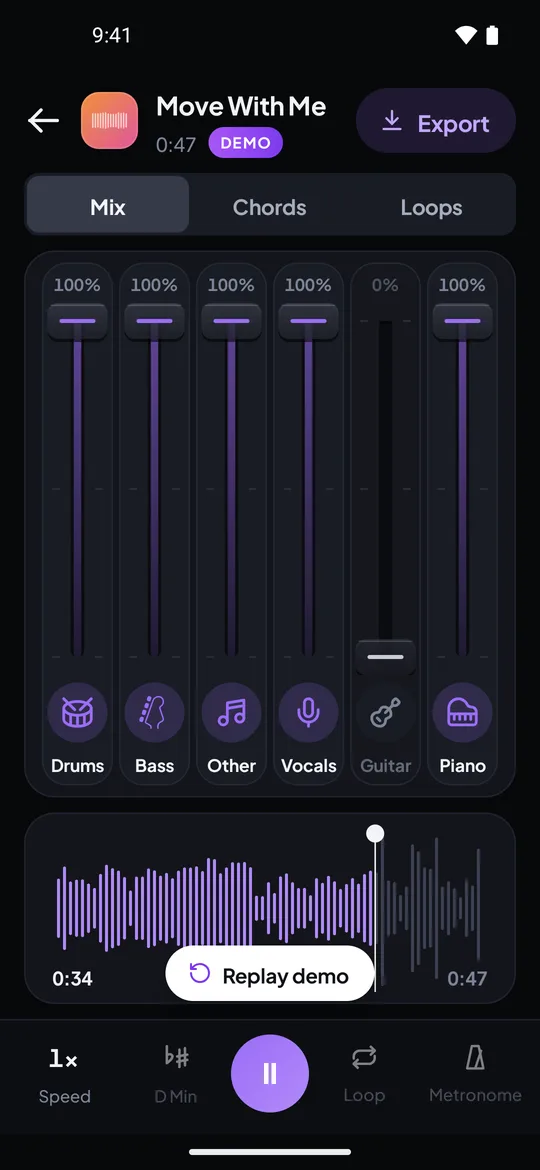
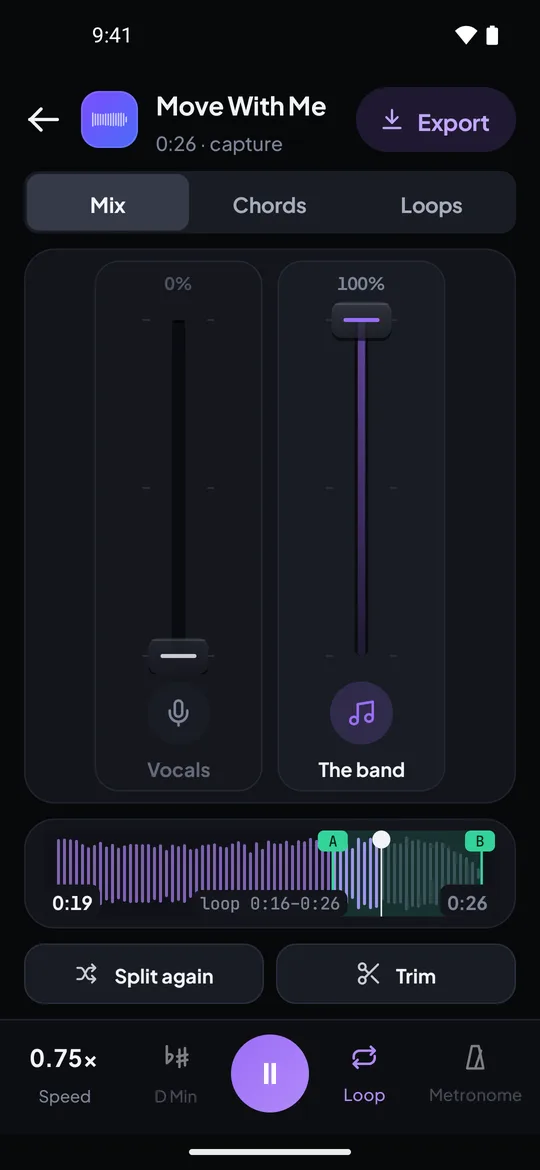
Real captures from the Riffloop Android app: six faders with the guitar pulled to 0%, and an A-B loop at 0.75× speed.
Minutes Versus a Flat Price
LALAL.AI charges Fast Queue minutes equal to the song's length times the number of stem types you pick, so a four-minute song split four ways costs sixteen minutes. Riffloop charges one credit per separation, with all six parts. For one stem, LALAL.AI's meter is cheap; for a full practice session it adds up.
| Riffloop | LALAL.AI | |
|---|---|---|
| Free | 3 songs as a guest, 5 a day signed in; looping always free | Starter: 10 Relaxed Queue minutes, 200 MB files; Result Downloads shows a dash |
| Entry plan | Pro $9.99/month | Lite $7.50/month billed annually ($90/year), 90 Fast minutes/month |
| Higher plan | — | Pro $15/month billed annually ($180/year), 250 Fast minutes/month |
| Yearly | $39/year | $90 (Lite) or $180 (Pro) |
| Pay once | $99 Founder's Lifetime | top-ups: 750 min $50, 3,000 min $190, 5,000 min $300 |
| Usage on paid plan | unlimited songs on Pro | unlimited Relaxed Queue; Fast minutes don't roll over |
| Refunds | cancel any time | "The subscription is non-refundable" |
LALAL.AI minute calculator
How many Fast Queue minutes does one song cost, using LALAL.AI's own formula?
16 Fast Queue minutes. Lite's 90 a month cover about 5 songs like this; Pro's 250 about 15. In Riffloop: one credit, all six parts.
A worked example
You're learning a four-minute song on bass. If all you need is the bassline, LALAL.AI's meter is kind: one stem type, four minutes. But practice rarely stops at one part. You'll want the drums to lock in with, then everything except the bass to play along to — that's bass, drums and the rest, at least three stem types, twelve minutes. A month of four songs a week at that rate is about 190 Fast Queue minutes: more than Lite's 90, inside Pro's 250. Past the fast minutes, paid plans keep going in the Relaxed Queue, where the wait depends on server load. In Riffloop the same month is sixteen credits — five a day on the free plan covers it — and every song comes with all six faders.
The honest sanity check: if you split a handful of songs a month into one or two stems, LALAL.AI's free minutes or a small plan may cost you less than anything else. The flat price wins when you hear many parts of many songs.
Switching From LALAL.AI: What Maps Across
The separation itself maps across for the common parts; the production tools don't. Here's what you keep, what you gain and what you'd give up.
| In LALAL.AI | In Riffloop |
|---|---|
| Vocal Remover (vocals / instrumental) | Remove vocals — the band at full, the vocal at 0%, or anywhere between |
| Stem Splitter (drums, bass, guitar, piano…) | Six parts: vocals, drums, bass, guitar, piano and the rest, one fader each |
| Synth, strings and wind stems | ✗ they stay in "the rest" — keep LALAL.AI for these |
| Lead/Back vocal splitter | ✗ one vocal part — keep LALAL.AI for harmony work |
| Voice Cleaner, Echo & Reverb Remover, Voice Changer | ✗ no equivalent — Riffloop is a practice tool |
| Download the stems | Export from your own uploads and the phone apps — 60 s free, whole song on Pro |
| Desktop, iPhone and Android apps | Chrome or Edge on a computer, plus iPhone and Android apps |
| VST plugin, API, batch processing | ✗ none — keep LALAL.AI for production pipelines |
Nothing to export from LALAL.AI first: Riffloop separates the song again on your device. If you already have stems you made there, keep them for your DAW and use Riffloop on the original song to practise.
One Song, Both Ways
Take a live version of a song on YouTube with a bass fill you can't catch. Both tools can separate it; the difference is how many steps sit between you and playing the fill.
With a file-first service
- Get the audio as a file. LALAL.AI needs an upload, so the live version has to exist as a file you're allowed to use.
- Upload and pick stems. Bass, drums and the rest — three stem types, so three times the song's length in minutes.
- Download and import. Load the stems into a DAW or a player that can loop and slow down.
- Find the fill again and set up the loop there.
With Riffloop
- Open the video. The Riffloop panel sits under it.
- Mark A and B around the two bars with the fill (how A-B looping works), and separate that section — one credit, six parts.
- Solo the bass and slow it to 60–70% with the pitch held.
- Mute the bass and play it against the band, raising the speed in 5% steps.
Neither makes the separation itself perfect: both rebuild parts from a finished mix, so a soloed bass can sound a little watery. What changes is the friction between deciding to practise and practising. For the full method, see how to learn a bassline by ear.
Test It Yourself in Ten Minutes
We make Riffloop, so don't settle this on our word. Run one song you know well through both free plans and listen to the part you'd actually practise.
- Pick a song you can already play. Familiar material makes separation artefacts obvious.
- Separate a 30-second section in LALAL.AI on the Starter plan — choose only the stem you care about, so you stay inside the free minutes.
- Open the same song in Riffloop — on YouTube with the extension, or as a file in the Studio — and separate the same section.
- Solo the same part in both and listen for bleed from neighbouring instruments.
- Now practise it. In Riffloop, loop four bars at 70% and play along. Whichever tool gets you playing sooner is your answer.
How We Checked This
Riffloop is our product, and the Riffloop column reflects that. Every LALAL.AI fact on this page comes from two of its own pages, read on 18 October 2026: lalal.ai and lalal.ai/pricing. We didn't use review sites, and we haven't benchmarked either tool's separation.
- 💲 Prices are the annual-billing figures shown on the pricing page that day. Monthly billing is a toggle on that page; check it, and your region, before buying.
- ⬇️ Free downloads. The pricing table shows a dash for Starter in the Result Downloads row, and the page calls Starter a way to test output quality. We read that as "no downloads on the free plan"; confirm on the page if it matters to you.
- 🔗 Links. Neither page mentions pasting a YouTube link. If LALAL.AI adds one, this row changes.
- 🎟️ Riffloop's numbers come from our pricing and how credits work, both public without an account.
There's no quality score here on purpose: separation depends on the song, the stem and the source file, and a vendor scoring itself is worth nothing. Prices move — if something here has gone stale, tell us via support and we'll correct it.
If Neither Is Quite Right
LALAL.AI and Riffloop sit at two ends — files and practice. Most other tools land somewhere between, and we compare the whole field on a separate page.
For the full category — free open-source desktop tools, stem editors, remix tools and instant two-stem sites — read our stem splitter roundup. If the tool you're leaving is a practice app rather than a file service, the closer comparison is Riffloop vs Moises; if it's pay-as-you-go credits, see Riffloop vs StemSplit. And if you just need the vocal out of one song, the vocal remover does it on the free plan.
LALAL.AI and Riffloop — FAQ
What people ask before switching: price, minutes, free plans, YouTube links, stem types and whether the two can live side by side.
Is there a LALAL.AI alternative made for practising?
Yes — Riffloop. It separates a song into six parts on your device, then gives you the tools to learn it: an A-B loop, slow-down with the pitch held, key change of up to twelve semitones, and the chords. It works on a YouTube video in place, on your own files in the Studio, and in the iPhone and Android apps. LALAL.AI is built for getting stem files out, not for practising with them.
Is LALAL.AI free?
It has a free Starter plan with 10 minutes in its Relaxed Queue and a 200 MB file limit, which LALAL.AI describes as being for testing the service and checking output quality. On its pricing page, read on 18 October 2026, the Result Downloads row shows a dash for Starter, so plan on a paid plan if you want to keep the files.
How much does LALAL.AI cost?
On its pricing page on 18 October 2026: Lite at $7.50 a month billed annually ($90 a year) with 90 Fast Queue minutes a month, and Pro at $15 a month billed annually ($180 a year) with 250. Both include unlimited Relaxed Queue minutes. One-time top-ups start at $50 for 750 Fast Queue minutes. Check the page for monthly billing and your region before buying.
How does LALAL.AI count minutes?
By the length of the file multiplied by the number of stem types you select. A four-minute song split into vocals, drums, bass and guitar uses sixteen minutes, not four. Unused Fast Queue minutes don't roll over to the next billing period.
How does Riffloop count songs?
One credit per separation, and every separation gives you all six parts. You get three as a guest with no account, five a day once you sign in, and unlimited on Pro. Looping a section without separating it never uses a credit.
Does LALAL.AI work with YouTube links?
Its home page describes uploading audio and video files — MP3, WAV, FLAC, AIFF, M4A, MP4, MOV and others — and doesn't mention pasting a link. Riffloop's Studio takes a YouTube or SoundCloud link, and its Chrome extension works on the YouTube video itself, so there's no file to make first.
Does LALAL.AI have practice tools like looping or speed control?
Its product pages don't list a looper, a speed control or a key changer — you download the stems and use them in your own software. Riffloop puts those tools around the stems: loop a bar, slow it to 70% with the pitch held, mute your part and play along.
Is Riffloop better than LALAL.AI?
For practising a song, Riffloop fits the job better because the practice tools are built in and a song costs one credit however many parts you hear. For producing — stem files in a DAW, more stem types, a lead and backing vocal split, batch work, a plugin or an API — LALAL.AI is the better tool. They are built for different jobs.
Does LALAL.AI split lead and backing vocals?
Yes — it lists a Lead/Back Splitter that separates lead and backing vocals. Riffloop doesn't: it gives you one vocal part with every voice in it. If you're learning a harmony line, LALAL.AI's split is the more useful one.
How many stems does each one separate?
LALAL.AI lists vocals, instrumental, drums, bass, guitar — including acoustic and electric — piano, synth, strings and wind. Riffloop separates six parts: vocals, drums, bass, guitar, piano and the rest of the band. For an orchestral or synth-heavy track, LALAL.AI's wider list is a real advantage.
Can I download stems from Riffloop?
Yes, from your own uploads in the Studio and from songs in the iPhone and Android apps: the first 60 seconds free, the whole song on Pro. Audio from YouTube can't be exported. If downloading files is the whole point, LALAL.AI is built around that.
Where does the separation happen?
Riffloop separates on your own device, on a computer or a phone, so your audio isn't uploaded to us. LALAL.AI processes uploads on its servers in a Fast or Relaxed Queue, and its pricing page mentions local processing in its desktop app on the Pro plan.
Can I use LALAL.AI and Riffloop together?
Yes, and there's nothing to migrate. A common split is LALAL.AI for the stems you deliver or mix, and Riffloop for the songs you're learning — especially ones you find on YouTube, where it works on the video with no download.
If You Remember Four Things
- 1 Stems you'll keep, mix or deliver → LALAL.AI. Stems you'll practise with → Riffloop.
- 2 LALAL.AI's minutes are song length × stem types; Riffloop is one credit for all six parts.
- 3 LALAL.AI separates more instruments and splits lead from backing vocals; Riffloop doesn't.
- 4 Riffloop works on the YouTube video itself, with nothing uploaded.
Keep Going With Riffloop
Split It, Then Play It
Open a song you're learning on YouTube, separate the section you're stuck on, and loop it at 70% with your part muted. Three songs as a guest, no account.

