YouTube Chord Finder
The chords of any YouTube song, on a track under the video — then mute the guitar and play the part yourself.
A YouTube chord finder reads the chords straight from a song's audio and shows them in time with the video, so you can play along without hunting for a chart. Riffloop does it on your device: nothing is uploaded, nothing is downloaded, and it works on live takes and covers that no chord database has ever seen.
Free to get started, with no account needed to try it — the free tier covers a section of a song at a time. YouTube audio can't be exported on any plan.
Last updated · maintained by the Riffloop team
Chords on a YouTube Song, at a Glance
Riffloop reads a YouTube song's chords from the audio itself and lays them on a track under the video, with the key, the real tempo and guitar shapes — and because the same tool separates the song, you can mute the guitar and play that part yourself.
- 🎼 A chord track under the video, synced to the music
- 👆 Click a chord to jump to that bar
- 🎸 Guitar shapes, not just letters
- 🔑 The detected key and the song's real BPM
- 🥁 A metronome locked to the song's own beats
- 🎚️ Mute the guitar and play the part yourself
- 🎹 Transpose moves the audio and the chart together
- 🔒 On your device — nothing uploaded or downloaded
- 🙂 Honest: a first draft you confirm by ear
What Is a YouTube Chord Finder?
A YouTube chord finder works out a song's chord progression from the recording and shows it in time with the video, so you can play along instead of searching for a chart that may not exist. Riffloop analyses the audio on your device and draws the chords on a track beneath the player.
There are two quite different things sold under this name. One kind looks up a chart someone already made, or that the site generated earlier and cached — fast when the song is in the catalogue, empty when it isn't. The other kind listens to the recording in front of it and works the chords out. Riffloop is the second kind, which is why an acoustic cover with forty views behaves the same as a hit.
If you want the chords of a file you already have, or you'd rather read about how automatic chord detection works in general, that's the AI chord finder. If you'd rather work the chords out with your own ears — which is the skill that lasts — the guide is how to find the chords of a song. This page is about the YouTube case specifically: the song is already playing in a tab, and you want the chords on it.
How to Get the Chords of a YouTube Song
Open the song, choose the part you care about, and separate it. The chord track appears under the waveform a few seconds later, together with the key and the song's real BPM. There is no link to paste and no file to download.
- Open the song on YouTube. With the free Riffloop Chrome extension installed, the panel appears under the video.
- Pick the part you want. Drag the A and B handles over the verse or the chorus — you rarely need the whole song to learn a progression.
- Separate that section. Riffloop splits the audio on your device and then reads the chords from it. The chord track lands about ten seconds after the stems.
- Read the chords as it plays. The current chord lights up and the next one is shown ahead of it; click any chord to jump to that bar.
- Play the part yourself. Mute the guitar or piano and play over the rest of the band, looping the bar that keeps going wrong.
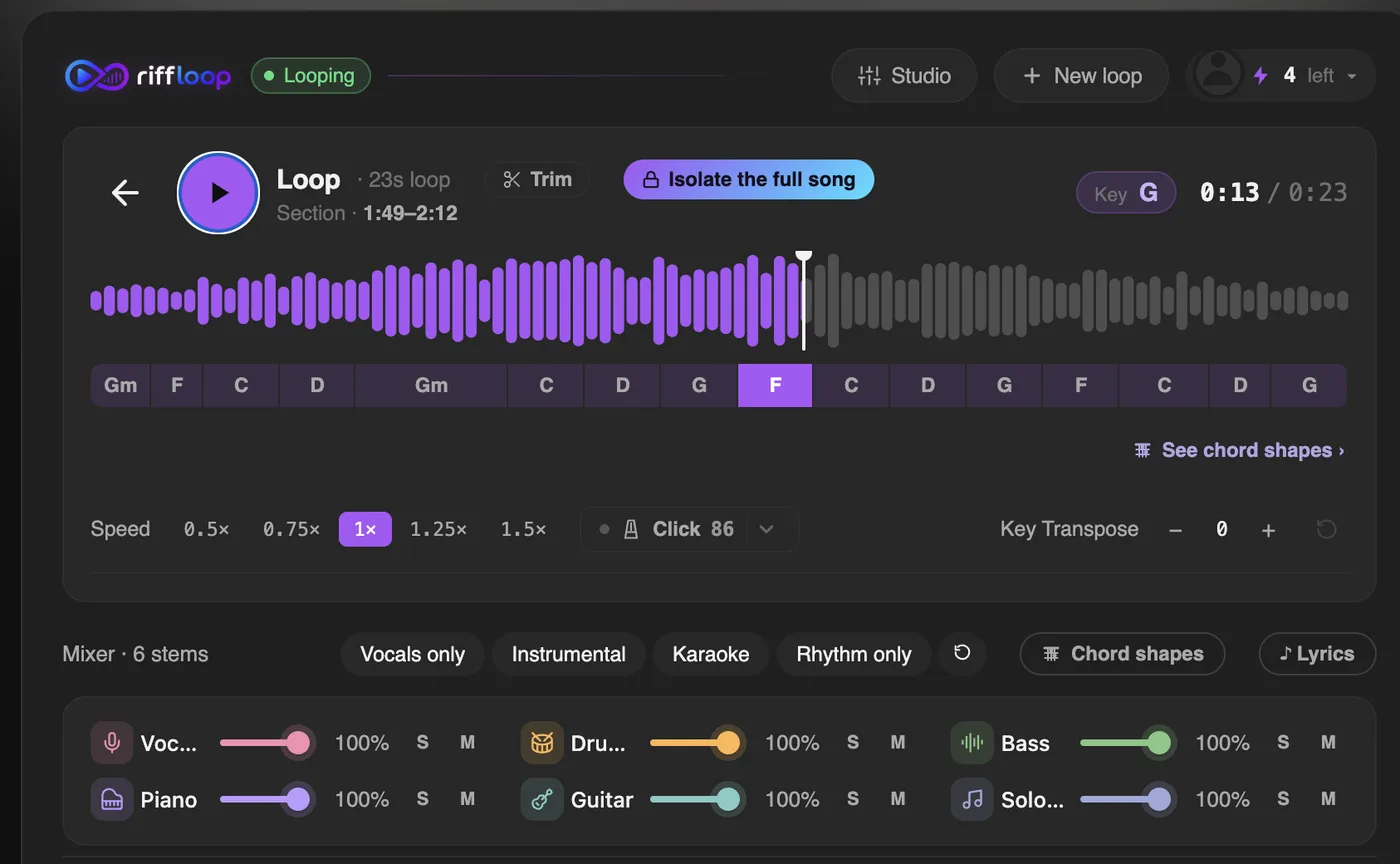
Prefer to work from a link? Paste the YouTube URL into the Riffloop Studio and you get the same chords, key and tempo under the player there.
On the Video, Not on Someone Else's Server
Riffloop analyses the audio on your own machine. That sounds like a privacy detail, and it is one — but the bigger practical benefit is coverage: there is no catalogue to be missing from, so live takes, covers, lessons and songs uploaded an hour ago all work exactly the same.
This is where most chord tools quietly fail. A tool that fetches a cached chart by video ID gives you a fast answer for a famous studio recording and nothing at all for the acoustic session you actually wanted. A tool that rips the audio through its own servers has to fetch the video first, which is slower, adds a queue, and puts what you're watching on someone else's machine.
The songs that benefit most are exactly the ones worth learning from: a live performance where the band reharmonises the bridge, a cover in a different key from the original, a lesson video, or a track too new or too obscure for anyone to have charted.
See the Chord, Then Play the Part Yourself
Riffloop separates the song as well as reading its chords, so the guitar you're looking at is also a fader you can pull down. Mute it and the band keeps playing without the guitar — you play that part, following the chord track above it.
Every other chord tool stops at the chart. You get letters on a screen and then go and find some other way to practise them. Here the chord track, the isolated instrument and the loop are the same panel, so the loop of "read the chord → hear how it's actually played → play it yourself" happens without leaving the video.
Singing it rather than playing it? The YouTube karaoke maker drops the vocal and puts synced lyrics on the video instead.
The instrument you mute is up to you. Guitarists usually drop the guitar; pianists drop the piano; a bassist reading the chord track can drop the bass and play the roots. That's the same move as a backing track, except you now have the chords on screen while you do it.
The Key, the Real BPM, and Guitar Shapes
The chords don't arrive alone. Riffloop reports the key it read from the harmony, the song's actual tempo, and a shape for every chord — and the metronome locks to the song's own beats rather than a number you guessed.
- 🔑 The key, read from the chords themselves, and spelled sensibly for it
- ⏱️ The real BPM, measured from the recording, not tapped in
- 🎸 Guitar shapes for each chord, so you get a fingering not a letter
- 🥁 A click that follows the band, accented on each bar
The spelling detail matters more than it sounds. A song in G minor reads E♭ and B♭, never D♯ and A♯ — right for the key, and the difference between a chart that reads naturally and one you have to translate. If you only wanted the key, finding the key of a song covers doing it by ear too.
Transpose That Moves the Audio, Not Just the Chart
When you transpose in Riffloop, the recording changes key with the chart. Most chord tools move only the letters on screen while the song keeps playing in its original key — useful with a capo, misleading for anything else.
That difference decides whether you can actually play along. If the chart says D and the speakers say E, you are either capoing or transposing in your head every bar. Here the audio, the chord track and the shapes all move together, so what you read is what you hear. The tempo stays exactly where it was — see changing the key of a song for the mechanics and how far you can push it.
How Accurate Is It, Honestly?
Reliable on clear, chord-driven recordings and shakier on dense or heavily effected ones. It reads harmony at the major and minor level — a Cmaj7 shows as C — so read the chord track as a strong first draft of the changes that you confirm with your ears, not as a finished transcription.
You can expect roughly this:
- ✅ Major and minor chords on a clear recording — dependable
- ✅ Straightforward pop, rock, folk and singer-songwriter material
- ⚠️ Extensions aren't labelled — a Cmaj7 reads as C
- ⚠️ Inversions and slash chords — the bass note is the weak spot
- ⚠️ Reads major and minor, so colour is yours to add
- ⚠️ Dense, distorted or very reverberant mixes
- ⚠️ Jazz and neo-soul harmony — read it as an outline
A concrete way to picture it: a song that alternates C, Am, F and G on a clean guitar will usually read straight through with the change points landing on the beat. A part built on sus and add9 shapes will read as plain majors, because those are the nearest labels the tool has — the changes are right, the colour is missing. And a wall-of-guitars chorus is where you should expect to check the screen against your ears.
You'll see competitors quote a single accuracy figure. Treat those with suspicion: nobody publishes the method behind them, and accuracy varies enormously by genre, mix and how ambiguous the harmony is in the first place. An honest tool tells you where it struggles.
When a Chord Looks Wrong, Check It in Thirty Seconds
Don't argue with the screen — solo the instrument that plays the chord and listen. Because Riffloop separates the song, you can hear the guitar or piano on its own, which settles most disagreements almost immediately.
- Mute everything except the chordal instrument. With the vocal and drums out of the way, an ambiguous chord usually becomes obvious.
- Loop the bar. Set A and B tightly around it and let it repeat — you'll hear on the third pass what you missed on the first.
- Check the bass note. Solo the bass. If it sits on the third rather than the root, you've found a slash chord the label flattened.
- Sanity-check against the key. A chord from far outside the detected key is either a genuine borrowed chord or a misread — the surrounding bars will tell you which.
- Slow it down if it's fast. At 75% the strum spreads out and the notes separate, with the pitch kept correct.
This is the one thing a chart alone can never give you. It's also, not coincidentally, how you build the ear to stop needing chord tools — every check trains the skill in learning songs by ear.
Riffloop vs Other Ways to Get a Song's Chords
Chord databases are fastest when the song is in them. Server-side analysers work on more songs but have to fetch the audio first. Riffloop analyses what's already playing, and is the only one of the three where you can then mute an instrument and play its part.
| What you get | Riffloop | Chord databases | Server-side analysers |
|---|---|---|---|
| Works on any video, incl. live takes & covers | ✓ | ✗ catalogue only | ✓ |
| Chords on the video itself | ✓ | ✗ | varies |
| Audio stays on your device | ✓ | n/a | ✗ |
| Guitar shapes, not just letters | ✓ | ✓ | varies |
| Key and real BPM included | ✓ | sometimes | ✓ |
| Transpose moves the audio too | ✓ | ✗ chart only | ✗ chart only |
| Metronome locked to the song | ✓ | ✗ | ✗ |
| Mute the guitar and play the part | ✓ | ✗ | ✗ |
| Human-checked accuracy | ✗ estimated | ✓ often | ✗ estimated |
| Price | Free / Pro from $5.95/mo | free with ads / paid tiers | freemium, usually capped |
The row worth reading twice is the second-to-last. A chart that a person transcribed and corrected will beat any automatic reading, so for a famous song that somebody has carefully charted, a database is genuinely the better answer. Automatic detection wins on everything nobody has charted — which is most music.
What It Deliberately Doesn't Do
Riffloop reads harmony, not notation, and it isn't a song catalogue. Knowing where the edges are saves you installing it for the wrong job.
- 🚫 No tabs or sheet music — chords and shapes, not note-for-note notation
- 🚫 No song database — nothing to browse; it analyses what you open
- 🚫 No lyrics-with-chords sheet — the chord track follows the audio, not a verse layout
- 🚫 No exporting YouTube audio — on any plan, deliberately
- 🚫 Not on phones — desktop Chrome or a Chromebook
The Panel Isn't There — Now What?
Riffloop appears under the player on a normal YouTube watch page. If you can't see it, it is almost always one of three things: the tab was open before you installed, you're not on a watch page, or the panel has been switched off in the extension's own popup.
- Reload the tab. A YouTube tab that was already open when you installed won't have the panel until it refreshes.
- Check you're on a watch page. It runs on ordinary
youtube.com/watchpages — not on Shorts, not on videos embedded in other sites, and not on YouTube Music. - Check the popup toggle. Click the Riffloop icon in your toolbar: there's a "Show player on YouTube" switch, and if it's off the panel stays hidden.
- Give the chords a moment. The stems arrive first and the chord track follows about ten seconds later — a blank chord row right after separating is it still working, not a failure.
One thing that is not the problem: your connection. The analysis runs on your machine, so a slow network can't stall it — but a very old laptop will take longer, because the work is real.
On a Phone or Tablet
Chords on the video need desktop Chrome — mobile browsers don't let an extension work on a YouTube video the way a laptop can. A Chromebook works, since it runs the same extension.
It runs in Chrome, Edge, Brave, Arc and Opera on Windows, macOS, Linux and ChromeOS. On a phone you can still open the Studio and work with a file you already have. We'd rather say that plainly than have you install something that can't do the job on your device.
Pricing
Reading the chords, the key and the tempo of a section is free, with no account needed to start. Pro raises the daily limits and unlocks full-length songs in the Studio.
| Plan | Price | What you get |
|---|---|---|
| Free | $0 | Chords, key, BPM, shapes and the stem mixer on a section of a song |
| Pro | $5.95/mo or $39/year | Higher daily limits, longer loops, full-length songs in the Studio, exporting your own uploads |
| Founder Lifetime | $99 once | Everything in Pro, paid once |
YouTube Chords — FAQ
What players ask before they install: whether anything gets downloaded, whether it works on covers and live versions, how accurate it really is, and what to do when a chord looks wrong.
How do I get the chords for a YouTube video?
Open the song on YouTube with the Riffloop Chrome extension, choose a section, and separate it. Riffloop reads the chords from the audio on your device and lays them on a track under the video, along with the detected key and the song's real tempo. The current chord lights up as it plays, and clicking a chord jumps you to that bar.
Is there a Chrome extension that shows chords on YouTube?
Yes — Riffloop is one, and it installs free from the Chrome Web Store. It adds a panel under the YouTube player with a chord track, the key, the BPM, guitar shapes and a six-stem mixer. A few other extensions show chord names on the video; what none of them do is let you mute the guitar and play that part yourself over the original band.
Do I need a downloader, or a link to paste?
Neither. Most chord tools either ask you to fetch the audio yourself with a downloader, or they rip the video through their own servers and hand you back a chart. Riffloop works on the video you already have open, and the audio never leaves your machine. If you would rather work from a link, the Studio also accepts a YouTube URL.
Does it work on live versions, covers and brand-new uploads?
Yes, and this is the practical reason on-device analysis matters. Tools that look a chart up in a database only work for songs already in that database, so a live take, an acoustic cover, a lesson video or a song uploaded this morning comes back empty. Riffloop listens to the actual audio in front of it, so it has no catalogue to miss.
Is it free?
Yes to get started, and no account is needed to try it. The free tier covers a section of a song at a time; Pro raises the limits and unlocks full-length songs in the Studio (from $5.95/month, $39/year, or a one-time $99 Founder's Lifetime). For comparison, the usual free tier in this category is a couple of songs per day.
How accurate is it on a YouTube video?
Good on clear, chord-driven recordings and less reliable on dense, distorted or heavily reverberant ones. Expect the major and minor changes and the points where they change to be right most of the time; extensions are not labelled at all, and inversions are the weak spot. Treat the output as a very good first draft that you confirm with your ears — anyone quoting a single accuracy percentage is inventing it.
What do I do when a chord looks wrong?
Mute everything except the guitar or piano and listen to that part on its own — most disagreements resolve in a couple of seconds once the vocal and drums are out of the way. Then check it against the bass note, and loop the bar so you hear it several times. Being able to solo the instrument that plays the chord is the part other chord tools cannot offer.
Can I see the fingering for each chord?
Yes. Every chord in the track has a shape you can open, so you get the fingering rather than just a letter. The shapes follow the transpose control, so if you move the song into a friendlier key the diagrams move with it.
Can I change the key, or use a capo?
You can transpose, and the important difference is that Riffloop moves the audio and the chart together — the song actually plays in the new key. Most chord tools transpose only the chart, so the letters change while the recording stays where it was, which is fine for a capo and confusing for everything else.
Does it detect the key and the tempo as well?
Yes, both come with the chords. The key is read from the harmony, and the tempo is the song's real BPM rather than a number you tapped in. The metronome locks to the song's own beats and accents each bar, so the click lands with the record instead of drifting against it.
Does it show sevenths and slash chords?
No — it reads harmony at the major and minor level, so a Cmaj7 shows as C and a Dsus4 shows as D. That is the level most play-along practice actually uses, and it is exactly why the checking workflow above matters: solo the guitar or piano and you will hear the colour the label left out. On jazz and neo-soul, treat the track as the outline of the changes rather than the full harmony.
Can I loop a section and drill it?
Yes — set an A to B loop over the two bars that keep going wrong and they repeat until you stop them. You can also slow the section down with the pitch kept correct while you learn the changes, then bring the speed back up.
Does it work on YouTube Shorts, playlists or age-restricted videos?
It works on normal YouTube watch pages, which covers the vast majority of music on the platform, including live sessions and covers. Shorts and other surfaces that are not a standard watch page are not supported, and anything you cannot play yourself will not work either.
Can I get chords on a phone or tablet?
Not yet. Mobile browsers do not let an extension work on a YouTube video the way desktop Chrome does, so this needs a laptop, a desktop or a Chromebook. On a phone you can still open the Studio and work with a file you already have.
Does the chord analysis run on my device?
No. The separation and the chord reading both happen on your device, which is why there is no upload step and no wait in a queue. It is also why the tool works on videos that no chord database has ever seen.
Why do two chord apps disagree about the same song?
Because they are all estimating. Chords are a human interpretation of overlapping notes, and a passing chord, an inversion or an added ninth can be labelled several defensible ways. Where tools disagree, the recording is usually ambiguous rather than one of them being simply wrong — solo the instrument and decide with your ears.
Can it give me guitar tabs?
No, and that is deliberate. Riffloop reads harmony, not notation, so you get chords and shapes rather than tab or sheet music. If you need note-for-note tab, a transcription tool is the right thing; if you want to work the part out yourself, isolate the guitar and use your ears.
Is it legal to get the chords of a song?
Chord progressions themselves are generally treated as musical building blocks rather than protected expression, and working out a song's chords to learn it is ordinary practice. The recording is still copyrighted, which is why Riffloop plays it in place rather than downloading it, and why YouTube audio cannot be exported on any plan.
If You Remember Four Things
- 1️⃣ Analysing the audio beats looking it up — covers and live takes work too
- 2️⃣ Chords plus stems means you can play the part, not just read it
- 3️⃣ Transposing should move the audio, not only the chart
- 4️⃣ Treat any chord reading as a first draft and check it by ear
Keep Going With Riffloop
See the Chords of Any YouTube Song
Open a song, get the chords on a track under the video with the key and the real tempo, then mute the guitar and play the part yourself. Free to start, and nothing leaves your device.