The Best Stem Splitters in 2026
Eight tools worth your time, compared by the job you're hiring them for — with real prices, checked and dated.
The best stem splitter depends on the job. For practising songs at a computer, Riffloop — our tool, disclosed up front — separates files, YouTube links and SoundCloud links on your device, with looping, chords and key change built around the stems. For a phone practice app, Moises. For clean stems into a DAW, LALAL.AI. For free with maximum control, Ultimate Vocal Remover. For editing the notes inside a stem, RipX DAW. This page makes the case for each — including when the right answer isn't ours.
Last updated · maintained by the Riffloop team
The Winner, by Use Case
- 🎸Practising songs at a computer — Riffloop (ours): stems + loop + chords, on the video, on your device
- 📱Practice app for phone or tablet — Moises, with native apps and setlists
- 🎛️Cleanest stems into a DAW — LALAL.AI, up to ten stem types, billed by the minute
- 🆓Free with maximum control — Ultimate Vocal Remover, open source on your desktop
- 🎼Editing notes inside a stem — RipX DAW, one-time purchase
- ⚡Instant free split, no signup — VocalRemover.org for two stems; Fadr for full free stems
How We Compared — and Our Bias, Disclosed
Riffloop is our product, so read our entry knowing that. To keep the rest fair we compare by use case rather than a score, we name what each competitor does better than us, and every price on this page comes from the vendor's own public pricing, checked in August 2026 and linked in the sources.
What we deliberately don't do: invent quality percentages. Separation quality depends on the song, the stem and the settings, and self-scored benchmarks from a vendor are worth nothing. Where quality genuinely differs in kind — two-stem tools versus six-stem tools, cloud versus on-device — we say so. For everything else, the honest test is the one you run yourself: the same song you know well, through two tools, listening to the part you'd actually practise or produce with.
Riffloop — Best for Practising Songs at a Computer
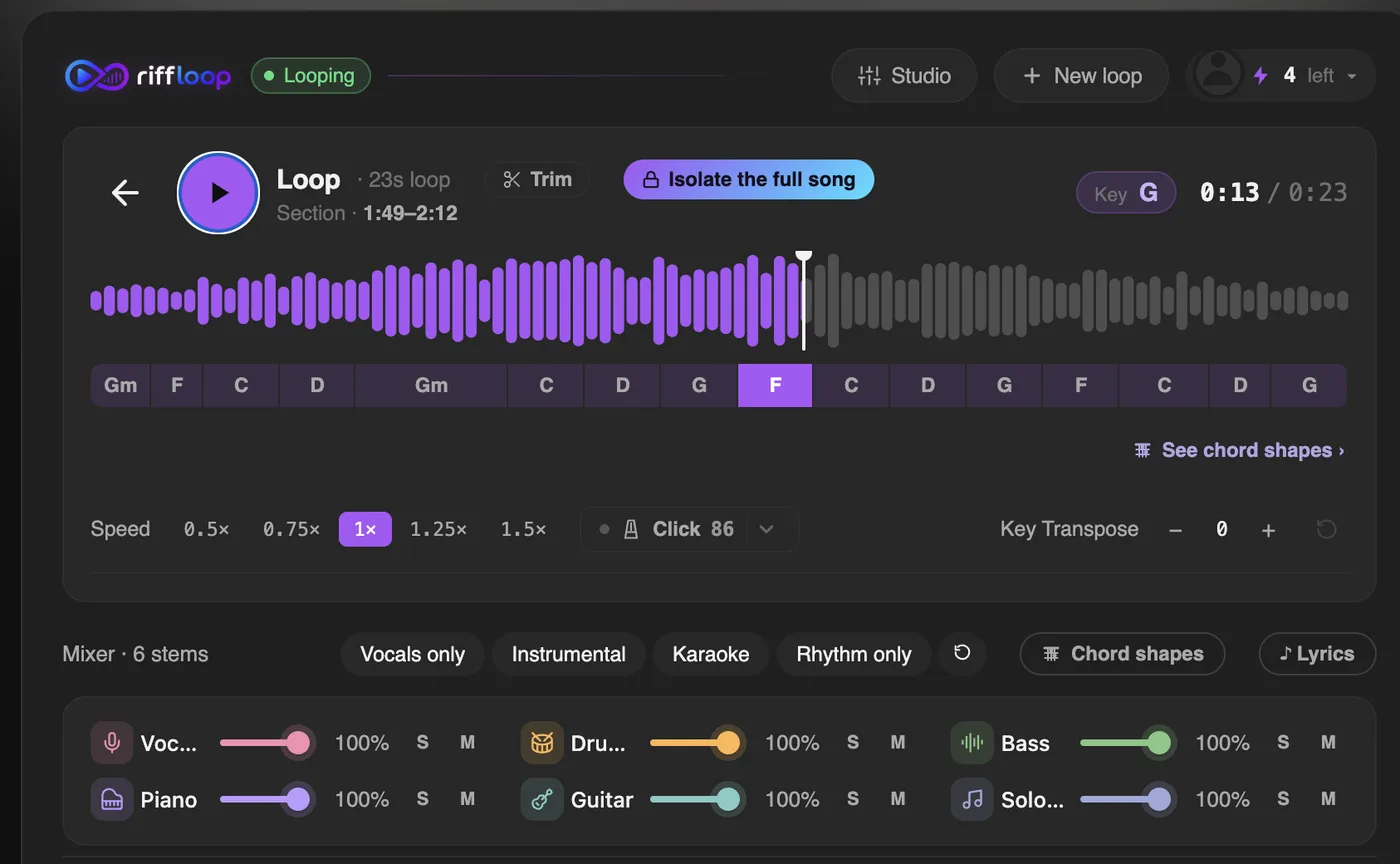
Riffloop is a stem splitter built into a practice workflow. It takes your own files, a YouTube link or a SoundCloud link, separates six stems on your device — nothing uploaded — and surrounds them with the tools you practise with: A-B looping, slow-down with the pitch held, key change, chords over a beat grid, a click at the song's tempo, and synced lyrics.
The part no other tool here has: the Chrome extension works on the YouTube page itself, so a song you found while browsing never has to become a file. Full disclosure — this is our product, and this entry follows the same format as the other seven.
Price (our own pricing, public): free to start — five separations a day with all the practice tools; Pro at $5.95/month or $39/year; a one-time $99 Founder's Lifetime. No account needed to try it.
Where it isn't the fit: phones and tablets — it's a desktop hybrid (extension + web Studio), so if you practise away from a computer, Moises is the practice app to pick. And if you want stems as files for a DAW session rather than a practice loop, LALAL.AI or UVR fit that job better.
Moises — Best Practice App for Phone and Tablet
Moises is the practice app to pick when your practising happens away from a computer: native iPhone, iPad and Android apps, cloud separation of an uploaded file, and a wide suite around it — chord detection, pitch and tempo, lyric transcription, AI stem generation, video recording and setlists.
Price (US App Store, August 2026): free tier with a limited number of uploads a month; Premium $5.99/month or $39.99/year; a Pro tier at $29.99/month. Note that Moises doesn't publish a price table on its site without signing in, and says pricing varies by region and device.
Where it isn't the fit: songs that live on YouTube or SoundCloud — Moises works on files you give it, so those songs must be obtained and uploaded first. If that's your main source, this is the exact gap our full Riffloop vs Moises comparison covers.
LALAL.AI — Best for Clean Stems Into a DAW
LALAL.AI is separation as a service, aimed at people who want the resulting files: up to ten stem types (including strings and wind), batch processing, an API and a plugin, with quality that has kept it the default recommendation for production use.
Price (its own pricing page, August 2026): a free tier that processes 10 minutes; Lite at $7.50/month billed annually ($90/year) with 90 fast-queue minutes a month; Pro at $15/month billed annually with 250; and one-time minute packs from $50 for 750 minutes. One honest detail to know: minutes are deducted per file duration multiplied by the number of stem types you request, so a full multi-stem split of one song costs several minutes of quota, not one.
Where it isn't the fit: practising. There's no looper, no slow-down, no chords — you download stems and bring your own workflow. It's a factory, and a good one, not a practice room.
Ultimate Vocal Remover — Best Free Tool for Power Users
Ultimate Vocal Remover (UVR) is a free, open-source desktop app that runs the separation entirely on your own machine, with a menu of community-maintained research models to choose from. On the right settings it competes with the paid tools on quality — and costs nothing, forever.
The trade is effort: it's an install, the interface is an engineer's, choosing models and settings takes reading, and long files want a real GPU. For tinkerers that's half the appeal. For everyone else it's the reason the paid tools exist.
Price: free, open source, Windows and Mac. Where it isn't the fit: anyone who wants an answer in two clicks, a phone, or a practice workflow around the stems.
RipX DAW — Best for Editing the Notes Inside a Stem
RipX DAW is in a category of one on this list: after separating, it lets you edit inside the stems — move, retune or delete individual notes, clean bleed, and rebuild the audio. If your goal is surgery rather than playback, this is the tool.
Price (Hit'n'Mix's own store, August 2026): one-time — RipX DAW $99, RipX DAW PRO $198, with discounts appearing regularly. No subscription.
Where it isn't the fit: quick splits and practising. It's a desktop production environment with a learning curve to match; hiring it just to mute a vocal is bringing a scalpel to butter bread.
Fadr — Best Free Web Stems, Plus Remix Tools
Fadr's free plan is the most generous on the web: unlimited stem separations with MP3 downloads, plus key, tempo and chord detection and MIDI extraction, wrapped in remix and DJ tools rather than practice tools.
Price (its own site, August 2026): free for unlimited MP3-quality stems; Fadr Plus at $10/month or $100/year adds lossless WAV downloads, per-drum splits and its best separation quality.
Where it isn't the fit: the free tier's MP3-only downloads rule it out for serious production, and there's no looper or slow-down for practising — it's aimed at remixers first.
BandLab Splitter — Best If You Already Make Music in BandLab
BandLab's Splitter is a free stem separator living inside a free, browser-based DAW and social music platform. If you already write or collaborate in BandLab, the stems land directly in your project — no exporting, no re-importing.
Price: free with a BandLab account; separation runs in their cloud. Where it isn't the fit: as a standalone splitter it's basic — fewer stem options and no practice tools — so it earns its place through the ecosystem, not the separation itself.
VocalRemover.org — Best Instant Free Split, No Signup
VocalRemover.org does one job with zero friction: drop a file in the browser, get a vocal and an instrumental back, free, no account. It also bundles small utilities — pitch and speed changers, a cutter, a key finder — that make it a handy toolbox for one-off jobs.
Price: free. Where it isn't the fit: it's a two-stem tool at heart — for isolating a bass line or muting just the drums you need a full splitter, and there's nothing built in for looping or slowing the result to practise with. For the karaoke use case specifically, compare our vocal remover, which does the split with the practice tools attached.
All Eight, Side by Side
The quickest way to read this table: the first four rows are about what each tool accepts and where it runs — that's what actually separates them. Everything below is the workflow around the split.
| Feature | Riffloop | Moises | LALAL.AI | UVR | RipX DAW | Fadr | BandLab | VR.org |
|---|---|---|---|---|---|---|---|---|
| Price model | Free + sub or $99 lifetime | Free + subscription | Sub + minute packs | Free | One-time $99/$198 | Free + $10/mo | Free | Free |
| Take a file you own | ✓ | ✓ | ✓ | ✓ | ✓ | ✓ | ✓ | ✓ |
| Open a YouTube / SoundCloud link | ✓ | ✗ | ✗ | ✗ | ✗ | ✗ | ✗ | ✗ |
| Works on the YouTube page itself | ✓ | ✗ | ✗ | ✗ | ✗ | ✗ | ✗ | ✗ |
| Where it runs | Your device | Cloud | Cloud | Your desktop | Your desktop | Cloud | Cloud | Cloud |
| Practice tools (loop, slow, key) | ✓ | ✓ | ✗ | ✗ | Editing tools | Remix tools | DAW | Pitch/speed |
| Chords & synced lyrics | ✓ | ✓ | ✗ | ✗ | ✗ | Chords/MIDI | ✗ | ✗ |
| Phone / tablet apps | ✗ | ✓ | ✗ | ✗ | ✗ | ✗ | ✓ | ✗ |
| No account needed to try | ✓ | ✗ | ✗ | ✓ | ✗ | ✗ | ✗ | ✓ |
How to Choose in Four Questions
Four questions settle it for almost everyone: what you're doing with the stems, where your songs live, where you'll use it, and how you'd rather pay.
- What's the job? Practising a part → Riffloop or Moises. Producing with the files → LALAL.AI, UVR or Fadr. Editing inside the audio → RipX. A one-off karaoke file → VocalRemover.org.
- Where do your songs live? YouTube or SoundCloud → Riffloop opens them directly; everything else needs a file first. Files on disk → all eight work.
- Where will you use it? Phone or tablet → Moises or BandLab. Desktop browser → Riffloop, LALAL.AI, Fadr, VocalRemover.org. Installed desktop app → UVR or RipX.
- How do you want to pay? Never → UVR, Fadr free, VocalRemover.org, or Riffloop's free plan. Once → RipX ($99/$198) or Riffloop's $99 lifetime. Monthly is fine → Moises, LALAL.AI, Fadr Plus.
What Every AI Stem Splitter Gets Wrong
All eight tools share the same physics: they reconstruct parts from a finished mix, so every output is an estimate. Vocals and drums come out cleanest; bass, guitar and anything grouped as "other" are the hardest, and a soloed stem can sound watery or carry ghosts of its neighbours.
This matters less than the marketing wars suggest. For practising, karaoke and remix sketches — the jobs nearly everyone hires these tools for — current separation is comfortably good enough, in every tool on this page. What it is not, anywhere, is a substitute for the original multitrack. A cleaner input helps every tool: lossless sources separate audibly better than low-bitrate rips.
The practical consequence: don't choose on quality claims — including ours. Choose on workflow, run one song you know intimately through your shortlist, and listen to the stem you'd actually use.
Frequently Asked Questions
What is the best stem splitter in 2026?
There is no single best — there is a best for each job. For practising songs at a computer, Riffloop (our tool) separates files, YouTube links and SoundCloud links on your device with looping, chords and key change built in. For practising on a phone, Moises. For the cleanest stems to take into a DAW, LALAL.AI. For free with maximum control, Ultimate Vocal Remover. For editing the notes inside a stem, RipX DAW. Match the tool to the job and every one of these is a good answer.
What is the best free stem splitter?
Ultimate Vocal Remover is the most capable free option — open source, runs on your own desktop, no upload — at the cost of installing software and learning its settings. Fadr offers unlimited free stem splits in MP3 quality on the web, and VocalRemover.org does instant free vocal/instrumental splits with no account. Riffloop's free plan includes five separations a day with the practice tools included.
Which stem splitter is best for practising an instrument?
The practice-first tools are Riffloop and Moises, and they split by where you practise. Riffloop (our tool) is built for a computer: it works on the YouTube video itself, or on a file or SoundCloud link, with A-B looping, slow-down, key change, chords and synced lyrics around the stems. Moises is built for phones and tablets, with native apps and setlists. The rest of the tools on this list separate well but leave the practising to you.
Can I split a YouTube song into stems?
Directly, only with Riffloop — the Chrome extension separates the song on the YouTube page you're watching, and the Studio also accepts a YouTube or SoundCloud link. Every other tool in this roundup needs the song as an audio file first, which means obtaining and uploading it before you can work.
Are AI-separated stems as good as the original studio tracks?
No — every tool here produces an estimate, reconstructed from the finished mix. Vocals and drums usually come out cleanest; bass, guitar and everything grouped as “other” are the hardest and can sound watery when soloed. The practical bar is different: for practising, karaoke or a remix sketch, today's separations are easily good enough. For replacing a studio multitrack, nothing on this list will.
Is it legal to use a stem splitter?
Using one on music you own or for private practice is generally uncontroversial — copyright concerns start when you distribute the results. Releasing a remix, cover or karaoke video built on separated stems needs the same rights and licences it would need if you'd sampled the record any other way. None of this is legal advice; when money or publishing is involved, ask someone qualified.
How much does stem separation cost in 2026?
Every pricing model exists. Free: Ultimate Vocal Remover, VocalRemover.org, Fadr's base plan. Subscriptions: Riffloop Pro $5.95/month or $39/year, Moises Premium $5.99/month or $39.99/year (US App Store), Fadr Plus $10/month, LALAL.AI from $7.50/month billed annually. Minutes and credits: LALAL.AI's one-time packs from $50 for 750 minutes. One-time forever: RipX DAW $99 ($198 for Pro) and Riffloop's $99 Founder's Lifetime. All checked August 2026 against each vendor's public pricing.
Can I separate stems without uploading my audio anywhere?
Yes, two ways. Ultimate Vocal Remover runs entirely on your own desktop. Riffloop runs the separation on your device inside the browser — your audio is never sent to us — while still needing no install beyond the extension. The other tools in this list process in the cloud, which is also what enables their phone apps and APIs.
How many stems can these tools produce?
The common set is four to six — vocals, drums, bass, piano, guitar and “other.” Riffloop gives six with a fader for each. Moises adds finer paid splits like lead versus rhythm guitar and lead versus backing vocals. LALAL.AI separates up to ten types including strings and wind, billed per stem type. VocalRemover.org focuses on the two-stem vocal/instrumental split.
What is the best stem splitter with a one-time payment?
Two real options: RipX DAW at $99 (or $198 for the Pro edition) if you want a stem-editing environment on your desktop, and Riffloop's $99 Founder's Lifetime if you want the practice workflow — stems, loops, chords, key — without a subscription. Everything else on this list is free, subscription or credits.
Which tool should I use to make a karaoke track?
Any of them can mute vocals, but the fastest routes are a dedicated vocal remover rather than a full splitter: VocalRemover.org for an instant free file, or Riffloop's vocal remover for doing it on the YouTube video itself with the lyrics on screen. If you want the vocal and the instrumental as files to keep, use a tool that hands you the files by default — LALAL.AI or Ultimate Vocal Remover; in Riffloop, exporting stems is a Pro feature for your own uploads.
Do I need a powerful computer for stem separation?
For the cloud tools, no — the work happens on their servers, so any laptop that runs a browser is fine. For local separation, more machine helps: Ultimate Vocal Remover benefits from a real GPU, and Riffloop's on-device separation is happiest on a reasonably modern computer. If your hardware is very old, a cloud tool or the patience for a slower first run are the honest options.
How We Checked This
Every price and plan detail above was read from the vendor's own public page in August 2026, so you can verify each one rather than trust a roundup — ours included.
- Moises — the US App Store listing (its site shows a full price table only after signing in).
- LALAL.AI — lalal.ai/pricing, including the per-stem-type minute accounting.
- RipX DAW — the Hit'n'Mix store.
- Fadr — fadr.com/plus.
- Ultimate Vocal Remover — the project site; free and open source.
- BandLab — bandlab.com; VocalRemover.org — the site itself.
- Riffloop — our pricing and daily-limit help page, public without an account.
Prices move. If something here has gone stale, tell us via support and we'll correct it — this page carries its check date for exactly that reason.
Keep reading: the full Riffloop vs Moises comparison, our AI stem splitter, splitting a YouTube song into stems, the vocal remover, how to isolate an instrument on YouTube, or browse everything in Tools and Learn.
Run One Song You Know Well
Riffloop is free to try with no account — open a song you know intimately, solo the part you'd practise, and judge the stems with your own ears. If another tool on this list fits your job better, you'll know that in five minutes too.