A Moises Alternative That Works Right on YouTube
Moises is a genuinely good app. Riffloop solves the same problem from the other end — here's the honest difference.
Riffloop is the closest Moises alternative for musicians who learn songs from other people's recordings. It takes the same input Moises does — your own audio files — and adds two Moises doesn't: a YouTube link and a SoundCloud link. On YouTube it goes further and works in place, adding stem separation, chords, key change, speed and A-B looping to the video you're already watching, with the separation running on your own device. Moises is the better fit if you practise on a phone, or want AI stem generation and video recording. This page compares both fairly — including where Moises fits better.
Last updated · maintained by the Riffloop team
Riffloop vs Moises, at a Glance
- 📥Riffloop takes your own files, a YouTube link or a SoundCloud link; Moises takes a file you upload
- ▶️On YouTube, Riffloop also works in place on the video — nothing to export first
- 🔒Riffloop separates on your device; Moises processes in the cloud
- 💻Riffloop is a desktop hybrid — extension plus web Studio; Moises adds phone and tablet apps
- 🎤Riffloop shows chords and synced lyrics on the video; Moises adds AI generation, video recording and setlists
- 💸Similar subscriptions — but Riffloop also sells a one-time $99 lifetime
Best for Riffloop: learning songs at a computer, whatever the source · keeping your audio on your own machine · paying once instead of subscribing.
Moises fits better if: you practise on a phone or tablet · you want AI-generated stems or recorded video takes · you want lead and rhythm guitar as separate stems.
Which One Actually Fits You
Choose Riffloop if the songs you learn live on YouTube and you practise at a computer. Choose Moises if you practise on a phone or tablet, or if you want AI stem generation and video recording alongside the practice tools. Neither is a strict upgrade on the other.
Moises is the better fit if:
- You practise away from a computer. Riffloop is built for the desktop, where a browser can do this work; Moises has the phone and tablet apps.
- You want AI-generated stems, recorded video takes or setlists.
- You need the finer stem splits — lead versus rhythm guitar, or lead versus backing vocals.
- You want it all in one native app rather than a browser tab — Riffloop is a browser tool, by design.
Riffloop will suit you better if:
- Your songs come from more than one place — some are files, some are YouTube or SoundCloud links — and you want one tool for all of them.
- You learn from YouTube and would rather not export and re-upload audio for every song.
- You'd rather your audio never left your machine.
- You want the whole practice loop free — stems, chords, key, speed, A-B loop — with a daily cap rather than locked features.
- You'd rather pay once than hold another subscription.
What Moises Is
Moises is a subscription app that describes itself as “the creative suite for musicians.” You give it a song and it separates the stems in the cloud, then layers practice and creative tools on top — chord detection, a speed changer, pitch shifting, lyric transcription, AI stem generation and video recording — across web, desktop, iPhone, iPad and Android.
It is the category leader for good reason. Moises says it has been used by more than 70 million musicians, it was Apple's iPad App of the Year in 2024 and an Apple Design Awards finalist in 2025, and its App Store listing carried a 4.7-star average from around 28,000 ratings when we checked in August 2026. It also states plainly that it never trains its models on your data and only trains on licensed material.
The thing worth understanding before comparing is the shape of the workflow: Moises operates on audio you hand it. That is what makes the phone apps possible, and it is also why a song you found on YouTube has to become a file before Moises can touch it.
What Riffloop Is
Riffloop is a practice tool that takes a song from wherever it lives — an audio file you own, a YouTube link or a SoundCloud link — and gives you the same set of controls: isolate or mute any part, set an A-B loop over the four bars you're stuck on, slow it down, change the key, and read the chords over a beat grid. The separation runs on your own device, so your audio is never uploaded to us.
It comes in two halves. The web Studio is the one that looks familiar: drop in a file, paste a YouTube or SoundCloud link, and work on the whole song. The Chrome extension is the part Moises has no equivalent for — it adds those controls to the YouTube page itself, so a song you found while browsing never has to become a file at all. It is a narrower product than Moises by design: it does the practice loop and stops there. The individual pieces have their own guides: splitting a YouTube song into stems, changing a song's key with the tempo locked, and reading the chords over a beat grid.
What you need to run it: a desktop or laptop with a Chromium-based browser — Chrome, Edge, Brave, Arc or Opera — which includes Chromebooks. There is no app to install beyond the free extension, and no account is needed to try it. The free plan allows five new separations a day (how the daily limit works).
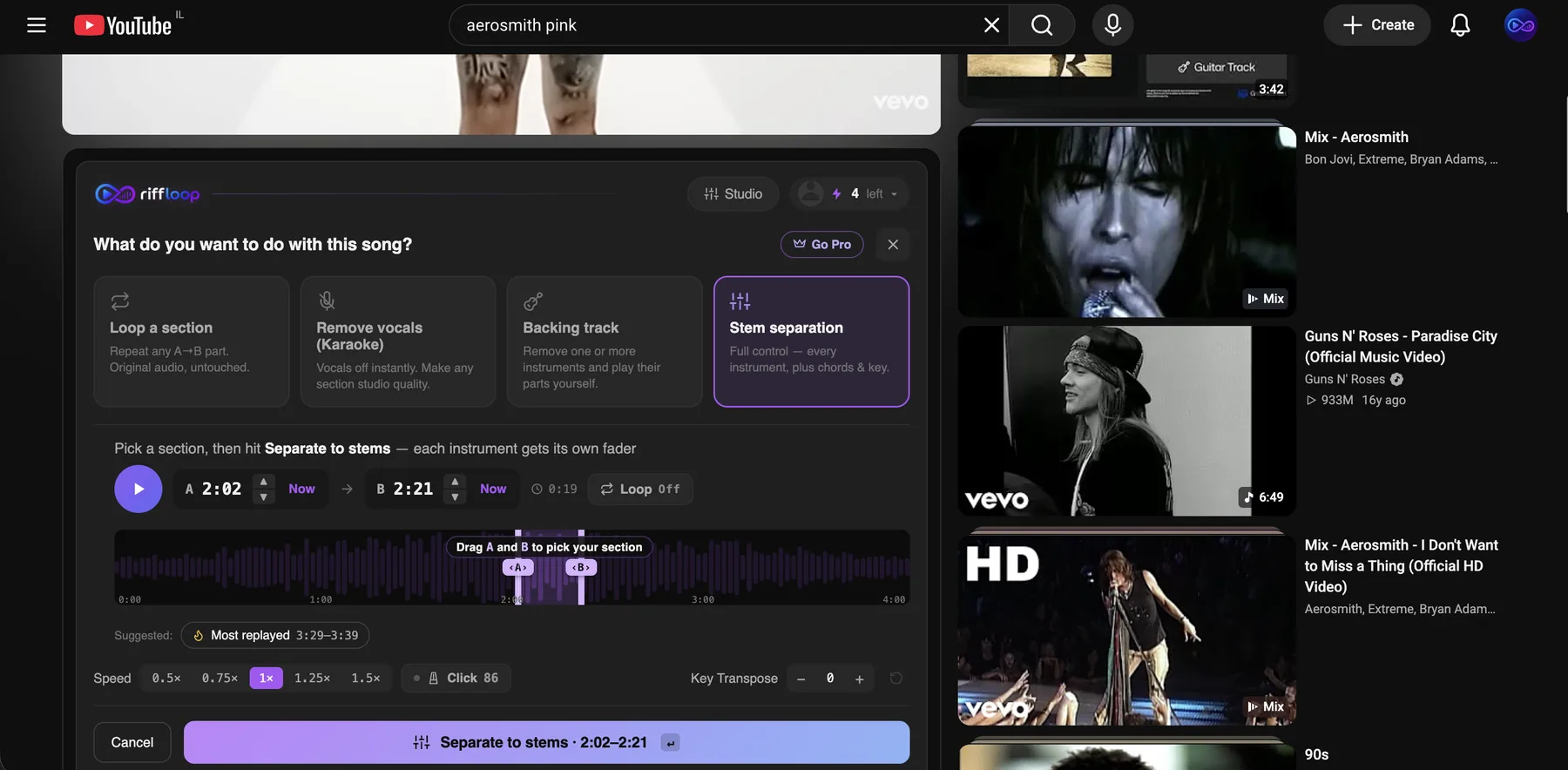
Riffloop is the younger and more focused of the two, and deliberately hybrid: the extension for songs you come across while browsing, the Studio for files and links you bring yourself. It puts that effort into the practice loop — stems, chords, key, tempo, A-B loops and synced lyrics — rather than into AI generation or video, which is the trade it makes and the reason the workflow has a step fewer in it.
Riffloop vs Moises
The short read of this table: Riffloop covers the practice path and keeps your audio on your machine, while Moises spreads wider into creation. Rows where Moises leads are marked as plainly as the rest.
| Feature | Moises | Riffloop |
|---|---|---|
| Separate your own audio files | ✓ | ✓ |
| Open a YouTube link directly | ✗ | ✓ |
| Open a SoundCloud link directly | ✗ | ✓ |
| Works in place on the YouTube page | ✗ | ✓ |
| Where separation runs | Their servers | Your device |
| Stem separation on the free plan | Limited uploads/mo | Daily limit |
| Chord detection | ✓ | ✓ Free |
| Key change, tempo locked | ✓ | ✓ |
| Speed change | ✓ | ✓ |
| A-B loop a section | ✓ | ✓ |
| Lead vs rhythm guitar stems | ✓ Paid | ✗ |
| Lyrics on screen, synced to the song | ✓ | ✓ Extension |
| AI stem & voice generation | ✓ | ✗ |
| Video recording, setlists | ✓ | ✗ |
| iPhone / iPad / Android app | ✓ | ✗ |
| One-time lifetime option | ✗ | ✓ $99 |
| Price shown without signing in | ✗ | ✓ |
Where Moises Is the Better Fit
Four areas, and the first matters most: Moises runs on a phone, Riffloop runs on the desktop. If your practice happens on a sofa, a train or in a rehearsal room with a tablet, Moises is the one to pick.
- Mobile. Native iPhone, iPad and Android apps, plus a desktop app. Riffloop runs on the desktop — Chrome, Edge, Brave, Arc or Opera, on Mac, Windows and Chromebooks.
- Feature breadth. AI stem generation, a voice studio, video recording and setlists are part of Moises's wider creative suite. Riffloop stays on practice — chords, key, tempo, loops and synced lyrics.
- Finer stems. On a paid plan Moises splits lead from rhythm guitar, and lead from backing vocals. Riffloop separates the standard parts — vocals, drums, bass, piano, guitar and the rest.
- Track record. Tens of millions of users, platform awards and years of iteration behind it. Riffloop is newer.
We would rather say that plainly than have you discover it after installing. If one of those four is how you practise, Moises is the right call — and if none of them is, read on.
Where Riffloop Is Genuinely Better
Riffloop's advantage is almost entirely about the shape of the workflow rather than a longer feature list: it meets the song where it already is, and keeps the audio on your machine.
- More ways in. Files, YouTube links and SoundCloud links all work. Moises takes the file; the two link routes are Riffloop's alone.
- No export-and-upload step on YouTube. The extension works on the page itself, which removes the most annoying part of a session that starts with browsing.
- Nothing is uploaded. Separation happens on your device, so your audio never reaches our servers — there is nothing for us to store, and nothing to delete later.
- The free plan is the whole loop. Stems, chords, key, speed and A-B looping are all available free, capped at five new separations a day rather than by locking the features away.
- You can stop subscribing. A one-time $99 Founder's Lifetime sits alongside the monthly and yearly plans. Moises is subscription-only.
- Prices are public. You can read ours without an account; Moises asks you to sign in to see a full price table.
Price, Honestly Compared
On subscription the two are within pennies of each other, so price is not the reason to switch. The real difference is that Riffloop sells a one-time plan and Moises does not.
Moises, as listed on the US App Store in August 2026: Premium at $5.99/month or $39.99/year, with a higher Pro tier at $29.99/month. Moises does not publish a price table on its website — you have to sign in — and it notes that pricing varies by region and device, so confirm the current figure before buying. Its free tier gives “a limited number of uploads each month, with access to a select set of features.”
Riffloop: free to start, Pro at $5.95/month or $39/year, and a one-time $99 Founder's Lifetime. The free plan covers separation, chords, key, speed and looping with a cap of five new separations a day. See the full pricing →
Sanity check before you switch: at roughly $40 a year either way, moving for the money alone is not worth the disruption. Move because the workflow fits — or because a one-time payment suits you better than a recurring one.
The Difference on a Real Song
Take a concrete case — learning a guitar solo you found on YouTube, where the phrase you're stuck on is about six seconds long. The tools do the same job; the number of steps between you and the sixth bar is what differs.
Upload-first, the session starts with logistics: get the song as a file, open the app, upload it, wait for the separation, then find your way back to the passage you were on. Riffloop's Studio can work this way too — if the song is already a file on your disk, that is the sensible route.
With Riffloop, the song is already open. You solo the guitar, drag A and B around the phrase, drop it to 70% speed, and play. If the key doesn't suit your voice or tuning, move it a semitone or two without the tempo shifting.
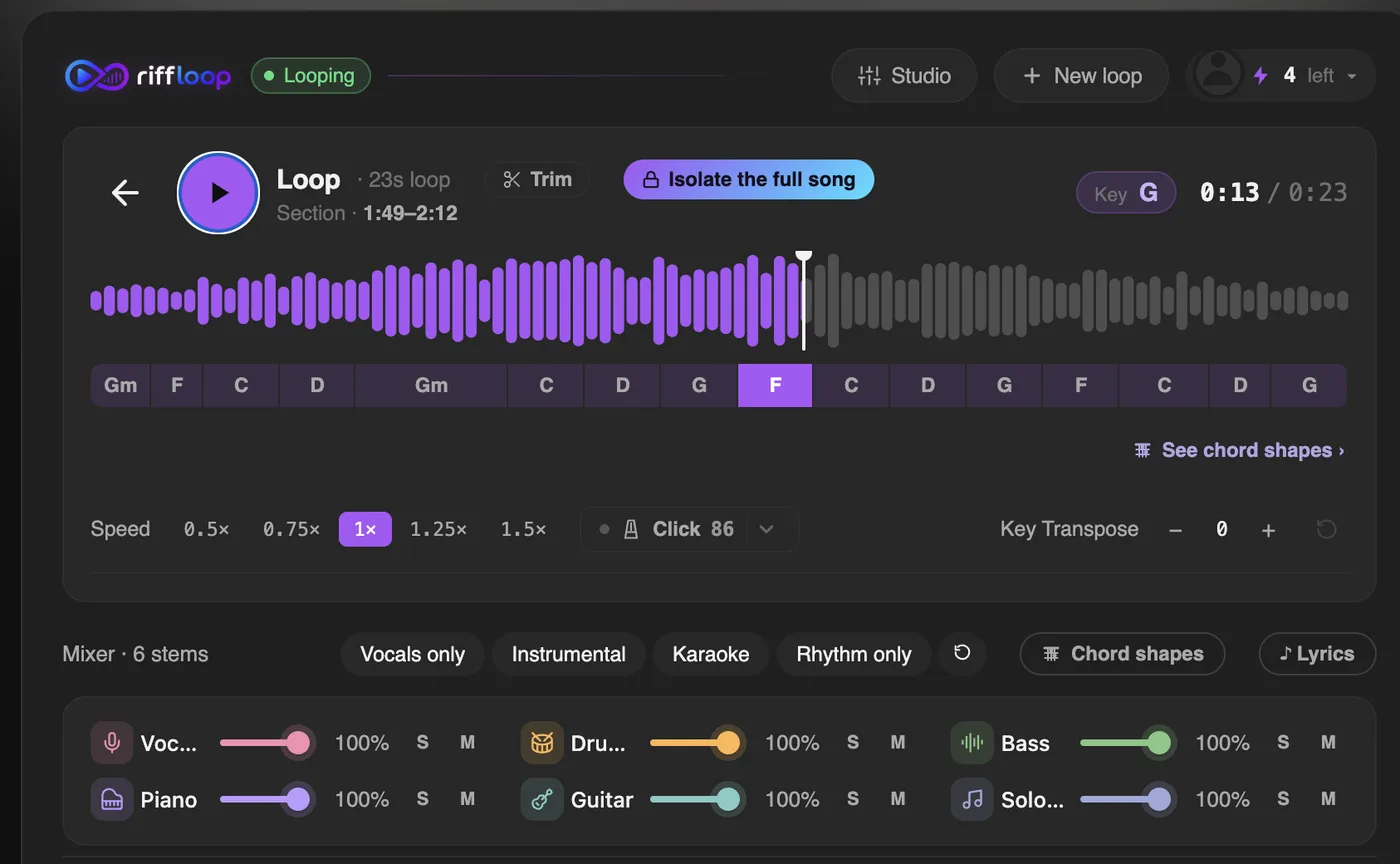
None of that makes the separation itself better — the underlying job is similar in both, and both produce estimates rather than the original studio tracks. It changes how much friction sits between deciding to practise and actually practising, which for most people is the thing that decides whether they do it.
If you want the step-by-step, we wrote it up separately: isolating an instrument on YouTube, looping a section, and slowing a song down without changing its pitch.
How to Test Riffloop Against Your Own Song
Don't take a comparison page's word for it — run the same song through both and judge the stems yourself. It takes about five minutes and needs no account.
- Add the extension from the Chrome Web Store, then reload a YouTube tab.
- Open a song you know intimately. Familiar material makes separation artefacts obvious — a track you've never studied will flatter any tool.
- Solo the part you'd actually practise and listen critically. Vocals and drums come out cleanest; bass and guitar are where any separator struggles.
- Loop four bars and slow them to 70%. That is the real test: not how the stem sounds once, but whether the tool makes the twentieth repetition easy.
An honest caveat about AI stems in any tool: they are reconstructions, not the original multitracks. Expect some smearing when a part is soloed, especially on bass, guitar and anything grouped as “other.” Both tools are perfectly good enough to learn from; neither gives you the studio session.
Other Moises Alternatives Worth Knowing
Riffloop isn't the only option, and it isn't right for every job. If neither tool above fits, these are the ones musicians actually end up using, and what each is for.
- LALAL.AI — separation quality first, sold as credits rather than practice tools. Good when you need clean stems to take into a DAW, not when you want to loop and slow them down.
- Ultimate Vocal Remover (UVR) — free, open source, runs on your own desktop. The most capable free option if you're comfortable installing software and reading settings; there is no practice layer at all.
- RipX DAW — a one-time purchase that lets you edit individual notes inside a separated stem. A different category: an editor, not a practice app.
- BandLab Splitter — free and simple, tied to BandLab's wider ecosystem. Fine for a quick split, thin if you want to work on a passage.
- Chordify — chords over songs rather than stems. Complementary to a separator rather than a replacement for one.
And if the job is really “just get the vocals out of this one track,” you do not need a subscription from anyone: our own vocal remover and stem splitter will do it on the free plan.
Frequently Asked Questions
Is there a free alternative to Moises?
Yes. Riffloop has a free plan that includes the whole practice loop — AI stem separation, chord detection, key change, speed control and A-B looping — capped at five new separations a day rather than by locking the features away. Ultimate Vocal Remover is also free and open source, though it is a desktop install aimed at separation only, with no practice tools.
What is the best Moises alternative for practising a song?
It depends where you practise, not where the song comes from — Riffloop handles files, YouTube links and SoundCloud links, so any of those is fine. If you work at a computer, Riffloop is the closest fit, and on YouTube it goes one better by working on the video itself with nothing to export. If you practise on a phone or tablet away from a computer, Moises is the better fit, with its native apps for exactly that.
Can Riffloop separate my own audio files, or is it only for YouTube?
Both. The Riffloop Studio takes an audio file you upload — MP3, WAV, FLAC and the rest — exactly as Moises does, and it also opens a YouTube or SoundCloud link directly. The Chrome extension is the extra: it puts the same controls on the YouTube page itself, so a song you came across while browsing never has to become a file. Whichever route you use, the separation runs on your device.
Is Riffloop better than Moises?
They are built for different moments, so neither is a straight upgrade on the other. Moises is a wider creative suite with phone and tablet apps, AI generation and video recording. Riffloop is a focused practice tool for the desktop: it opens files, YouTube links and SoundCloud links alike, works in place on the YouTube page with chords and synced lyrics, keeps your audio on your own machine, and can be bought once instead of subscribed to. For practising at a computer, Riffloop fits better; for practising away from one, Moises does.
Does Moises work on YouTube videos?
Not directly on the video. Moises works on audio you give it, so a YouTube song has to be obtained as a file and uploaded to Moises first. Riffloop's approach is the opposite: the Chrome extension adds its controls to the YouTube player you are already watching.
How much does Moises cost?
As listed on the US App Store in August 2026, Moises Premium is $5.99 per month or $39.99 per year, and a higher Pro tier is $29.99 per month. Moises does not publish a price table on its website — you have to sign in to see one — and it notes that pricing varies by region and device, so check the current price before you buy.
Is Moises free?
Moises has a free tier. In its own words it gives “a limited number of uploads each month, with access to a select set of features” — the App Store listing describes free separation of vocals, drums and bass, plus chord detection, a metronome, pitch shifting and BPM detection. Unlimited separations and the finer stem types are part of a paid plan.
Is there a Moises alternative with a one-time payment instead of a subscription?
Riffloop offers a one-time $99 Founder's Lifetime plan alongside its $5.95/month and $39/year options, so you can buy once rather than subscribe. RipX DAW is another one-time purchase, though it is a desktop editor rather than a practice tool. Moises is subscription-only.
Does Riffloop have an iPhone or Android app?
Not today. Riffloop is a desktop hybrid — a Chrome extension that works on the YouTube page, plus a web Studio for files and links — running in Chrome, Edge, Brave, Arc or Opera on Mac, Windows and Chromebooks. If you practise on a phone or tablet, Moises has the native apps for that.
Is Riffloop's stem separation as good as Moises?
They are close on the parts most musicians isolate, and both are estimates rather than the original studio multitracks. Vocals and drums come out cleanest in either tool; bass, guitar and everything grouped as “other” are hardest and can sound watery when soloed. Moises does offer finer splits on a paid plan — lead versus rhythm guitar, main versus background vocals — where Riffloop separates the standard parts.
Can I use a stem separator without uploading my music?
With Riffloop, yes — separation runs on your own device and your audio is never sent to us or stored. Moises processes in the cloud, which is what makes its phone apps possible; it states it never trains models on your data and only trains on licensed material.
Does Riffloop detect chords like Moises?
Yes. Riffloop shows chords over a beat grid with guitar diagrams, and detects the key and tempo, on both the YouTube video and in the Studio. It is free for all users, where Moises keeps some chord and practice tools on the paid tier.
What happens to my stems if I cancel Moises?
Anything you already exported to your own computer is yours to keep; what lives in the account goes away with the subscription. This is a general argument for exporting the stems you care about before a plan lapses, whichever tool you use.
Which is better for singers who need to change a song's key?
Both change key with the tempo locked, so pick on workflow. If you are working at a laptop — from a file, a YouTube link or a SoundCloud link — Riffloop re-keys it in place and loops the phrase you are learning. If you want to build a setlist and take it to a rehearsal on your phone, Moises fits better.
Can I use both Moises and Riffloop?
Plenty of people will, and there is nothing to migrate between them. A common split is Riffloop on the laptop for working a song out from YouTube, and Moises on a phone for practising away from the desk.
How We Checked This
Every claim about Moises on this page comes from Moises' own public pages, checked in August 2026, so you can verify it rather than take a competitor's word for it.
- Features, platforms and the free tier — the FAQ on moises.ai, which describes the app's tools, its web, desktop, iOS and Android availability, its “limited number of uploads each month” free tier, and its statements on training data.
- Prices, stem types and ratings — the in-app purchase list and description on the US App Store listing, read in August 2026.
- Riffloop's own numbers — our pricing and how the daily limit works, both public and readable without an account.
We have not published separation-quality benchmarks here, because a fair one needs a controlled test set and we would rather show nothing than a number we scored ourselves. The four-step test above exists so you can judge the stems on a song you know, which is a better answer for a musician than any figure we could quote about our own product.
Prices and features change. If something here has gone stale, tell us via support and we will correct it.
Keep reading: what Riffloop does, split a YouTube song into stems, use the stem splitter on your own file, remove vocals from a YouTube song, get the chords to a song, change a song's key, or browse everything in Tools and Learn.
Try It Before You Switch Anything
Riffloop is free to start and needs no account to try. Run one song you know well through it, solo the part you'd practise, and decide from the stems rather than from a comparison table.