AI Chord Finder — See the Chords of Any Song
Play a song — and read its chords under the music, live, as it plays. No tabs to hunt for, no catalog to be missing from.
Riffloop's AI chord finder listens to the actual recording and shows its chords on a timeline synced to the music — with the detected key, the real BPM and guitar chord diagrams. It works on any song: your own audio file, or a YouTube link in the Studio. Free to get started, and the analysis runs on your device.
✓ Your song is ready. We’ll split the first 60 seconds free — then you can open it in the Studio and see its chords — synced to the music, with the key and BPM read for you.
No account needed · your audio never leaves your device
Free to get started — full-song chords, the beat-locked click and higher limits are Pro. See what's free and what Pro adds →
Last updated · maintained by the Riffloop team
The Chord Finder, at a Glance
- 🎼 Chords of any song, read from the audio by AI
- ⏱️ Synced to the music — click a chord to jump there
- 🔑 Key detected from the chords, plus the real BPM
- 🎸 Guitar diagrams — easy or barre voicings
- ▶️ Works on your files or a YouTube link
- 🎚️ Isolate, loop, slow down and re-key in the same player
- 🔒 Runs on your device, nothing uploaded
- 💸 Free to get started — Pro from $5.95/mo
What Is an AI Chord Finder?
An AI chord finder (also called a chord detector or chord identifier) listens to a recording and works out which chords are being played, then shows them as the song plays. Instead of searching for tabs someone else wrote — and hoping they exist and are right — you get a chord chart read from the actual audio.
Riffloop shows the chords on a timeline under the player, highlights the one sounding now, and lets you click any chord to jump straight to it. Because the chords come from the recording itself, it works on any song — deep cuts, live covers, your band's rehearsal recording, even AI-generated tracks with no tabs anywhere.
How Does AI Chord Detection Work?
The AI analyzes the recording's harmonic content moment by moment — which pitches are sounding and how strongly — and recognizes the chord they add up to, the way a trained ear does. A second pass tracks the song's beats, so each chord change lands where the music actually changes, not on an arbitrary grid.
That's a different thing from a chord database: nothing is being looked up. It's also why two ingredients decide the quality of the result — how clearly the harmony is voiced in the mix, and how steady the groove is. A clean pop or worship track reads almost like sheet music; a wall of distorted guitars is harder to hear, for the AI and for you. Riffloop separates the song into stems first, which is also what lets you verify any chord by ear — more on that below.
How to Get the Chords of Any Song
Load the song — a file or a YouTube link — let the AI listen once, then read the chart under the player. Five steps, nothing to install, and the one-time AI setup on your first song is the slowest part.
- Load the song. Drop an audio file above, or open the Studio and paste a YouTube link.
- Let the AI listen. The song is separated into stems and analyzed on your device — chords, key and BPM come out of one pass.
- Read the chords as it plays. The chart sits under the player, synced to the music; the current chord is highlighted, and clicking a chord jumps the song there.
- Open the chord shapes. Switch to the diagram view to see the current and upcoming guitar shapes — easy or barre voicings, your pick.
- Practice it. Loop the change that trips you up, slow it down with the pitch held, isolate the instrument, or transpose — the chords follow the new key.
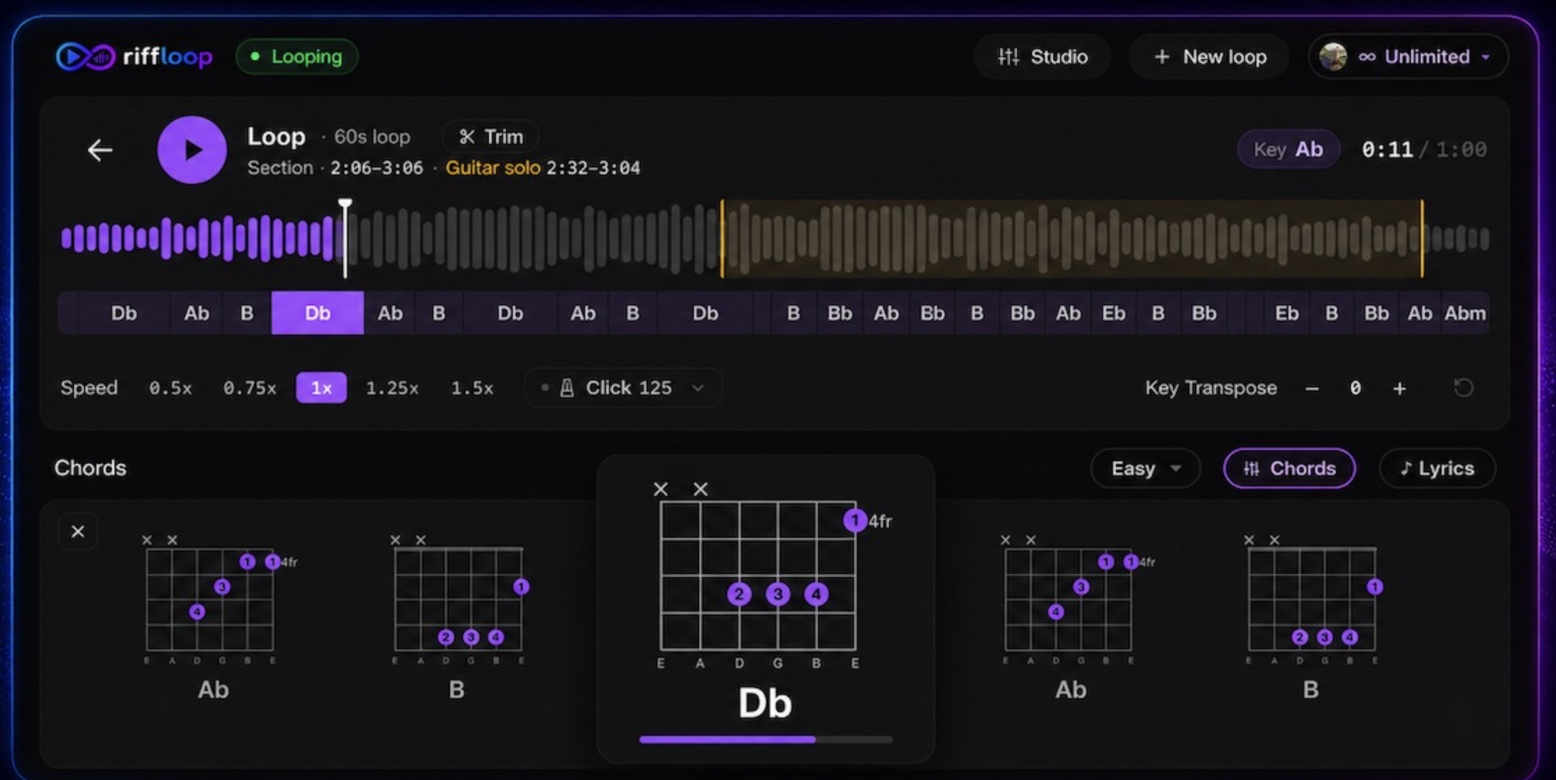
This also works right on the YouTube page, without opening the Studio. Mute the instrument you want to play and follow the same chord shapes live — our guide to getting the chords to any YouTube song walks through it step by step.
If the Song Is on YouTube
You don't have to upload anything. Paste the link into the Studio, or read the chords on the video itself with the free Chrome extension — either way the audio is analysed on your device, with no download and no upload.
That case has its own guide, because it works differently and it has its own quirks: the YouTube chord finder covers reading chords on the video, why analysing the audio beats looking a chart up, and what to do when a chord looks wrong. This page stays on the general job — chord detection itself, and getting the chords of a file you already have.
The Key, the Real BPM, and a Click That Locks to the Song
Every analysis also tells you the song's key and its real tempo. The key is worked out from the detected chords themselves — steadier than guessing from raw audio — and the BPM comes from AI beat tracking of the actual performance, so a song that sits at 77 BPM reads 77, not a rounded 80.
The beats do more than fill a readout: chord changes snap to them, so the chart lines up with the bars you're counting. Pro users can lock the metronome to the song's tracked beats — the click lands with the actual drums, accents on the real downbeats, and it stays locked when you slow the song down. If you've only ever practiced against a free-running click, a song-locked one is a different experience.
- 🔑 Key detected from the chords — flats spelled like a musician would (E♭, not D♯)
- 🥁 Real BPM from the performance, not a rounded guess
- 🎯 Chord changes snapped to the actual beats
- 🕰️ Beat-locked metronome with real downbeat accents (Pro)
Guitar Diagrams — and Chords That Follow Your Key
Every detected chord comes with a guitar diagram, in your choice of easy open-position voicings or barre shapes, and the diagram view shows what's playing now and what's coming next. Chord names work for any instrument — pianists and bassists read the same symbols.
The part most chord tools miss: when you transpose the song to fit your voice or an easier set of shapes, Riffloop's chords and diagrams move with it — symbols respelled correctly for the new key, shapes updated to match. Shift a song two semitones down and you're not doing capo math in your head; the chart already agrees with what you're hearing.
How Accurate Is AI Chord Detection?
Good enough to practice from on most songs, and honest enough to say where it isn't: no chord AI — ours or anyone's — hears everything. On clearly-voiced pop, rock, folk and worship music, expect most chords and their change points to be right. On dense mixes and jazz harmony, expect a map of the changes, not a transcription.
Riffloop currently reads harmony at the major/minor level — the "easy chords" view other tools default to. That's the level play-along practice actually uses, but it means a Cmaj7 displays as C and a Dsus4 as D. Here's what to expect by material:
| What you're analyzing | What to expect |
|---|---|
| Clean pop, rock, worship, acoustic covers | Most chords and change points land right; the occasional wrong call on a passing chord |
| Folk & singer-songwriter | Solid — but sus/add colors display as their plain major or minor |
| Jazz, gospel, neo-soul | The core progression only; extensions are simplified, so use your ears for the color |
| Heavy distortion & dense mixes | Roots mostly right; major-vs-minor can smear when the guitars wall up |
| Live recordings & lo-fi | The weakest case — tempo drift and noise blur both the beats and the changes |
One more honest note: different chord apps will show different chords for the same song, because each uses a different AI, a different simplification policy and a different beat grid. The recording is the truth — which is why the next section exists.
When a Chord Looks Wrong, Check It With Your Ears
Treat any AI chord chart as a very fast first draft. When a chord sounds off, solo the instrument playing it — the guitar or piano stem — loop that bar, slow it down, and listen for the bass note first, then the chord's color. In Riffloop, all of those moves live in the same player as the chords.
This check is also a skill worth owning. Our guide to finding the chords of a song by ear teaches the manual method — root from the bass, then major or minor by color — and the chord finder makes a great training partner for it: work the chord out yourself, then peek.
Chords Inside a Practice Studio, Not a Static Chart
Most chord tools hand you a chart and stop. Riffloop's chords live inside a full practice studio — the same player that isolates instruments, loops sections, slows the song down and changes its key. Reading the changes is step one; actually learning them is what the rest of the studio is for.
- Get the chart. Chords, key and BPM from one analysis.
- Loop the change that trips you up. Set an A-B loop around the two bars where the progression turns.
- Slow it to 70–80%. The pitch stays put, so the chords don't move — only the tempo does.
- Hear the part on its own. Isolate the guitar or piano stem to catch the exact voicing — or mute it and take its place.
- Put it in your key. Transpose the song and play the shapes the chart now shows.
- Bring the tempo back up. Raise the speed in steps until the change is clean at full tempo.
Riffloop vs. Other Ways to Get a Song's Chords
The short version: catalog sites and mobile apps show you chords; Riffloop puts the chords inside a practice player — with stem isolation, looping, slow-down and key change — and runs on your device instead of a server.
Chord catalog sites are great when a popular song is already well-transcribed, and mobile chord apps are handy away from a desk. Here's what each kind of tool actually gives you when you want the chords of the song in front of you:
| Capability | Riffloop | Chord catalog sites | Mobile chord apps | Upload-only chord tools |
|---|---|---|---|---|
| Chords from a YouTube link | ✓ | ✓ | varies | ✗ |
| Chords from your own audio files | ✓ | paid tiers | ✓ | ✓ |
| Chords synced to the music as it plays | ✓ | ✓ | ✓ | varies |
| Detected key + real BPM | ✓ | ✓ | ✓ | varies |
| Isolate or mute a single instrument | ✓ | ✗ | varies | ✗ |
| Loop, slow down & re-key in the same player | ✓ | paid add-ons | varies | ✗ |
| Runs on your device (audio not uploaded) | ✓ | ✗ | ✗ | varies |
| Works without installing an app | ✓ | ✓ | ✗ | ✓ |
| Price | Free to start · Pro from $5.95/mo | Free with daily caps & ads · subscription | Freemium · subscription | Often free |
Built for Players Who Learn From Records
Anyone who'd rather play the song than hunt for its chords. Perfect for:
Riffloop AI Chord Finder, in One Table
| What it does | Detects a song's chords and shows them synced to the music, with the key and real BPM |
|---|---|
| Works on | Your own audio files, or a YouTube link in the Riffloop Studio |
| Audio formats | MP3, WAV, M4A, FLAC, OGG, AAC — up to 50 MB |
| Chord level | Major and minor harmony; extended chords shown as their core triad |
| Diagrams | Guitar — easy and barre voicings, updating with the song and your transposition |
| Free | 3 songs/day as a guest, 5 signed in; chords for the first 30 seconds of each, key & BPM included |
| Pro | Full-song chords, beat-locked metronome and higher limits — from $5.95/mo, $39/yr or $99 once |
| Privacy | Analysis runs on your device; your audio is never uploaded to us |
| Also includes | Stem isolation, A-B looping, slow-down (pitch held), key change |
| Where | Web Studio — plus the free Chrome extension for practicing on YouTube |
Frequently Asked Questions
How does AI chord detection work?
The AI listens to the actual recording — not a database of tabs. It analyzes the audio's harmonic content moment by moment, recognizes the chord being played the way a trained ear would, and lines the changes up with the song's beats. That's why it works on any song, including ones nobody has ever transcribed.
How accurate is the chord detection, honestly?
On clearly-voiced pop, rock, folk and worship songs, most chords and their change points come out right. Dense mixes, heavy distortion and jazz harmony are harder — expect the occasional wrong call, and extended chords shown as their core major or minor. When something sounds off, isolate the instrument and check by ear; the fix is built into the same player.
Does it work on any song — even one with no tabs anywhere?
Yes. Riffloop reads the chords from the audio itself, so it doesn't matter whether the song is famous, obscure, unreleased or AI-generated — if you can play it, it can be analyzed. Upload your own file or use a YouTube link; there's no catalog to be missing from.
Do I have to download the audio first?
No. For a YouTube song, paste the link into the Studio and it's captured in your browser while it plays — no downloader, no file juggling. For your own recordings, drop the file straight in (MP3, WAV, M4A, FLAC, OGG or AAC, up to 50 MB).
Is the chord finder free?
Free covers a few songs a day (3 as a guest, 5 with a free account), with chords shown for the first 30 seconds of each song — plus the detected key and BPM in full. Pro reads the chords for the whole song, from $5.95/month, $39/year, or $99 once.
Does it show 7ths, slash chords and inversions, or does it simplify?
Riffloop currently shows the song's core harmony as major and minor chords — the same easy-chords level most apps default to, and the level most play-along practice actually needs. A Cmaj7 or Csus4 displays as C. For jazz-level color, use the chart as your map of the changes, then isolate the part and pick out the extensions by ear.
Can it tell me the key and BPM too?
Yes — the key is worked out from the detected chords themselves, which is steadier than guessing from the raw audio, and the BPM comes from AI beat tracking of the actual performance, not a rounded estimate. Pro can also lock the metronome to the song's real beats, so the click lands exactly with the track.
Does it show guitar chord diagrams?
Yes. Every detected chord has a guitar diagram, with a choice of easy open-position voicings or barre shapes, and the diagram view shows what's playing now and what's coming next. Chord names work for any instrument — pianists and bassists read the same symbols.
What if a chord looks wrong?
Trust your ears over any app — ours included. Solo the guitar or piano stem so the harmony isn't buried, loop that bar, slow it down, and listen for the bass note and the chord's color. If you want to get good at that check, our guide to finding the chords of a song by ear walks through it step by step.
Why do different chord apps show different chords for the same song?
Each tool uses a different AI, a different policy for simplifying extended chords, and a different beat grid for deciding where a change lands — so the same recording can honestly come out as C, Cmaj7 or Am7 depending on the app. The recording itself is the truth: when it matters, verify by ear.
Is my audio uploaded anywhere?
No — the analysis runs on your device, and your audio is never uploaded to us. The first run sets the AI up in your browser, a one-time download, so expect your first song to take a little longer than the ones after it. A desktop browser handles the work best.
Can I export the chords as a PDF or chord sheet?
Not yet — the chords live in the player, synced to the music, which is where they're most useful for practice. Exporting audio stems from your uploads is available on Pro; a printable chord sheet isn't currently offered.
Is there an app that shows the chords for any song?
Riffloop does it without an app: it runs in your browser on Mac, Windows and Chromebooks — where you're usually sitting with your instrument — with nothing to install beyond the optional Chrome extension. Upload a file or paste a YouTube link and the chords appear over the song.
Does it work for piano, ukulele or other instruments?
The chord chart works for every instrument — C minor is C minor whether you play piano, ukulele or bass. The diagrams are guitar-specific for now; players of other instruments use the chord names and the key readout, and can isolate their instrument's stem to hear its exact voicing.
Can it follow a key change in the middle of a song?
The chord timeline keeps tracking through a modulation — chords are detected moment by moment, so the new key's chords simply appear when they arrive. The key readout shows the song's overall home key, so on a song with a big late key change, trust the timeline over the single key label.
Continue Improving Your Music Practice
- 👂 Find the chords of a song by ear — the manual method the chord finder trains you toward
- 🔑 Find the key of a song by ear — hear the home note the analyzer names for you
- 🎸 Guitar stem splitter — isolate the guitar to check a voicing or learn the part
- 🎹 Piano stem splitter — hear the piano's exact chords and voicings alone
- 🎼 Song key changer — transpose the track; the chords follow
- 🐢 Slow down songs — drill a fast change with the pitch held
- 🔁 Loop a YouTube video — A-B repeat the two bars that matter
- 🏠 Riffloop Practice Studio — everything above in one player
See the Chords of Your Next Song
Drop a file or paste a YouTube link, and read the chords under the music — with the key, the real BPM, and a practice studio around them.