The Best Chrome Extensions for Musicians
The best Chrome extensions for musicians, by job: Transpose for pitch and speed, Riffloop for hearing one instrument, Tab Connect for chords, GuitarApp for tuning, Metronome for a click.
Music extensions turn the browser into a practice room: they change a song's pitch and speed, loop the hard bars, separate the instruments, show the chords, tune your guitar, keep time and log what you listen to — on the sites where the music already plays. Below are twelve, one or two per job, each read on its own Chrome Web Store listing on 18 October 2026. One of them, Riffloop, is our product: it's listed once, for the job it does, with the same "look elsewhere if" as the rest.
Last updated · every listing read on 18 October 2026 · maintained by the Riffloop team
Chrome Extensions for Musicians, at a Glance
One pick per job: Transpose for pitch, speed and loops across music sites; Video Speed Controller for speed shortcuts on any video; Riffloop for hearing one instrument on YouTube; Ultimate Guitar's Tab Connect for human-written chords; GuitarApp for tuning; Metronome for a click; Web Scrobbler for a listening log.
- 🎚️ Pitch, speed, loops on YouTube and Spotify — Transpose; Music Speed Changer as a free alternative
- ⏩ Speed shortcuts on any video — Video Speed Controller
- 🔁 A section loop on YouTube — Enhancer for YouTube, or any of the A-B tools above
- 🎸 One instrument alone, or your part muted — Riffloop (ours)
- 📖 Chords — Chord Finder reads them from the audio; Tab Connect opens Ultimate Guitar's
- 🎯 Tuning — GuitarApp - Guitar Tuner
- 🥁 A click — Metronome
- 📝 A log of what you play — Web Scrobbler
How We Chose — and Our Bias, Disclosed
We make Riffloop, one of the extensions on this list, so read its entry knowing that. Everything else here comes from each extension's own Chrome Web Store listing, read on 18 October 2026; we sorted by job rather than ranking, and we didn't benchmark any of them.
- 🧾 Only listings we read. If we couldn't open an extension's store page, it isn't here — whatever its reputation.
- 🎯 By job, not by score. A tuner and a stem splitter don't compete, so a single ranking would be meaningless.
- 📅 Dates, not star counts. We show when each listing was last updated, because an extension that hasn't changed in years can break when a site redesigns.
- 🚫 Nothing that downloads audio from streaming sites. Practice tools only.
Change Pitch and Speed, and Loop, on Music Sites
For changing a song's pitch and speed and looping a passage on YouTube and Spotify, Transpose is the established pick, and Music Speed Changer is a free, simpler alternative. Both hold the pitch when you slow down, which is what makes a slowed solo usable. The method behind both moves is in our guides to slowing a song down and changing a song's key.
Transpose: pitch ▸ speed ▸ loop
From Transpose Studio B.V. Its listing describes pitch shifting, speed from 25% to 400% without changing pitch, A-B loops and section markers on YouTube, Spotify and other supported sites. A Studio mode adds Stem Mix, chords, key and tempo, clip sequences with a count-in and a practice ramp — free for three songs, paid for unlimited. It carries the store's Featured badge and was updated the day before we read it.
- ✅ Pick it if your songs live on Spotify or other music sites, or you want practice ramps and finer pitch control.
- ↪️ Look elsewhere if you want the band taken apart on every song — see Riffloop vs Transpose for the head-to-head.
Music Speed Changer
From Single Minded Productions. Its listing offers pitch shifting up or down 12 semitones in whole or fractional steps, speed from 25% to 250% on online video and streaming music, and loop points — "completely free". It says it only captures the audio of the active tab when you click its icon.
- ✅ Pick it if you want pitch, speed and loops for free with no account, on more than YouTube.
- ↪️ Look elsewhere if you want a Studio of practice tools around it, or stems.
Speed Control on Any Video
Video Speed Controller puts speed and rewind on keyboard shortcuts for any HTML5 video or audio — handy for lesson videos on any site, not just YouTube. It's a speed tool only: no pitch change and no section loop.
Video Speed Controller
Its listing covers any site with HTML5 media, YouTube and local files included, with speed from 0.07× to 16× in steps you set, per-site default speeds, and shortcuts: S slower, D faster, R reset, Z back 10 seconds, X forward 10 seconds. Its developer discloses that it doesn't collect or use your data. Featured on the store.
- ✅ Pick it if you watch lessons on many sites and want "back ten seconds, a bit slower" under two keys.
- ↪️ Look elsewhere if you need to loop a passage or change the key.
Loop a Section of a YouTube Video
YouTube's own Loop repeats the whole video, so you need an extension to repeat four bars. Enhancer for YouTube does it as part of a broad YouTube toolkit; every pitch-and-speed tool in job 1, and Riffloop, has an A-B loop too. The free whole-video method is in our YouTube looping guide.
Enhancer for YouTube™
A general YouTube toolkit. For musicians, the useful parts in its listing are speed from 0.07× to 16× on the mouse wheel or keys, an Enhanced Loop Mode that repeats "specific parts or the entire video", and custom keyboard shortcuts; the rest is themes, player sizes and hiding distractions. Featured on the store.
- ✅ Pick it if you already want a YouTube power-user tool and a section loop is one more thing it does.
- ↪️ Look elsewhere if you need the pitch held at slow speeds or the key changed — it's built for watching, not practising.
Smaller and single-purpose: Just Repeat - Looper for YouTube sets precise start and end times and keeps a list of saved loops — but its listing was last updated in June 2023, so check it still works after YouTube's player changes.
Hear One Instrument, or Mute Your Part
To solo the bass or mute your guitar on a YouTube song, you need stem separation. Riffloop — our extension — separates a YouTube song into six parts on your device and puts the loop, speed, key change and chords around them. Transpose's Studio has a Stem Mix too, free for three songs.
Riffloop (ours)
A panel under the YouTube video. Pick a section and it separates vocals, drums, bass, guitar, piano and the rest, with a fader each; then A-B loop it, slow it from 0.25× to 2× with the pitch held, move the key up to 12 semitones either way with the tempo kept, and read the chords as guitar shapes with the key and BPM. Synced lyrics can sit on the video. Free to try — three songs as a guest, five a day signed in, looping always free; Pro is $9.99 a month, $39 a year or $99 once. Also on Edge, with a web Studio for files and iPhone and Android apps.
- ✅ Pick it if you learn parts from YouTube and want to hear them on their own, then play along with your part muted.
- ↪️ Look elsewhere if you practise from Spotify, want finer pitch steps, or need stem files for a DAW — our stem splitter roundup covers the tools for that.
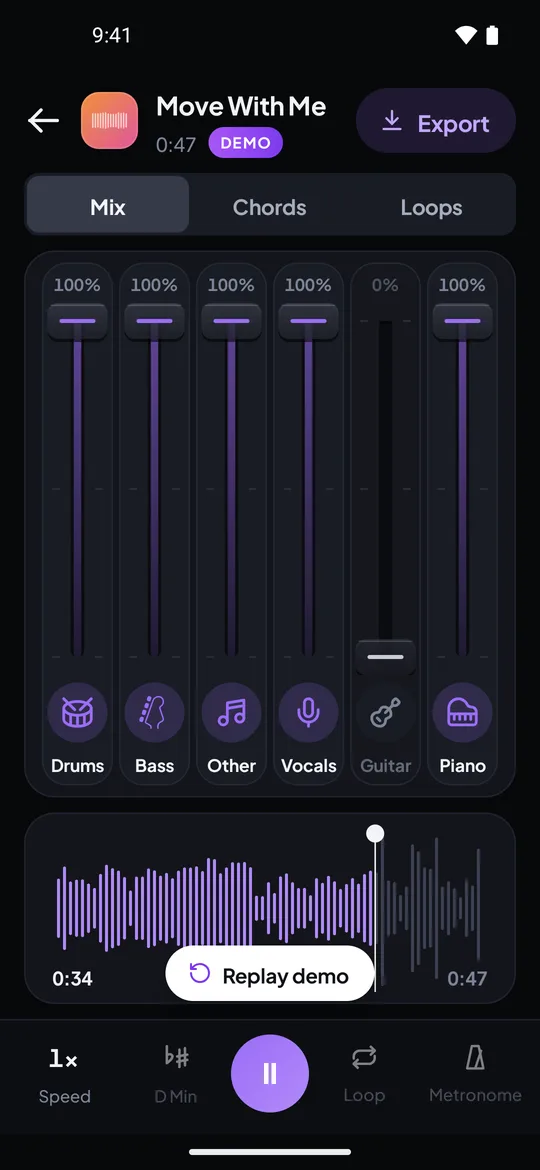
A real capture from the Riffloop Android app: six parts, guitar pulled to 0%. On a computer, the same faders sit under the YouTube video.
Chords and Tabs for the Song That's Playing
Chord extensions work one of two ways: they read the chords from the audio (Chord Finder, Riffloop), or they open a human-written chart on a tab site (Ultimate Guitar's Tab Connect). Detected chords cover any recording; written charts are usually better on sevenths, sus chords and inversions.
Chord Finder
Adds a button to YouTube videos; click it and the listing says it analyses the audio and shows the chords as an overlay in time with the video, with duration bars and the next change coming up, for guitar, piano and ukulele. No account required, per the listing.
- ✅ Pick it if you want detected chords on the video with nothing else around them.
- ↪️ Look elsewhere if you want to hear the chord instrument alone to check a chord — that takes stems.
Instant Chords: Tab Connect by UltimateGuitar
From Ultimate Guitar itself. It adds an "Open Chords" button to Spotify, YouTube Music and YouTube in the browser and opens that song's chords or tab on Ultimate-Guitar.com — free, with no Ultimate Guitar account needed. Its listing notes it works on the websites, not the desktop apps. Featured on the store.
- ✅ Pick it if you want a chart written by a person, for popular songs.
- ↪️ Look elsewhere if the song is a live take, a cover or anything obscure enough not to have a chart.
If you already use Chordify and listen on YouTube Music, Open in Chordify for YouTube Music™ adds one button that opens the song there (last updated May 2023). For how Chordify itself compares, see Riffloop vs Chordify.
Riffloop shows detected chords too, as guitar shapes that move when you change key — see the YouTube chord finder. One gap we looked for and didn't find well filled: an extension that transposes a chord chart on any web page. The one we read, Chord Transposer, says it only works on sites with Italian chord names (Do, Re, Mi).
Tune Up Without Leaving the Lesson
A tuner extension listens through your computer's microphone, so you can tune between takes of a video lesson without picking up your phone. GuitarApp's tuner covers guitar and most other string instruments.
GuitarApp - Guitar Tuner
Free, from GuitarApp, using your laptop microphone. Its listing offers a chromatic mode, instrument modes for guitar, bass, ukulele, banjo, mandolin, bouzouki, violin, cello and viola, more than 20 guitar tunings and tap-to-hear reference notes. Its developer discloses that it doesn't collect or use your data. Featured on the store; last updated January 2024.
- ✅ Pick it if you tune an acoustic instrument at your desk.
- ↪️ Look elsewhere if you play electric unplugged or in a noisy room — a clip-on tuner will hear the strings better than a laptop mic.
Keep Time With a Click
A metronome extension stays one click away while you read a chart or watch a lesson. It keeps its own steady time, which is right for exercises — but it won't follow a recording whose tempo drifts.
Metronome
Free with no ads, per its listing: several sounds, volume, subdivisions, tap tempo, bar breaks and a saved list of songs with their tempos. It stays open while you browse; Space plays and stops, the arrow keys change volume and tempo. Featured on the store; last updated January 2024.
- ✅ Pick it if you want a click for scales, exercises and songs you play at a fixed tempo.
- ↪️ Look elsewhere if you're playing along to a record — a fixed click and a live band drift apart within a few bars.
For playing along to a recording, the click has to follow the song. Riffloop detects a song's real tempo, and its metronome locks to the song's own beats on Pro. Either way, the method for practising with one is in our guide to slowing songs down and building speed back up.
Log What You Listen To
Web Scrobbler records the songs you play on music websites to Last.fm, Libre.fm or ListenBrainz. For a musician, a year of scrobbles is an honest list of the songs you love most — usually the best list of what to learn next.
Web Scrobbler
Built by a large group of contributors, with bug reports on GitHub rather than in store reviews. It shows what's playing next to the address bar, lets you correct a title it doesn't recognise, and can show desktop notifications for the song playing. Updated in September 2026.
- ✅ Pick it if you want a running record of what you listen to across music sites.
- ↪️ Look elsewhere if you only listen in desktop apps — it works on websites.
All Twelve, Side by Side
The table gives each extension's job, where it says it works, what it says it costs and when its store listing was last updated. "Not stated" means the listing didn't give a price; check before relying on it.
| Extension | Job | Works on | Price | Listing updated | Featured |
|---|---|---|---|---|---|
| Transpose: pitch ▸ speed ▸ loop | Pitch, speed, loops | YouTube, Spotify and other music sites | Free; Studio paid | 17 Oct 2026 | ✓ |
| Music Speed Changer | Pitch, speed, loops | Online video and streaming music | Free | 2 Oct 2026 | — |
| Video Speed Controller | Speed shortcuts | Any site with HTML5 video or audio | Not stated | 15 Aug 2026 | ✓ |
| Enhancer for YouTube™ | Speed, section loop | YouTube | Not stated | 16 Jul 2026 | ✓ |
| Just Repeat - Looper for YouTube | Section loops | YouTube | Not stated | 18 Jun 2023 | — |
| Riffloop (ours) | Stems, loop, key, speed, chords | YouTube watch pages | Free; Pro $9.99/mo | 17 Oct 2026 | — |
| Chord Finder | Chords from the audio | YouTube | Not stated | 27 Aug 2026 | — |
| Instant Chords: Tab Connect by UltimateGuitar | Find tabs and chords | Spotify, YouTube, YouTube Music (websites) | Free | 18 Jul 2024 | ✓ |
| Open in Chordify for YouTube Music™ | Open a song in Chordify | YouTube Music | Not stated | 5 May 2023 | ✓ |
| GuitarApp - Guitar Tuner | Tuner (microphone) | Any tab | Free | 26 Jan 2024 | ✓ |
| Metronome | Metronome | Any tab | Free, no ads | 11 Jan 2024 | ✓ |
| Web Scrobbler | Scrobble what you play | Music sites → Last.fm, Libre.fm, ListenBrainz | Not stated | 19 Sep 2026 | — |
Starter Kits by Instrument
Three extensions are plenty for most players: one to shape the song, one for the chart, one for your instrument. Start with the kit for what you play and add only when a job comes up.
- 🎸 Guitarist: Riffloop to solo the guitar and mute it to play along, Tab Connect for the written chart, GuitarApp's tuner.
- 🎤 Singer: Riffloop to turn the vocal down and move the key, with synced lyrics on the video; Transpose if you sing along to Spotify.
- 🎵 Bassist: Riffloop to solo the bassline and slow it, then mute it and play; Metronome for scale and groove drills.
- 🥁 Drummer: Riffloop to hear the kit alone or remove it; Metronome for rudiments at a fixed tempo.
- 🎹 Pianist: Riffloop to isolate the piano; Chord Finder or Riffloop for the changes, checked against a written chart.
- 🧑🏫 Teacher: Video Speed Controller for lesson videos on any site, Transpose for students who practise on Spotify.
A Practice Session With Four Extensions
Here is how the tools combine on a real job — learning a guitar solo from a YouTube video — with each extension doing only the part it's good at.
- Tune first with GuitarApp's tuner, so the record and your guitar agree before you start.
- Open the written chart with Tab Connect, if one exists, to see the shape of the solo before you hear it slowly.
- Loop the first phrase in Riffloop — mark A a beat before the phrase and B just after it.
- Solo the guitar and slow it to 60–70% with the pitch held. Listen three times, then play.
- Drill the hardest lick on its own against the Metronome at a slow, fixed tempo, then return to the record.
- Mute the guitar and play with the band, raising the speed 5% at a time until you're at 100%.
If the song is on Spotify instead, swap step 3 and 4 for Transpose's loop and speed — you lose the soloed guitar, but the rest of the session works the same. The full by-ear method is in our guide to figuring out a guitar solo by ear.
How to Read a Chrome Web Store Listing
Four things on a listing tell you more than its star rating: when it was last updated, how many people rated it, what its privacy section says it handles, and which sites it says it works on.
- Updated. Under Details. A music extension that hasn't changed in two or three years may have broken quietly when YouTube or Spotify changed their player.
- Number of ratings. A 5.0 from four people says little; a 4.2 from a thousand says more. Read a few recent reviews, not just the average.
- Privacy. The listing names the kinds of data the extension handles, or says it collects none. For example, Riffloop's lists personally identifiable information and user activity. Ask whether that fits the job.
- Where it works. "YouTube" and "any site" are different products. Check it names the site you practise on — and that it means the website, not the desktop app.
- Who makes it. The developer name and website. An official extension from the service it connects to, like Ultimate Guitar's, removes one question.
Common Mistakes With Music Extensions
Most problems come from too many extensions touching the same audio, or from trusting a listing that hasn't been looked after.
- Stacking two pitch or speed tools on one tab. Keep one in charge and the other neutral, or you won't know what you're hearing.
- Practising slow without the pitch held. A turntable-style slowdown drops the pitch too; you'll learn the solo in the wrong key.
- Trusting a detected chord over your ears. Detection is an estimate. Loop the bar and check the chord against the bass note.
- Installing for one job you do once. Each extension is one more thing running on every page. Remove the ones you don't use.
- Expecting a desktop app to work. Extensions work on websites in the browser, not in the Spotify or YouTube Music apps.
Music Extensions — FAQ
What players ask about music extensions: which to pick, Spotify, looping, stems, chords, tuners, metronomes, safety and running several at once.
What are the best Chrome extensions for musicians?
It depends on the job. For pitch, speed and loops on YouTube and Spotify, Transpose. For speed shortcuts on any video, Video Speed Controller. For hearing one instrument or muting your part on YouTube, Riffloop (our tool). For finding human-written tabs, Ultimate Guitar's Tab Connect. For tuning, GuitarApp's tuner; for a click, a metronome extension; for logging what you listen to, Web Scrobbler.
Which Chrome extension changes pitch and speed on Spotify?
Transpose lists Spotify along with YouTube, SoundCloud, Apple Music, Deezer, Vimeo and Tidal, with pitch ±12 semitones and speed from 25% to 400%. Music Speed Changer says it works on online videos and streaming music sites, with whole or fractional semitones and 25% to 250% speed. Riffloop's extension works on YouTube only.
Which extensions loop a section of a YouTube video?
Enhancer for YouTube has a loop mode for a specific part or the whole video, Just Repeat sets and saves start and end points, and Transpose, Music Speed Changer and Riffloop all have A-B loops. Riffloop's loop also works on separated parts, so you can loop the bass alone. YouTube itself can only loop the whole video.
Is there a Chrome extension that isolates instruments?
Yes. Riffloop separates a YouTube song into six parts — vocals, drums, bass, guitar, piano and the rest — on your device, with a fader for each, so you can solo or mute any of them on the video. Transpose's Studio has a Stem Mix for vocals, drums, bass and other instruments, free for three songs. For tools outside the browser, see our stem splitter roundup.
Can a Chrome extension show the chords of a song?
Yes, two ways. Chord Finder and Riffloop read chords from the song's audio on YouTube and show them in time with the video. Ultimate Guitar's Tab Connect instead opens the human-written chords or tab for the song playing, on Ultimate-Guitar.com. Detected chords are estimates; a human-written chart is often better on sevenths and inversions.
Is there a guitar tuner extension for Chrome?
Yes. GuitarApp - Guitar Tuner uses your computer's microphone, with a chromatic mode and instrument modes for guitar, bass, ukulele, banjo, mandolin, bouzouki, violin, cello and viola, and more than 20 guitar tunings. A built-in laptop mic in a quiet room is enough for an acoustic; an electric needs to be played loud enough to reach the mic.
Which metronome extension stays open while I browse?
Several. The one we list, simply called Metronome, is free with no ads, has subdivisions, tap tempo, bar breaks and saved songs, and stays open while you browse; Space starts and stops it. It keeps its own time, so it won't follow a recording that drifts — for a click that follows the song itself, Riffloop's metronome locks to the song's beats on Pro.
What does Web Scrobbler do?
Web Scrobbler logs the songs you play on music websites to Last.fm, Libre.fm or ListenBrainz — this is called scrobbling. For a musician it's a quiet way to build a list of songs you keep coming back to, which is often the best list of songs to learn next. It's built by a large group of contributors, with bug reports on GitHub.
Are music Chrome extensions safe?
Check each listing before you install. Look at the date it was last updated, how many people rated it, and its privacy section, which lists the kinds of data it handles — for example, Riffloop's lists personally identifiable information and user activity. Be wary of an extension that hasn't been updated in years or asks for far more than its job needs.
Do these extensions work in Microsoft Edge?
Most Chrome extensions install in Edge, which can add them from the Chrome Web Store. Some also publish to Microsoft Edge Add-ons directly — Transpose and Riffloop both do. Brave, Arc and Opera take Chrome extensions too.
Do music extensions work on a Chromebook?
Yes. Chrome extensions install on ChromeOS the same way as on Mac or Windows, so the pitch, speed, loop and stem tools on this page all run on a Chromebook. A tuner extension needs the Chromebook's microphone to be allowed.
Can I run two audio extensions at the same time?
You can, but don't let two of them change the same sound. If Transpose and Riffloop are both on a YouTube tab, keep one at 0 semitones and 1× speed, so you know which one you're hearing. If playback stutters or a setting keeps resetting, switch one off for that tab.
Is Riffloop the best Chrome extension for musicians?
It's the best fit on this list for one job: hearing the parts of a YouTube song separately — muting your instrument, soloing another — with the loop, speed, key change and chords alongside. It's our product, so weigh that. For Spotify, tuning, a metronome or human-written tabs, the other extensions here do those jobs and Riffloop doesn't.
How We Checked This
Every extension above was read on its own Chrome Web Store listing on 18 October 2026, and each name in the table links to that listing. Transpose's prices also come from its own site, transpose.video, the same day.
We describe what each listing says it does; we didn't install and benchmark every one, and we don't score them. Where a listing didn't state a price, we wrote "not stated" rather than guess. Riffloop's entry comes from our own pricing and help pages. Some extensions we looked at didn't make the list because their store page wouldn't open for us, or because they send you to download audio from streaming sites. Listings change often — if one here has, tell us via support and we'll update it.
If You Remember Four Things
- 1 Choose by job: shape the song, find the chart, serve your instrument.
- 2 Slow down with the pitch held, and keep only one pitch tool active per tab.
- 3 To hear or mute one instrument on YouTube, you need stems — Riffloop does that.
- 4 Check a listing's update date and privacy section before its stars.
Keep Going With Riffloop
Mute Your Part on Any YouTube Song
If hearing the band apart is the job missing from your toolbar, try Riffloop on a song you're learning — three songs as a guest, no account.

