Loop, Slow Down and Isolate — In One Tool
Repeat the hard bar, drop the tempo with the pitch held, and mute the instrument you're learning — without moving a file between apps.
Plenty of practice apps do all three. The catch is that almost all of them need the song as a file on your machine first, so the moment your source is a YouTube video you're back to downloading, converting, or running two tools side by side. This page is about doing all three on the video itself — and about when one of the established apps is genuinely the better choice.
Free to get started, no account needed to try it. Riffloop is a desktop and Chromebook tool — see the honest limits below before you install.
Last updated · maintained by the Riffloop team
The Short Version
Yes — you can loop a section, slow it down with the pitch held and mute one instrument on a YouTube video, without downloading anything. Several practice apps do all three well from a file on your machine; the short list that does it on the video itself is where this page spends its time.
- 🔁 A-B loop the two bars that keep failing
- 🐢 Slow it with the pitch kept correct
- 🎚️ Mute the part you're playing, or solo it to hear it
- ▶️ All three on the video — no download, no export
- 🔒 Runs on your device
- 🙂 Honest: on a phone, or offline, other apps beat us
Three claims worth taking away on their own. The source of the song decides your tool more than any feature does. Most practice apps that separate instruments need a file, not a link. And looping, slowing and isolating are one motion, so the order you apply them in changes the result.
Why the Three Belong Together
Each move fixes a different reason you can't play the part. Isolating tells you what the part actually is, slowing gives your hands time to execute it, and looping gives you the repetitions. Do one without the others and you usually stall.
The failure modes are distinct, which is why the fix has to be. If you can't tell what's being played, no amount of repetition helps — that's an isolation problem. If you know exactly what it is but your fingers arrive late, that's a tempo problem. And if you can play it once in five tries, that's a repetition problem and nothing else. Most people reach for the wrong one: they slow a passage they haven't actually heard clearly yet, and practise a guess very accurately.
Each of the three has its own guide here, and this page won't repeat them — see looping a section of a YouTube video, slowing a song down without changing the pitch, and isolating an instrument on a YouTube video for the mechanics of each. What follows is about using them as one motion.
Where You Still End Up With Two Tools
All-in-one practice apps are real and several are excellent. The gap isn't the feature list — it's the source. Ask most of them to work on a YouTube video and they can't, because they expect a file, so you end up downloading the audio or running a looper in one tab and a separator in another.
That's the split worth naming. If the song is already an MP3 on your drive, you have good options and have had for twenty years. If the song is a YouTube video — a live take, a lesson, a cover, something not on any streaming service — the established apps ask you to solve that yourself first.
The download step isn't just friction. It's the point where the workflow breaks: you lose the timestamps you'd found, you're managing files you don't want, and depending on where you are it may not be something you should be doing at all. Working on the video sidesteps the question entirely.
All Three at Once, on the Video
In Riffloop the loop range, the speed control and the stem faders sit in the same panel under the YouTube player, and they're all live at the same time. Changing one doesn't cost you the others.
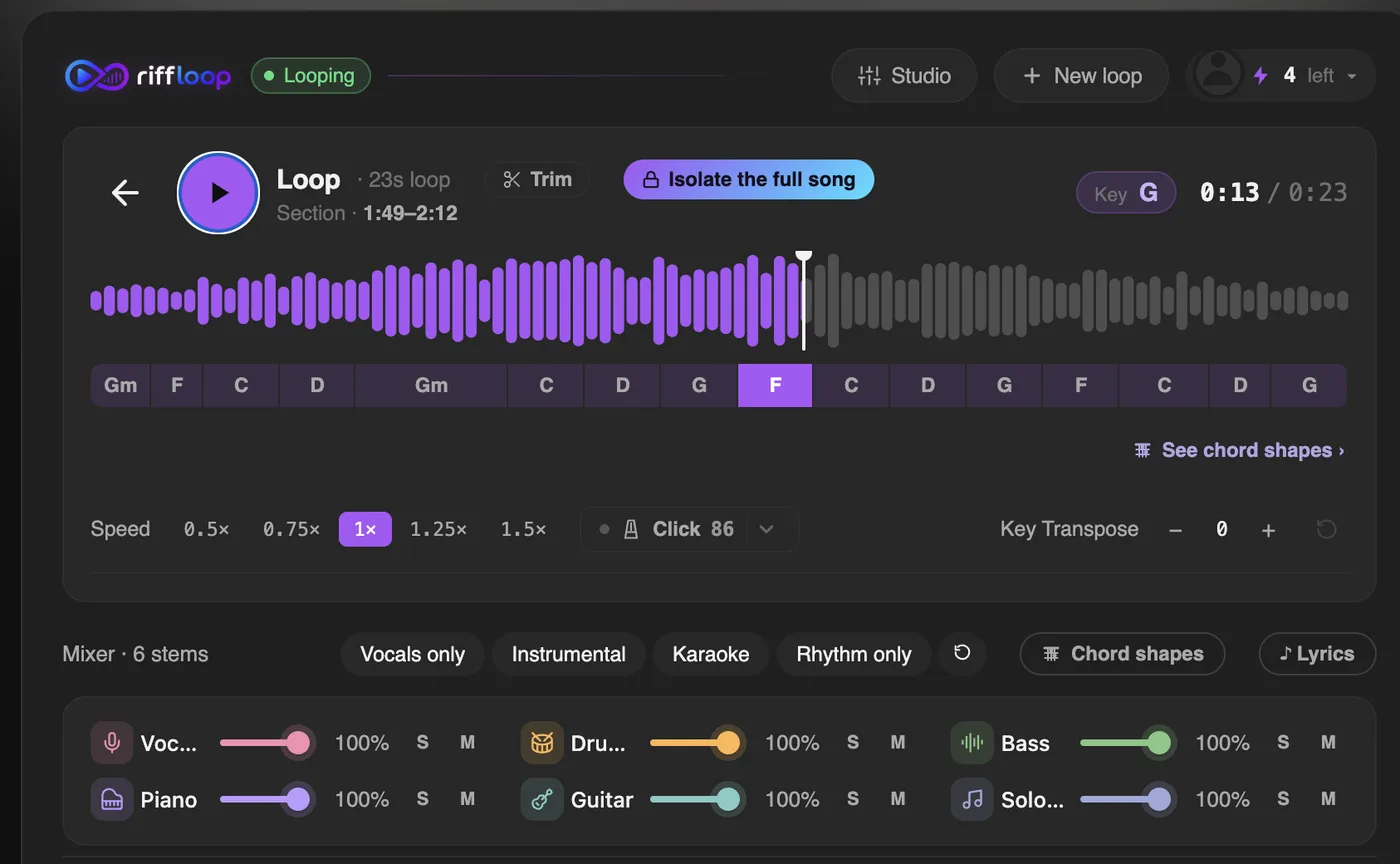
The practical test of "one tool" isn't whether the features exist somewhere in the product — it's whether you can change your mind cheaply. Halfway through a loop you decide the bass is the part you actually need to hear, so you solo it; the loop keeps running and the tempo stays where you set it. In a two-tool setup that decision costs you an export.
The Order That Actually Works
Isolate first, loop second, slow last. Each step narrows the next one, and doing it in this order stops you slowing down a passage you haven't heard properly yet — the most common way practice time gets wasted. We call it the isolate-loop-slow order, and the sequence matters more than any single setting.
- Isolate before you decide anything. Solo the instrument you're learning and listen once at full speed. Half the time the part turns out to be simpler than it sounded inside the mix, and you've saved yourself the rest of the process.
- Set the loop tight. Two bars, not eight. A loop long enough to contain the bit you can already play is a loop that spends most of its time confirming what you know.
- Slow only as far as you need. Start at 85% and go down in steps until you can play it accurately, rather than starting at 50% and working up. The slowest speed you need is usually higher than you'd guess.
- Raise the tempo in small steps. Roughly 5% at a time, and only after two clean passes. If you miss it twice, drop back one step rather than pushing through — you're rehearsing the mistake otherwise.
- Put the part back in. Unmute the original instrument and play alongside it at full speed. If you can't hold your place against the record, the part isn't learned yet, however clean it was in isolation.
The step people skip is the last one. Practising a part in isolation at 70% builds a version of it that only exists in isolation at 70%. If you're learning by ear rather than from a chart, the same loop is also the engine of working songs out by ear.
The Tools That Combine Two or Three
Sort them by what they can point at, not by feature count, and the field falls into three groups. Two tools work on a YouTube video but only one of them separates anything beyond vocals. Three separate instruments properly but need a file. And the classics loop and slow beautifully while doing no separation at all.
Group one — works on a YouTube video
slowdownpractice.com is the closest thing to a direct rival and it deserves a plain recommendation: free, no subscription, A-B loops, 0.1× to 4× with the pitch held, and machine-learning vocal isolation. It takes a YouTube link and ships a Chromium extension. The limit is in the word "vocal" — it reduces or isolates the singing, so if you need the drums or the bass on their own it can't do it. looptube.xyz is free for YouTube and does clean pitch-preserved looping, with no instrument separation of any kind. Riffloop is the third, and the difference is multi-instrument separation on the video rather than vocals only.
Group two — real separation, but bring a file
PracticeSession is the strongest value here: unlimited loops, 0.05× to 4×, genuine two, four or six-stem separation, and a $39 one-time lifetime licence rather than a subscription. It's desktop only and it wants an audio file. Moises has the best separation quality in the group and proper phone apps, which matters if you practise on a tablet; its pricing is behind a login, so we're not going to quote a figure we can't see. Anytune carries the field's biggest trap: its Demix source separation is Android only. On Mac and iOS you get ReFrame, which is parametric filtering and stereo-field work, not stem separation. Buy it on the wrong platform expecting isolation and you'll be disappointed.
Group three — the classics, which don't separate
Amazing Slow Downer has been the reference for twenty years and still is for what it does: seamless loops, 20% to 200% with the pitch held, on four platforms, one-time. It has an equaliser, not stem separation, and people regularly assume otherwise. Transcribe! is the transcriber's tool — stored loops, down to a twentieth speed, spectrum analysis, and it runs on Linux, which almost nothing else here does. Its "karaoke" mode is a mid-side phase trick, not separation. Capo loops by measure, slows 25% to 150%, and extracts individual parts through what it calls its Neptune engine — the vendor never uses the words stem separation or AI, so treat it as somewhere between the groups. It's Apple only and it can't touch streaming.
One name you'll still see recommended: Riffstation. Its domain no longer resolves at all, so whatever you read about it, there's nothing to download today.
All of Them, Side by Side
The column that decides most choices is the fourth one. Everything to the left of it is table stakes; whether a tool can point at a YouTube video is what actually changes your workflow.
| Tool | Loop | Slow, pitch kept | Isolate | On a YouTube video | Platforms | Price |
|---|---|---|---|---|---|---|
| Riffloop | ✓ | ✓ | ✓ 6 parts | ✓ on the page | Desktop & Chromebook browsers | Free · Pro from $5.95/mo |
| slowdownpractice.com | ✓ | ✓ 0.1–4× | vocals only | ✓ link + extension | Web + Chromium extension | Free |
| looptube.xyz | ✓ | ✓ | ✗ | ✓ paste a link | Web | Free for YouTube |
| PracticeSession | ✓ unlimited | ✓ 0.05–4× | ✓ 2/4/6 stems | ✗ needs a file | Windows, macOS, Linux | $39 one-time |
| Moises | — | ✓ | ✓ best quality | ✗ upload | Web, desktop, iOS, Android | subscription, not public |
| Anytune | ✓ | ✓ | Android only | ✗ | iOS, macOS, Android | $34.99 one-time (Mac) |
| Amazing Slow Downer | ✓ | ✓ 20–200% | ✗ EQ only | ✗ | Windows, macOS, iOS, Android | $39.95 desktop, one-time |
| Transcribe! | ✓ stored | ✓ to 1/20× | ✗ mid/side | ✗ | Windows, macOS, Linux | $39 one-time |
| Capo | ✓ by measure | ✓ 25–150% | per-part, vendor is vague | ✗ | macOS, iOS | $39.99/yr (App Store) |
Two prices are genuinely not public and we've left them that way rather than guess: Moises puts its table behind a login, and Anytune doesn't publish its mobile or Demix credit figures. Capo's numbers come from its App Store listing, because the vendor's own page confirms a yearly subscription without naming a figure.
How to Choose, in Four Questions
Almost everyone lands correctly by answering these in order. The first question decides more than the other three combined.
- Where does the song live? A YouTube video and you want to stay on it, or you'd rather not download anything — that's what Riffloop is for. Already a file on your drive — the established desktop apps are excellent and several are a one-time purchase.
- Do you practise on a phone? Then pick a mobile app. Browser extensions can't work on a phone's YouTube, and pretending otherwise wastes your afternoon.
- Do you need to see notation or tab? If reading it matters as much as hearing it, you want a tool built around a score, not a mixer.
- Do you need it offline? On a train, in a lesson room with no signal — a native app that owns the file is the safer bet.
When Something Else Is the Better Pick
Riffloop is a desktop and Chromebook tool built around the browser. That shape buys the YouTube workflow and costs us several things worth being straight about.
- 📱 On a phone — extensions can't touch mobile YouTube. Use a mobile practice app.
- ✈️ Offline — a native app that owns the file is the safer bet.
- 🎼 Notation or tab — we read harmony, not notation. Score-based tools win.
- 🎛️ Stems into a DAW — that's a production job, not a practice one.
- 💳 One-time purchase — several rivals sell a licence outright; we don't.
If separation quality on a difficult mix is the whole job, our honest roundup of stem splitters compares the field by use case, including where we come second.
How We Checked This
We make one of the tools in the table, so read the Riffloop row with that in mind. Everything else was read off each vendor's own product or pricing page on 4 September 2026, not from review sites, and where a vendor doesn't publish a figure we've left the cell empty rather than fill it.
Two definitions do a lot of work in that table. "Isolate" means real per-instrument separation — an equaliser that pushes a part forward, or a phase trick that thins a centred vocal, does not count, which is why Amazing Slow Downer and Transcribe! show a cross there despite both being excellent tools. "On a YouTube video" means without you producing an audio file first; pasting a link counts, downloading the video does not.
Known soft spots, stated rather than hidden: Moises publishes no public price table, so we quote none; Capo's figures come from its App Store listing because its own site names a subscription without a number; and Anytune's separation differs by platform, so a single tick would have been wrong. Prices move — if you're reading this well after the date above, check before you buy.
Loop, Slow and Isolate — FAQ
The questions that decide whether this workflow fits you: what a phone can do, what a free tier covers, whether anything gets downloaded, and how far you can push the speed before it sounds wrong.
Is there one app that can loop, slow down and isolate instruments?
Several can, and a few do it very well — PracticeSession, Moises and Anytune on Android all combine the three. The catch is the source: nearly all of them need the song as a file on your machine. If you want the three on a YouTube video without downloading it, the field narrows sharply, which is the gap Riffloop was built for.
How do I loop and slow down a YouTube video at the same time?
Set an A-B loop over the section, then change the playback speed — in a tool built for practice the two are independent, so the loop keeps running while you move the tempo. YouTube's own speed control works while its loop is on, but it loops the whole video rather than a section, and it gives you fixed speed steps.
Can I mute the guitar and slow the song down together?
Yes, and they're separate controls that don't interfere. Mute the guitar in the mixer and the rest of the band keeps playing; drop the tempo and everything slows with the pitch held. The point of having both in one panel is that changing your mind about either one costs nothing.
Which of these tools need a file instead of a link?
Amazing Slow Downer, Transcribe!, PracticeSession, Capo and Anytune all expect an audio file on your machine. looptube.xyz and slowdownpractice.com take a YouTube link, and Riffloop works on the video in the page. That single distinction decides most people's choice.
Does Amazing Slow Downer isolate instruments?
No, and this is the most common misconception in this category. It has an equaliser, which can push an instrument forward or back in the mix, but that is not the same as separating a part out. For actual isolation you need a tool doing stem separation.
Does Transcribe! separate stems?
No. Its karaoke and mono modes use phase cancellation and channel mixing — an old stereo trick that can reduce a centred vocal, but it isn't stem separation and it fails on anything not panned dead centre. Transcribe! is superb at looping, extreme slowdown and spectrum analysis; separation isn't what it does.
Is Anytune's instrument isolation available on iPhone?
No — and this trips people up. Anytune's Demix source separation is Android only. On macOS and iOS you get ReFrame, which is parametric filtering and stereo-field manipulation rather than separation. Check the platform before buying if isolation is the reason you're buying.
What's the best free option?
For looping and slowing a YouTube video, looptube.xyz is free and does that cleanly. If you also want the vocal out, slowdownpractice.com is free, takes YouTube links and has a Chromium extension. Riffloop's free tier is the one that separates multiple instruments rather than just vocals.
How slow can I go before it sounds bad?
Down to roughly 70% most material holds together well. Below about 50% you start hearing a watery, smeared quality on cymbals and reverb tails, because stretching time that far is genuinely hard. In practice you rarely need to go that low — start at 85% and only go further if you have to.
Can I loop a slowed section with the vocals removed?
Yes — that's the three-in-one case. Mute the vocal, set the loop over the phrase, take the speed down, and all three stay applied together. That combination is exactly what most single-purpose tools can't hold at once.
What replaced Riffstation?
Nothing directly, and its site no longer resolves, so there's nothing to install. Riffstation's combination of chords plus per-part control is now split across several tools; for chords on a song the closest equivalent is a chord finder that works on the video, and for muting a part it's a stem splitter.
Can I do this on my phone?
Not with Riffloop — mobile browsers don't let an extension work on a YouTube video, so this is a desktop and Chromebook workflow. If phone practice is the requirement, Moises has full mobile apps and Amazing Slow Downer and Anytune both ship iOS and Android versions.
What about practising offline?
A native app that owns the file is the better tool. Anything working on a YouTube video needs the video, which needs a connection. For a train or a lesson room with no signal, one of the one-time-purchase desktop apps is the safer choice.
Is stem separation free anywhere?
Partly. Riffloop's free tier separates a section of a song into individual parts, and slowdownpractice does vocals free. PracticeSession includes local separation with its one-time licence. Most cloud services meter it, because running separation on their hardware costs them per song.
How long should my loop be?
Shorter than you think — usually two bars. A loop long enough to include material you can already play spends most of its repetitions confirming what you know. If you can play three of the four bars, loop the one you can't.
Should I slow it down or isolate it first?
Isolate first. Slowing down a part you haven't heard clearly means practising your best guess very accurately, which is worse than not practising it. Hear the part on its own at full speed, then decide whether you need the tempo at all.
Does any of this help if I'm reading notation?
The looping and slowing do, but none of these tools will put a score in front of you. If reading matters as much as hearing, you want something built around notation rather than a mixer — Capo and score-based platforms are aimed at that, and this page's tools are not.
If You Remember Four Things
- 1️⃣ Isolate first — never slow down a part you haven't heard clearly
- 2️⃣ Two-bar loops beat eight-bar loops
- 3️⃣ Start at 85%, not 50%, and climb in 5% steps
- 4️⃣ Always finish by playing it back inside the full mix
One Guide per Move
Try It on the Bar You Keep Missing
Open the song on YouTube, solo the part, loop two bars and take the tempo down until it's clean. Free to start, and nothing leaves your device.