How to Slow Down and Loop Songs on Spotify
Spotify can repeat a song, but it can't slow music down, loop a section, change the key or take out the vocals. Here's what does.
Spotify has no playback speed control for songs — its speed button is for podcasts and audiobooks — and its repeat button repeats the whole track. So the usual way to practise a song you found on Spotify is to open the same recording somewhere with practice tools: on YouTube with a practice extension at a computer, as a file you own, or recorded from the YouTube app on your phone. This page checks every Spotify claim against Spotify's own help pages and lays out the three routes.
- Find the same recording on YouTube — match the length shown on Spotify.
- Open it in Chrome or Edge with the Riffloop extension.
- Set an A-B loop and drop the speed to 70%; the pitch holds.
A-B looping is always free. Three songs as a guest, no account; five a day signed in. Also on iPhone and Android.
Last updated · Spotify features checked against Spotify Support the same day · Riffloop is our product; every Spotify fact links to Spotify's own page
Maintained by the Riffloop team
Practising a Spotify Song, at a Glance
You can't slow down or loop part of a song inside Spotify. Find the same recording on YouTube and use a practice extension at a computer, or load a file you own into a practice tool. Spotify itself is still useful for finding the song and checking its BPM and key.
- 🐢 Speed control: podcasts and audiobooks only, not music
- 🔁 Repeat: whole song, album or playlist — select twice for one song
- 🚫 No A-B loop, no key change, no vocal removal
- 🎚️ Mix (Premium) shows BPM and key for playlist songs; it doesn't change them
- 📜 Spotify's guidelines list recording its content as not allowed
- ✅ Best route: the same song on YouTube + the Riffloop extension
What Can Spotify Do for Practice?
Spotify can repeat a song, show synced lyrics, show BPM and key in a Premium mixed playlist, and adjust bass and treble with its equalizer. It can't change a song's speed or key, loop a section, or mute a part.
| Practice job | In Spotify | With Riffloop |
|---|---|---|
| Slow a song down | ✗ podcasts and audiobooks only | ✓ 0.25–2× on YouTube, pitch held |
| Repeat the whole song | ✓ repeat, select twice | ✓ |
| Loop four bars | ✗ | ✓ A-B loop, always free |
| Change the key | ✗ | ✓ ±12 semitones, tempo kept |
| Take out the vocals | ✗ lyrics only | ✓ vocals or any of six parts |
| See BPM and key | ✓ in Mix, Premium | ✓ plus chords |
| Works on the Spotify app itself | ✓ | ✗ YouTube, files, phone recordings |
Can You Slow Down a Song on Spotify?
No. Spotify's playback speed control is for podcasts and audiobooks, not songs. Its podcast help page shows a "Playback speed 1x" control beside an episode's play controls, and nothing in Spotify's help describes the same for music.
That's on every plan and every device: Spotify's podcasts and shows and audiobooks pages are where speed appears, and its Premium benefits list doesn't add it for music. If you see a speed button, you're on a podcast or an audiobook.
For a song, the job you actually want is time-stretching: the tempo drops and the pitch stays where it is, so you still hear the right notes. That's covered in depth on how to slow down songs without changing pitch — this page sticks to getting a Spotify song into a tool that can do it.
Can You Loop Part of a Song on Spotify?
Spotify repeats whole songs, albums and playlists, but it can't loop a section. In the Now Playing view, select repeat once to repeat the album or playlist, and twice to repeat the song.
- Play the song and open the Now Playing view (on a phone, tap the bar above the menu).
- Select repeat twice. Spotify's Now Playing help page says this repeats the song; once repeats what you're playing.
One plan caveat: Spotify lists playing tracks "in any order" as a Premium benefit, so on the free plan on a phone you may not always be able to pick one song and put it on repeat. Either way, repeating a whole song means sitting through the verse to hear the chorus again — fine for singing along, slow for learning a part. For the bars you keep missing you want an A-B loop; the YouTube looping guide explains the idea.
Key, Vocals and Spotify's Mix
Spotify can't change a song's key or remove its vocals. Premium's Mix feature does show each playlist song's BPM and key, which helps you plan, but it adds transitions between songs rather than changing them.
- 🎼 Key: no pitch control anywhere in Spotify. Moving a song into your range happens in a song key changer.
- 🎤 Vocals: Spotify shows synced lyrics on free and Premium (availability varies by market, device and song), but describes no vocal-off or karaoke mode. To take the voice out, use a vocal remover.
- 📊 BPM and key: turn on Mix for a playlist you made (Premium) and each song shows its BPM and key. Free listeners hear mixed playlists as regular playlists.
- 🎛️ Equalizer: Spotify's equalizer moves bass and treble. It can lift the low end, but it can't separate the bass guitar from the kick drum.
Handy trick: if you're Premium, Mix gives you a quick BPM and key before you start, so you can set a metronome or capo. Riffloop reads the same two things from the audio — see the key and BPM finder.
Why Not Just Record Spotify?
Because Spotify's User Guidelines list "recording", alongside copying and "ripping", among the things you may not do with its content. Its downloads are for offline listening inside Spotify, not files for other apps. So the routes below start from a different copy of the same song.
Sources: Spotify's User Guidelines and Listen offline help page, both read November 3, 2026. We'd rather tell you this than have you build a practice library on something the service doesn't allow. Separating a song for practice doesn't change who owns it either: use Riffloop with music you have the right to use.
Route 1: The Same Song on YouTube, at a Computer
Most songs on Spotify are also on YouTube as an official upload. Open that video in Chrome or Edge with the Riffloop extension and you get an A-B loop, 0.25–2× speed with the pitch held, ±12 semitones of key and the vocals or any instrument muted, on the video itself.
- Note the version on Spotify — artist, title and track length.
- Find it on YouTube. Search the artist and title with "official audio", or the artist's Topic channel, and pick the upload whose length matches.
- Add the extension to Chrome or Edge and play the video. The controls appear on the page.
- Loop the bars. Set A and B around the passage. A-B looping is free, with no account.
- Slow it to about 70%. The pitch holds. Climb in 5% steps as it gets clean.
- Re-key or mute if needed. Shift the key up to 12 semitones either way, or split the song and drop the vocals or your instrument. Splitting is free for sections up to a minute.
Prefer to paste a link? Riffloop Studio takes YouTube and SoundCloud links in any browser; songs from links are for practising there. For the instrument-by-instrument side of this, see how to isolate an instrument on YouTube, or split a YouTube song into all its stems.
Route 2: A File You Own
If you have the song as an audio file — bought as a download, or your band's own recording — load it into Riffloop Studio or the phone app and practise from that. It's the cleanest source, and it's the route that lets you export the parts.
- 💻 Studio: MP3, WAV, M4A, FLAC, OGG or AAC up to 50 MB, processed on your device, nothing uploaded.
- 📱 Phone app: audio or video files up to 10 minutes, on iPhone (iOS 26+) or Android (12+).
- 💾 Export: stems and mixes from your own files export on Pro ($9.99 a month, $39 a year, or $99 once).
- 🎧 Quality: a lossless file (WAV, FLAC) separates more cleanly than a heavily compressed one.
From a file you can split every instrument onto its own fader, or take out the part you play and perform over the rest.
Route 3: On Your Phone
Away from a computer, play the same song in the YouTube app and record it into the Riffloop app with Record, then loop, slow and split it on the phone. Riffloop records what the phone plays, not the room, up to 10 minutes.
- In Riffloop, tap Add, then Record, then Start recording. iPhone asks to start a broadcast, Android to share the screen; Riffloop keeps the sound and nothing else.
- Play the song in the YouTube app from the start, after any ad.
- Come back, tap Stop recording, trim the silence and Save.
- Choose Remove vocals, Stem separation or Backing track, then set a loop with Loop and Set B, and slow it with Speed (50–150%, pitch held).
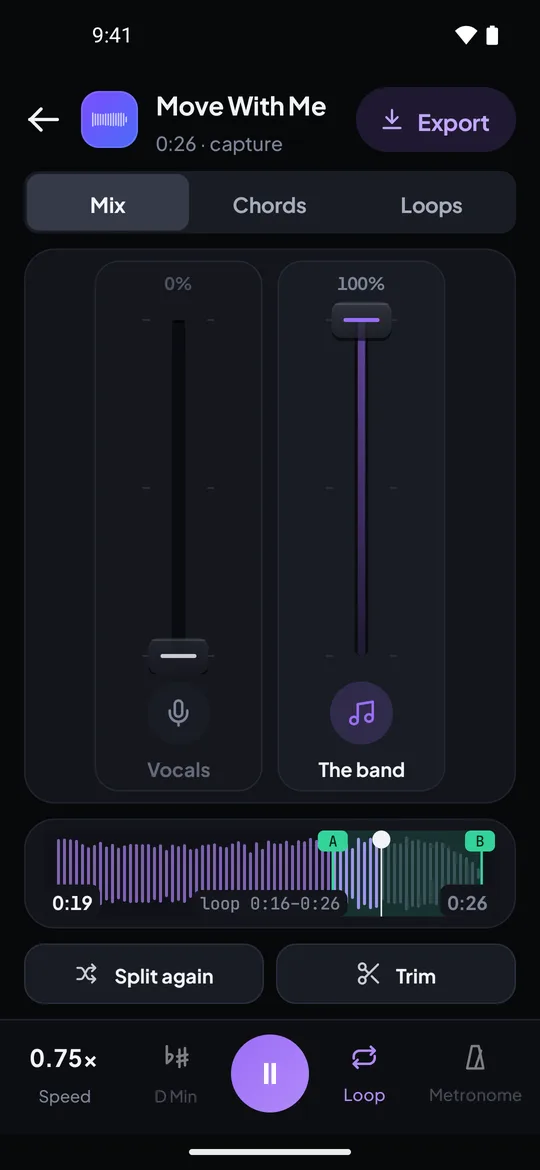
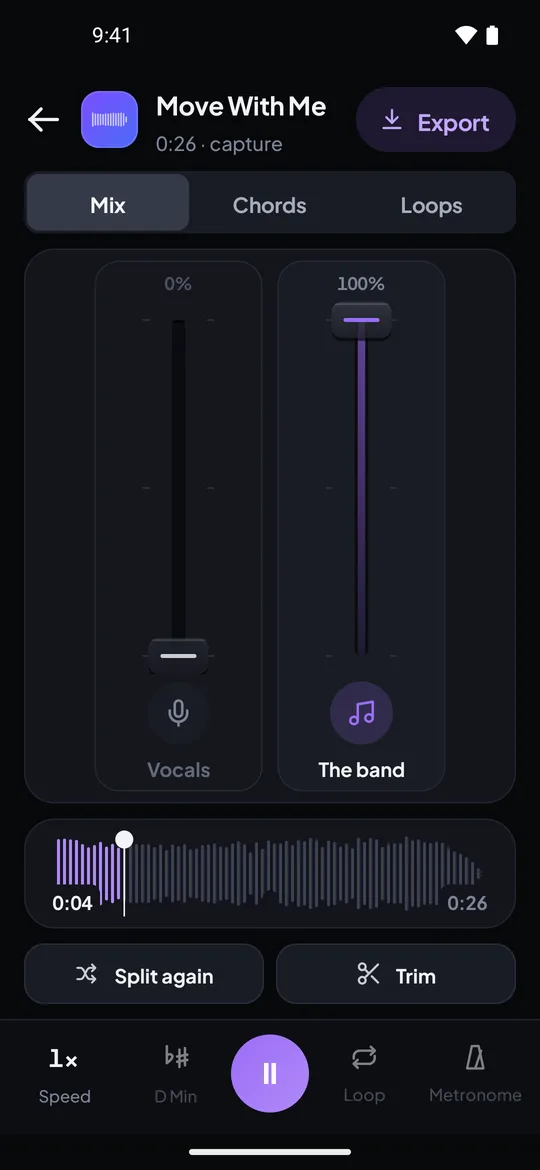
Real captures from the Riffloop Android app, using our own demo song: a looped line at 0.75×, and the vocal faded out against the band.
Step-by-step: add a song from YouTube on mobile. The YouTube app's own speed and loop controls — and where they stop — are in looping and slowing YouTube on your phone.
How to Find the Same Version on YouTube
Use a three-point version check: match three things before you practise: the track length (within a second or two of Spotify's), the intro, and the key. A live take, radio edit or remaster can differ in length, tempo or key, and you'll learn a version that doesn't match the record you love.
| Check | How | If it doesn't match |
|---|---|---|
| Length | Compare with Spotify's track length | Probably a different edit or a live take |
| Intro | Play the first ten seconds of both | Look for the official audio or Topic upload |
| Key | Play the opening chord on your instrument against both | Different master, or a fan upload sped up |
| Tempo | Compare BPM (Spotify Mix, Premium) with Riffloop's reading | A few BPM off usually means a different take |
A worked example
A guitarist hears a song on a Spotify playlist and wants the intro riff. Spotify shows 3:41. On YouTube, the first result is a live video at 4:12 — skip it; the official audio upload is 3:41. In Chrome, the extension loops the four-bar riff, drops it to 70%, and the guitar stem goes solo so the bass under it stops confusing the ear. Twenty minutes later it's at 90%, and the version matches the one on the playlist.
Common Mistakes With Spotify Practice
The usual mistakes are practising a different version, relying on whole-song repeat to learn a short passage, and boosting the equalizer instead of isolating the part.
- Learning the live version by accident. Check length and intro first.
- Repeating the whole track to learn eight bars. Every lap costs three minutes; an A-B loop costs seconds.
- Hunting for a speed button that isn't there. If it shows, you're on a podcast.
- Turning the bass EQ up to hear the bass line. You'll hear more kick drum too; isolate the bass instead.
- Practising straight at full speed. Slow, clean repetitions first; then raise the tempo.
- Recording the stream. Spotify's guidelines don't allow it — start from YouTube or a file you own.
Sources for the Spotify Facts
Every statement about what Spotify can and can't do on this page comes from Spotify's own help and legal pages, read on November 3, 2026. Spotify says features vary by plan, market and device, so check them if your app differs.
- 🎙️ Speed for podcasts: Podcasts and shows; for audiobooks: Audiobooks in Premium plans
- 🔁 Repeat (select twice for a song): Now Playing view
- ⭐ Play in any order, downloads, mixed playlists: Your Premium benefits
- 📊 BPM and key in Mix (Premium): Mixed Playlists
- 📜 Lyrics on free and Premium: View lyrics; bass and treble: Equalizer
- ⚖️ Recording not allowed: User Guidelines; downloads: Listen offline
Slowing and Looping Spotify Songs — FAQ
What musicians ask about Spotify's speed, repeat, lyrics and Mix features, and how to practise a Spotify song with Riffloop.
Does Spotify have a playback speed control for music?
No. Spotify's help pages describe a playback speed control for podcasts and audiobooks, and nothing similar for songs. To practise a song slower, open the same recording somewhere that has a speed control with the pitch held, such as YouTube with the Riffloop extension.
Why does the speed button only appear on podcasts?
Because Spotify only offers playback speed for spoken content. Its podcast help page shows a Playback speed 1x control next to the play controls of an episode, and audiobooks have one too; music tracks don't get it.
How do I put one song on repeat in Spotify?
Open the Now Playing view and select the repeat button twice; Spotify's help page says that repeats the song. Selecting it once repeats the album or playlist. On the free plan, Spotify lists playing tracks in any order as a Premium benefit, so on a phone what you can pick and repeat may be limited.
Can Spotify repeat just the chorus?
No. Spotify repeats a whole song, album or playlist; its help pages describe no way to loop a section. To repeat a chorus or four bars, you need an A-B loop, which Riffloop has free on YouTube and in its Studio.
Is there a karaoke or vocal remover mode in Spotify?
Spotify's help pages describe synced lyrics, on free and Premium, but no way to turn the vocals down or off. Lyrics availability varies by market, device and song. To take the vocals out, use a vocal remover on the same song from YouTube or on a file you own.
Can Spotify transpose a song?
No. Spotify has no pitch or key control. To move a song you found on Spotify into your key, open the same recording on YouTube with the Riffloop extension, or load a file you own into the Studio, and shift it up to 12 semitones with the tempo kept.
Does Spotify show a song's BPM and key?
In one place: when a Premium user turns on Mix for a playlist they made, Spotify shows each song's BPM and key, and adds transitions between tracks. The help page describes displaying them, not changing them, and free users hear mixed playlists as regular playlists.
Can I record a Spotify song to practise with it?
Spotify's User Guidelines list recording, alongside copying and ripping, among the things you may not do with its content, so we don't recommend it. Use the same song on YouTube at a computer, a file you've bought, or record the song from the YouTube app on your phone instead.
Can I paste a Spotify link into Riffloop?
No. Riffloop Studio takes YouTube and SoundCloud links and your own audio files, the Chrome extension works on YouTube videos, and the phone apps take files or record what the phone plays. A Spotify link won't open in any of them.
Does the Riffloop extension work on the Spotify web player?
No. The extension works on YouTube pages in Chrome and Edge. Search YouTube for the same song, usually the official audio upload, and the extension adds the loop, speed, key and stem controls on that video.
How do I find the same version of a Spotify song on YouTube?
Search the artist and title with "official audio", or look for the artist's auto-generated Topic channel. Then check that the length matches Spotify's to within a second or two and that the intro sounds the same. Live takes, radio edits and remasters can differ in length, tempo or even key.
Can I open Spotify downloads in another app?
Spotify's help page describes Premium downloads for offline listening inside Spotify; it doesn't offer them as audio files for other apps. For a file you can load into a practice tool, buy the track as a download from a store that sells audio files.
Will Spotify's equalizer help me hear the bass line?
Only a little. Spotify's equalizer adjusts bass and treble, so boosting the bass raises the whole low end, kick drum included. To hear the bass line on its own, isolate the bass stem instead.
Is Spotify Premium worth it for practising songs?
Premium helps with listening: no ads, any song in any order, downloads, and BPM and key in mixed playlists. It adds no way to slow a song down, loop a section, change the key or remove a part, so for practice you still need a separate tool.
If You Remember Four Things
- 1 Spotify's speed control is for podcasts and audiobooks; songs don't have one.
- 2 Repeat (select twice) loops the whole song; there's no section loop.
- 3 Practise from the same recording on YouTube, or a file you own — not a recording of Spotify.
- 4 Match the version first: length, intro, key.
Keep Going With Riffloop
Find It on YouTube. Loop It at 70%.
Open the same song on YouTube, loop the bars you're learning, slow them with the pitch held, and take out the part you play. Three songs as a guest, no account.

