How to Loop and Slow Down YouTube on Your Phone
The YouTube app on iPhone and Android can slow a video down and loop the whole video. It can't loop one section, change the key or mute a part.
To slow down YouTube on your phone, tap the video, tap Settings, then Playback speed. To loop it, go to Settings, Additional settings, Loop video. Both are built in and free. But the loop repeats the entire video, so if you're learning four bars of a guitar part, you replay three minutes to hear them again. This guide shows exactly what the app does, where it stops, and the phone route to an A-B loop at 70% with the pitch held.
- Slow it down: tap the video → Settings → Playback speed → 0.75×.
- Loop the whole video: Settings → Additional settings → Loop video.
- Loop one section: record the song into the Riffloop app, then set A and B.
Free to download; the free plan splits sections of up to 60 seconds. At a computer instead? See how to loop a YouTube video in Chrome.
Last updated · YouTube steps checked against YouTube Help the same day · maintained by the Riffloop team
Phone Practice on YouTube, at a Glance
To slow a YouTube video on a phone, use the app's Playback speed menu. To repeat it, turn on Loop video. To loop just one section, keep the pitch and mute a part, record the song into the Riffloop app and practise it there.
- 🐢 Speed: tap the video → Settings → Playback speed
- 🔁 Loop: Settings → Additional settings → Loop video (whole video)
- ⏪ Double-tap the left side to jump back 10 seconds
- 🚫 No section loop, key change or vocal removal in the app
- 🎙️ Riffloop records what the phone plays, up to 10 minutes
- 🎚️ Then: A-B loop, 50–150% speed with pitch held, ±12 semitones, mute parts
What Can the YouTube App Do on a Phone?
The YouTube app on iPhone and Android can change the playback speed, loop a whole video or playlist, jump back or forward 10 seconds with a double-tap, and fast-forward at 2× while you hold the screen. That's the full set of practice controls YouTube documents for phones.
| What you want | YouTube app | Riffloop app |
|---|---|---|
| Slow the song down | ✓ whole video | ✓ 50–150%, pitch held |
| Repeat the whole song | ✓ Loop video | ✓ |
| Loop one section (A-B) | ✗ | ✓ save 3 per song free |
| Change the key | ✗ | ✓ ±12 semitones |
| Mute the vocals or one instrument | ✗ | ✓ 4 parts free, 6 on Pro |
| Chords and a click that follows the song | ✗ | ✓ first 30 s free |
| Works on the video as it streams | ✓ | ✗ records it first |
Read the table honestly: for "I just want to hear this a bit slower", the YouTube app is all you need. The gap opens the moment you want to drill a short passage, which is most of what learning a part actually is.
How to Slow Down a Video in the YouTube App
Tap the video once, tap Settings (the gear), tap Playback speed, and pick a slower speed. The steps are the same on iPhone, iPad and Android, and the speed stays set for that video until you change it.
- Open the video in the YouTube app and tap it once to show the controls.
- Tap Settings, the gear icon on the player.
- Tap Playback speed.
- Choose a speed. For learning a part, start at 0.75×; drop to 0.5× for fast runs. In current versions of the app the slowest setting is 0.25×.
Two more controls from the same help page are worth knowing as a player. A double-tap on the left side of the video jumps back 10 seconds, and a double-tap on the right jumps forward 10. And tapping and holding anywhere plays at 2× until you let go, which is handy for skipping a long intro. On Android, YouTube notes you need Android 5.0 or later for playback speed (YouTube Help: speed up or slow down videos).
The app keeps the pitch where it is as it slows down, so the song stays in its key. What it can't do is slow only the passage you're learning: the speed applies to the whole video. For the wider picture of practising slowly, see slowing a song down without changing pitch.
How to Loop a Video in the YouTube App
On a phone, Loop video lives one level down in the settings: tap Settings, then Additional settings, then Loop video. The whole video then repeats. In a playlist, use the Loop button under the video instead, and tap it twice to repeat just the current video.
- Open the video's watch screen and tap the video once.
- Tap Settings, then Additional settings.
- Tap Loop video. The video repeats until you switch it off the same way.
- In a playlist: tap Loop in the playlist box under the video to repeat the playlist, then tap it again until a 1 appears in the icon to repeat the current video.
Those steps are from YouTube Help: loop videos or playlists (iPhone & iPad and Android versions), read October 18, 2026. Menus move between app versions, so if yours looks different, the help page is the place to check. Looping on a computer or a Chromebook works differently — right-click and Loop — and is covered in the Chrome looping guide.
What the YouTube App Can't Do for Practice
The YouTube app can't repeat a chosen section, slow only part of a video, change a song's key, or take out the vocals or an instrument. None of these appear in YouTube's help pages for phones, and no setting adds them.
- 🔂 No A-B loop. Loop video repeats everything, intro and outro included.
- ✂️ Clips aren't practice loops. YouTube's Clip tool cuts a 5–60 second section to share; its help page describes sharing, not repeating, and not every video can be clipped.
- 🎼 No key control. There's speed, but no pitch.
- 🎤 No mute for parts. You hear the whole mix, so a bass line under a busy chorus stays buried.
- ⭐ Premium doesn't change this. Premium's auto speed is for the Android app, English content, and not for music.
The 10-second workaround
If all you have is the YouTube app, you can fake a rough loop: set 0.75×, play the phrase, and double-tap the left side to jump back 10 seconds. It works for a phrase that ends just after a 10-second boundary, and it's fine for a quick listen on the bus. For anything you need to play twenty times in a row, the jump lands in the wrong place too often to build muscle memory.
How to Loop One Section and Slow It Down on Your Phone
Record the song into the Riffloop app while it plays in the YouTube app, then split it and practise it there: set an A-B loop around the hard bars, slow them with the pitch held, and mute the part you play. The recording and the split stay on your phone.
On iPhone (iOS 26 or later)
- Open Riffloop, tap Add, then Record.
- Tap Start recording, then Start Broadcast. iPhone calls it a screen broadcast because it has no audio-only option. Riffloop keeps the sound and nothing else.
- Switch to the YouTube app and play the song from the start.
- Switch back and tap Stop recording when the song ends. Drag the ends to trim the silence, then tap Save.
On Android (12 or later)
- Open Riffloop, tap Add, then Record, then Start recording.
- Allow the permissions. The first time, Android asks for the microphone permission (that's where it keeps access to the phone's own audio — the room isn't recorded), then to share your screen. Tap Start now, or Start on Android 14 and later.
- Play the song in the YouTube app from the start.
- Come back and tap Stop recording, or tap Riffloop's recording notification. Trim and Save.
Then practise it
- Pick the job. Tap the recording at the top of your Songs and choose Remove vocals, Stem separation (four parts, or six with guitar and piano on Pro) or Backing track, for the whole song or one section.
- Set the loop. Play, tap Loop where the hard bit starts (A), and Set B where it ends. Name and save it, and it's on the Loops tab tomorrow.
- Slow it down. Tap Speed. On Android it moves in 5% steps from 50% to 150%; on iPhone a dial runs from half speed to 1.5×. The pitch stays put.
- Mute or solo. Every part has a fader. Drop your instrument to play along, or pull everything down but the bass to hear what it's doing.
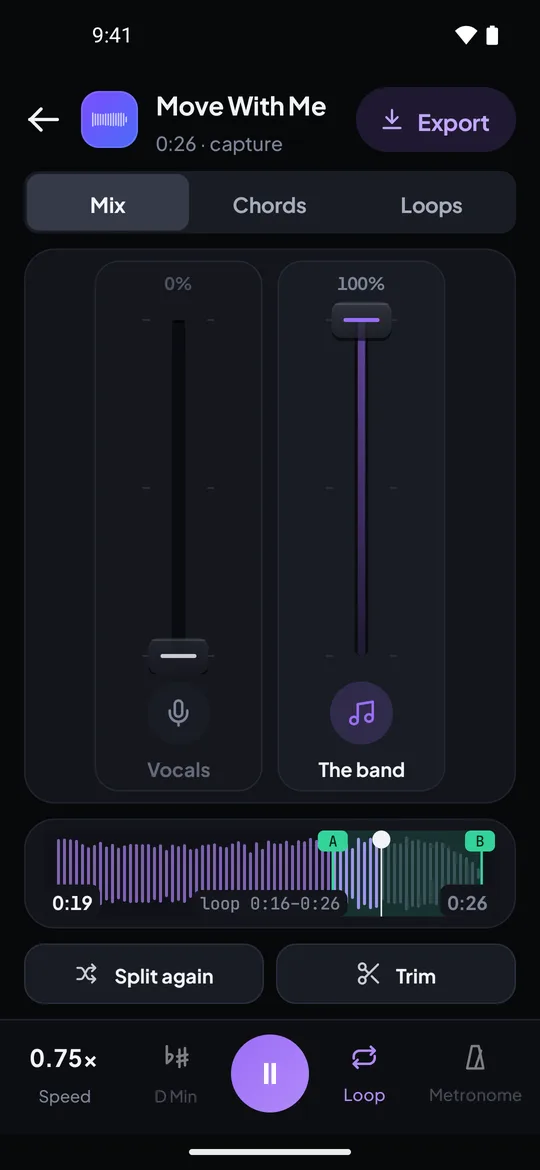
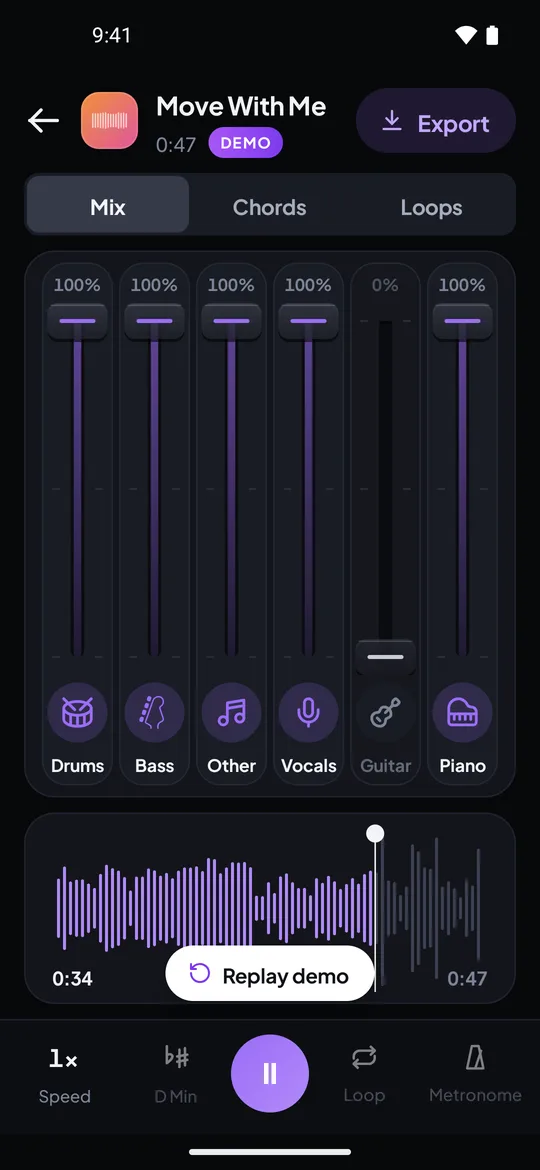
Real captures from the Riffloop Android app, using our own demo song: an A-B loop at 0.75× with the vocals off, and six faders with the guitar pulled down.
The full screen-by-screen guides are Riffloop on iPhone, Riffloop on Android and adding a song from YouTube on mobile. If you're deciding whether to install, the vocal remover app page covers what the app is and what it costs.
Which Route for Which Job?
Use the YouTube app alone when you only need the song slower or on repeat. Record it into Riffloop when you need to drill a short section, change the key or hear one part. Use a computer when you'd rather skip recording.
| Your job | Best route | Why |
|---|---|---|
| Hear a fast lick a bit slower, once or twice | YouTube app, 0.75× | Nothing to set up |
| Play along with the whole song on repeat | YouTube app, Loop video | Built in, streams as you go |
| Drill four bars twenty times | Riffloop app, A-B loop | The loop lands on the beat every time |
| Hear the bass or the guitar on its own | Riffloop app, Stem separation | Solo one part, mute the rest |
| Sing it lower or higher | Riffloop app, key | ±12 semitones, tempo kept |
| Practise at a desk, no recording | Chrome extension | Works on the video itself |
A 15-Minute Phone Practice Session
Our "60-second section" method: pick one 60-second section, record and split it once, then spend fifteen minutes on it: listen with your part soloed, loop the hardest bar at 70%, step the speed up in 5% jumps, and finish at full speed with your part muted. It fits inside the free plan.
- Find the passage in the YouTube app (1 minute). Scrub to the bit you can't play yet — usually the solo, the bridge or a fill — and note the time.
- Record and split just that section (2 minutes). Start the recording a few seconds early and trim it down; under Which part of the song, pick the section.
- Listen with your part soloed (2 minutes). Pull the rest of the band down and hear exactly what your instrument does.
- Loop the hardest bar at 70% (5 minutes). Set A and B tight around it and play until you get it right five times running.
- Climb in 5% steps (3 minutes). Move up only after a clean pass; drop back one step if it falls apart.
- Mute your part and play with the band (2 minutes). Full speed, whole section, then save the loop for tomorrow.
A worked example: a bass player learning a 12-second fill in a pop chorus. In the YouTube app at 0.75× it's still a blur, and the 10-second jump-back keeps landing a bar early. Recorded into Riffloop, the fill gets its own A-B loop, the bass is soloed so the kick drum stops masking it, and at 70% each note can be found on the neck. Ten clean reps later, the loop goes to 80%, then 90%. The same plan works for a singer's run — just solo the vocal instead. For more on the method, see learning songs by ear.
Limits to Know on a Phone
On a phone, Riffloop can't open a YouTube link, records in real time up to 10 minutes per song, and can't record apps that protect their audio. The separated parts are estimates, and on iPhone the app must stay on screen while it splits.
- 🔗 No links in the app. Files and recordings only; links work in Riffloop Studio on a computer.
- ⏱️ Real time, 10 minutes max. A four-minute song takes four minutes to record.
- 🔇 Protected audio records as silence. If a recording is empty, use a computer instead.
- 📲 iPhone: keep the app open while it splits. iPhone pauses long work in apps you leave. On Android, turn on notifications and you can lock the phone.
- 🎛️ Stems are estimates. The vocal separates cleanest; bass and the leftover part are hardest. See how AI splits a song into stems.
- ⚖️ For personal practice. Use Riffloop with music you have the right to use, and check the terms of the app you play it from.
If a recording comes back silent
- Check the permission prompt. On iPhone you must tap Start Broadcast; on Android, allow the microphone permission and screen sharing.
- Start the recording first, then press play in the other app, and keep the song playing until you stop.
- Try again from the start. A recording that began before the permission was granted can miss the song.
- Still silent? That app protects its audio. Use the Studio or the Chrome extension on a computer instead.
Common Mistakes When Practising YouTube on a Phone
Most phone practice goes wrong in the setup: practising at full speed, looping the whole song, recording the ad, and listening on Bluetooth earbuds that lag behind your playing.
- Looping the whole video to learn one phrase. Three minutes between attempts kills the repetition that makes a part stick.
- Going straight to 0.25×. Very slow audio smears; 0.5×–0.75× keeps the groove recognisable.
- Recording the ad. Start the recording when the song itself begins, or trim the ad off before you save.
- Letting a notification into the take. Turn on Do Not Disturb before you record.
- Splitting the whole song on the free plan. Pick the 60 seconds you're practising; that's what you'll loop anyway.
- Playing along over Bluetooth. Wireless earbuds add a delay you'll chase with your hands. Wired headphones or the phone speaker are steadier — more in practice headphones and latency.
Looping and Slowing YouTube on a Phone — FAQ
What players ask about the YouTube app's speed and loop controls on iPhone and Android, and about recording a song into Riffloop to practise it.
Where is the speed setting in the YouTube phone app?
Tap the video once, tap Settings, then Playback speed, and choose a slower speed. The gear sits on the player itself. It works the same way on iPhone and Android, and the speed applies to the whole video until you change it back.
What is the slowest speed in the YouTube app?
In current versions of the app the slowest setting is 0.25×, a quarter of normal speed. YouTube's help page gives the steps but not the list of speeds, so your menu may look slightly different. For learning music, 0.5× to 0.75× is usually more useful than the very bottom.
Does slowing down a YouTube video change the pitch?
No, the YouTube app keeps the pitch where it is when you slow a video down, so the song stays in the same key. At very low speeds the sound gets smeary, which is normal for any slowed recording, and why most practice happens between half speed and full speed.
Is there an A-B loop in the YouTube app?
No. The app's Loop video switch repeats the whole video, and its playlist Loop repeats one video or the playlist. YouTube's help pages describe no way to repeat a chosen section, so for that you need another tool.
Why can't I find Loop video on my phone?
Loop video sits one level down: tap Settings, then Additional settings, then Loop video. If you are playing a playlist, use the Loop button in the playlist box under the video instead, and tap it twice so a 1 appears to repeat just the current video.
How do I repeat one video inside a playlist on my phone?
In the playlist box under the video, tap Loop once to repeat the whole playlist, then tap it again until a 1 appears in the middle of the icon. That video now repeats until you change it.
Is there a pitch or key control in the YouTube phone app?
No. The app has a speed control but no pitch or key control. On a phone, the Riffloop app moves a recorded song up or down by as much as 12 semitones with the tempo left alone.
Can I take the vocals out of a YouTube song on my phone?
Not in the YouTube app. In the Riffloop app you record the song while it plays, then choose Remove vocals, or Stem separation to put every instrument on its own fader. The split runs on the phone, and the parts are estimates, with the vocal usually the cleanest.
Why does Riffloop record the song instead of opening the YouTube link?
The iPhone and Android apps add songs from files or by recording what the phone is playing; they don't take YouTube links. Pasting a link works in Riffloop Studio on a computer, and the Chrome extension works on the YouTube video itself.
Will room noise end up in the recording?
No. Riffloop records the sound your phone plays, not the room. On iPhone it never uses the microphone; Android asks for the microphone permission because that is where it keeps access to the phone's own audio, but the room is not recorded.
What if the recording comes back silent?
Some apps protect their audio, and it records as silence. Try the song again from the start, and if it is still silent, use Riffloop Studio or the Chrome extension on a computer instead.
How long can a song be when I record it on my phone?
Up to 10 minutes per recording; Riffloop stops there by itself. Recording happens in real time, so a four-minute song takes four minutes, and you trim the silence at each end before you save.
Is it free to loop and slow down YouTube on a phone?
The YouTube app's speed and whole-video loop are free for everyone. The Riffloop app is free to download: on the free plan your first song splits in full, then you split sections of up to 60 seconds, five times a day, with three saved loops per song. Pro splits whole songs.
Does YouTube Premium give me more speed options?
Not for practising music. Premium's auto speed is listed for the Android app, English content only, and YouTube says it isn't available on music. The ordinary Playback speed menu is the same with or without Premium.
If You Remember Four Things
- 1 Speed: tap the video → Settings → Playback speed. Start at 0.75×.
- 2 Loop video repeats the whole video; the YouTube app has no section loop.
- 3 To loop four bars on a phone, record the song into Riffloop, then set A and B.
- 4 Practise at 70%, climb in 5% steps, finish at full speed with your part muted.
Keep Going With Riffloop
Loop the Four Bars, Not the Whole Video.
Record the song you're learning, split it on your phone, and drill the hard bit at 70% with your part muted. Start with the demo song — it's already split.

